Best iPads in 2026 (Top 6: Pro, Air and More)

Looking for the best ipads? Discover our expert selection covering models perfect for work, creativity, and entertainment. Find the right Apple tablet for you.
You don’t need a laptop to get serious work done. Just the right iPad, the right app, and a little focus.
Contents
- The Best iPads
- iPad Pro 11-inch (M5) — Ultimate Performance Tablet
- iPad Air 11-inch (M3) — Apple Intelligence
- iPad mini (A17 Pro) — Pocket Powerhouse
- iPad 11-inch (A16) — Great All-Rounder
- iPad Air 5th Gen (Renewed) — Solid Performer
- iPad 2021 (10.2-inch) — Reliable Budget Option
- Final Thoughts on the Best iPads
- How to Choose the Best iPads for Your Needs
- Check Out the Best iPads
- Also Check Out Other Helpful Articles
- Video About the Best iPads
The Best iPads


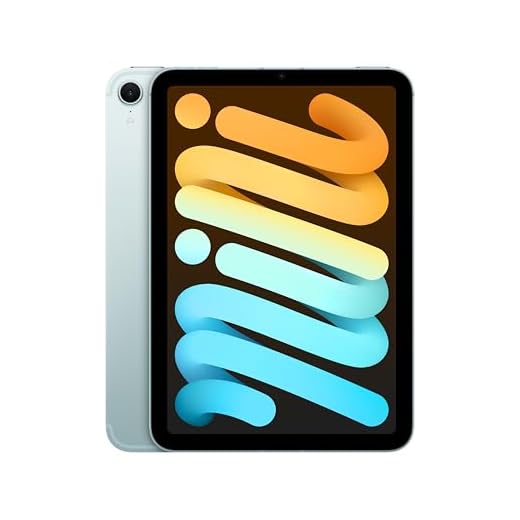


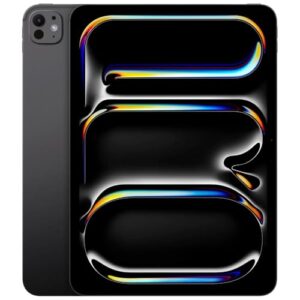
iPad Pro 11-inch (M5) — Ultimate Performance Tablet
You’ll get class-leading performance, a high-quality display, and top-tier connectivity that supports demanding creative and professional tasks. It’s the go-to option if you need maximum power in a portable tablet.
Pros
- M5 chip with Neural Accelerators for AI and pro apps
- Ultra Retina XDR display for accurate color and high dynamic range
- LiDAR scanner and pro-level cameras for AR and content capture
- Fast Wi‑Fi 7 and strong connectivity options
Cons
- High price—overkill if you only need basic tablet tasks
- Battery life can vary under heavy pro workloads
Overview
The Pro model is designed for professionals and power users who demand the best performance, display fidelity, and connectivity available in an iPad. With the M5 chip, Ultra Retina XDR display, LiDAR, and high-speed Wi‑Fi, it’s built to handle editing, 3D work, and AI-accelerated workflows.
Who benefits most from the Pro
- Creators who edit video, render graphics, or work with large photo libraries
- Developers and power users who run complex multitasking setups and pro apps
- Anyone using AR workflows or precision color work that demands an XDR display
Practical insights and real-world use
- When you edit 4K footage, run multiple professional apps, or use on-device AI features, you’ll notice the responsiveness and reduced render times.
- The LiDAR scanner improves AR placement and scanning tasks, while the advanced cameras help with high-quality content capture.
Considerations before buying
- If your work is mostly email, web browsing, streaming, or note-taking, this model may be more capability than you need.
- Accessories like the Magic Keyboard and Apple Pencil Pro unlock desktop-class workflows but increase the total cost of ownership.
If you require the best performance Apple offers in a tablet and plan to use pro apps, the iPad Pro is the most capable option — just be prepared for the premium price.
iPad Air 11-inch (M3) — Apple Intelligence
You’ll appreciate the M3 performance in a thin, light chassis that handles creative work and multitasking with ease. It’s one of the most future-proof iPads without stepping up to the Pro line.
Pros
- M3 chip delivers near-Pro performance for most pro tasks
- Excellent Liquid Retina display and color accuracy
- Supports Apple Pencil Pro and accessories
- Lightweight design with premium build quality
Cons
- 60Hz display may disappoint users used to Pro's higher refresh rates
- Higher price than standard iPad models
Overview
This iPad Air brings the M3 chip into a slim, focused design that was built with Apple Intelligence features in mind. It’s ideal if you want strong performance for creative apps, note-taking, and multitasking without the extra cost and complexity of a full iPad Pro.
Why it stands out
- M3-class processing power that smooths demanding workflows and provides more longevity for software updates
- Liquid Retina display that’s great for photo editing, sketching, and watching HDR content
- Compatibility with Apple Pencil Pro and Magic Keyboard for a near-laptop experience
How you’ll use it day-to-day
You can expect fast app launches, reliable multitasking, and pleasant stylus feel for drawing or handwriting. Students, creative professionals on the go, and anyone who wants a premium tablet experience without the Pro premium will find this model especially compelling.
Practical trade-offs
- Refresh rate stays at 60Hz, so fast-motion scrolling and some gaming feel less fluid compared with Pro models.
- If you need the highest-end GPU performance or XDR-level displays for color-critical work, the Pro remains the better (but more expensive) option.
In short, this Air is a very strong middle ground — powerful, portable, and ready for most pro-adjacent tasks.
iPad mini (A17 Pro) — Pocket Powerhouse
You’ll enjoy top-tier performance in the smallest iPad footprint, making it perfect for reading, commuting, and one-handed use. It’s a great pick when portability matters more than screen real estate.
Pros
- A17 Pro chip brings impressive speed in a small body
- Highly portable 8.3-inch Liquid Retina display
- Excellent battery life for daytime use
- Optional cellular (5G) keeps you connected on the go
Cons
- Smaller screen isn’t ideal for heavy multitasking or pro creative work
- Accessories are limited compared to larger iPads
Overview
The iPad mini compresses powerful hardware into an ultraportable package. With the A17 Pro chip and an 8.3-inch Liquid Retina display, it’s aimed at users who prioritize one-handed comfort, reading, and mobility without sacrificing modern performance.
What makes it useful for everyday life
- Fast chip means you can play demanding games, edit photos, and run productivity apps comfortably
- Small size fits in purses, backpacks, and many cup holders — ideal for travel or reading in tight spaces
- Cellular options let you stay connected away from Wi‑Fi
Real-world examples and tips
- If you travel daily, you can use it as a lightweight media player and eReader.
- Use a compact folio case and a screen protector to protect the device while maximizing portability.
Limitations
- The smaller display makes heavy multitasking (split view, pro-level editing) less convenient compared with 10–11 inch iPads.
- If you plan to use a full-size keyboard or do extensive tablet-as-laptop work, consider a larger iPad model.
Overall, this mini is perfect when you want near-phone convenience with the power and polish of an iPad.
iPad 11-inch (A16) — Great All-Rounder
You get a responsive, well-rounded tablet that balances performance, display quality, and battery life for most users. It’s an excellent choice if you want modern features without paying Pro-level prices.
Pros
- A16 chip delivers fast, smooth performance
- Bright Liquid Retina display that's great for media
- Long battery life for all-day use
- Solid camera system and Touch ID convenience
Cons
- Not as feature-rich as the Pro models
- Base storage can fill up if you store lots of media
Overview
This 11-inch model gives you a modern iPad experience with the A16 chip, a vivid Liquid Retina display, and essentials like Touch ID and USB-C. It’s aimed at users who want strong day-to-day performance for browsing, streaming, light photo editing, gaming, and school or work tasks.
Key features and what they mean for you
- A16 chip for smooth multitasking, quick app launches, and reliable gaming performance
- 11-inch Liquid Retina display that makes movies and photos pop
- 128GB storage as a solid starting point for apps and media
Practical benefits and everyday use
You’ll find it especially good for media consumption, video calls, and note-taking. Battery life holds up across a work or school day, and the four color options make it easy to personalize. If you pair it with an external keyboard or Apple Pencil, you can turn it into a compact productivity device.
Limitations and who should consider alternatives
- If you rely on pro-level photo/video editing, the Pro line is better suited thanks to more powerful chips and advanced displays.
- Heavy local media libraries or large pro projects may require higher storage tiers or cloud solutions.
Overall, this model strikes a sensible balance between price and capability — a dependable choice for most people who want a modern iPad without the Pro price tag.
iPad Air 5th Gen (Renewed) — Solid Performer
You get impressive M1-era speed and a crisp 10.9-inch display at a lower cost when buying renewed. It’s a sensible upgrade if you want strong performance without paying full price for newer models.
Pros
- M1 chip delivers fast, dependable performance
- Excellent 10.9-inch Liquid Retina display for media and notes
- Compatible with Apple Pencil and Magic Keyboard
- Good battery life for full-day use
Cons
- Renewed condition varies by seller—inspect warranty and return policy
- Lower base storage (64GB) may be limiting for some users
Overview
This renewed 5th-generation iPad Air gives you M1-class performance in a 10.9-inch form factor for substantially less than a brand-new unit. It’s a practical option if you want Apple’s powerful silicon and a premium display but are happy to accept a refurbished condition.
What you’ll notice day-to-day
- Responsive app performance for browsing, photo editing, and multitasking thanks to the M1 chip
- A color-accurate Liquid Retina display that works well for media consumption and sketching
- Support for Apple Pencil and Magic Keyboard to expand your productivity options
Buying tips and considerations
- Check the refurbisher’s grading, return window, and warranty before purchase.
- If you plan to keep many large apps, videos, or files locally, consider models with larger storage or using cloud storage to avoid running out of space.
This model is a pragmatic pick: it delivers modern performance and features while saving money, but you should verify the device condition and warranty when buying renewed.
iPad 2021 (10.2-inch) — Reliable Budget Option
You’ll find a dependable, no-frills tablet that handles browsing, streaming, and light productivity without breaking the bank. It’s a smart choice if you want a proven iPad experience at a low cost.
Pros
- Lower price makes it accessible for families and students
- Solid battery life and responsive A13-class performance
- Big 10.2-inch Retina display for media and reading
Cons
- Older design and hardware compared with newer iPad lines
- Limited storage on base configurations
Overview
This 2021 10.2-inch iPad represents a practical entry point into the Apple ecosystem. The renewed units especially offer good value — you get a large Retina display, competent performance, and the simplicity of iPadOS at a budget-friendly price.
Everyday strengths
- Handles web browsing, streaming, video calls, and light productivity with ease
- Large display is comfortable for reading and media consumption
- Renewed units can be a great way to save while getting a functional iPad
Buying and usage notes
- Confirm the refurbisher’s grading and warranty; many renewed units arrive in near-new condition.
- If you need future-proofing for heavier apps or long-term storage, consider stepping up to newer models with more modern chips and larger storage options.
This model remains a sensible, cost-effective option for anyone who wants the core iPad experience without the higher price tags of recent models.
Final Thoughts on the Best iPads
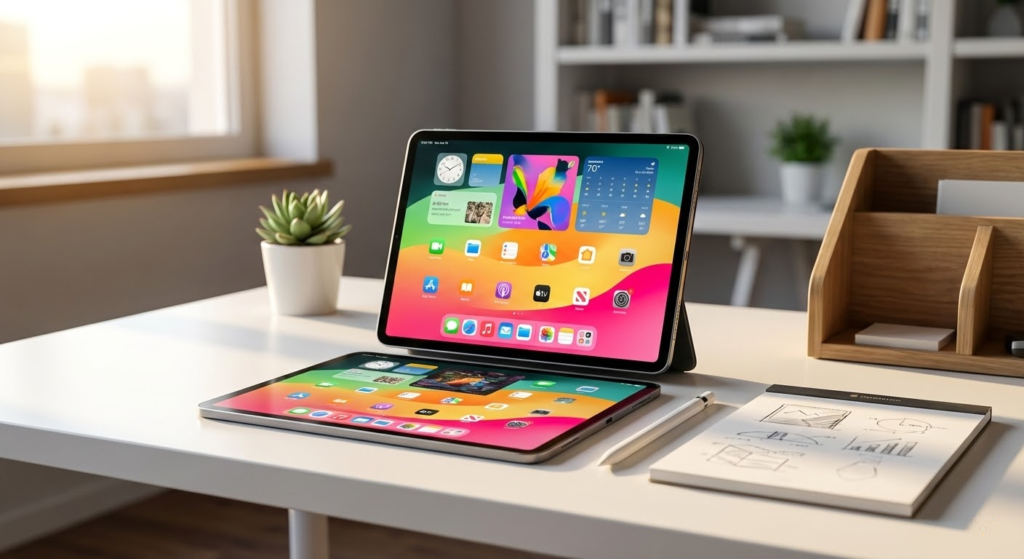
Pick the iPad Pro 11-inch (M5) if you want absolute power in a portable slab. It’s the best pick for creators, video editors, designers, and anyone who runs demanding apps or uses external displays. You’ll get class-leading performance, a pro-quality display, and the connectivity to dock, drive, or edit without compromise.
Choose the iPad Air 11-inch (M3) if you want nearly the same performance in a lighter, more affordable package. It’s ideal for students, multitaskers, light creators, and anyone who wants future-proof speed without stepping up to the Pro line. Fast, thin, and excellent for everyday creative work.
How to Choose the Best iPads for Your Needs
Choosing from the best iPads can feel overwhelming, especially with multiple models designed for different types of users. From studying and working to entertainment and creativity, Apple’s tablet lineup offers options that vary in performance, screen quality, and accessories support. The key is understanding which features actually matter for how you plan to use your iPad.
Best Hydrolyzed Whey Protein Powders
Define Your Main Use: Everyday Tasks, Work, or Creativity
Before comparing models, it’s important to be clear about how you’ll use your iPad. For browsing, streaming, note-taking, and casual gaming, entry-level models already deliver a smooth experience. If your focus is productivity, multitasking, or creative work like drawing and video editing, more powerful models will make a noticeable difference.
Identifying your usage upfront helps narrow down the best iPads without paying for features you won’t use.
Performance Matters: Choose the Right Chip
Performance is one of the main differences between iPad models. More advanced chips handle demanding apps, multitasking, and graphic-intensive tasks with ease, while standard chips are optimized for everyday activities.
If you plan to use your iPad for work-related apps, editing software, or long-term use without slowdowns, prioritizing a more powerful processor is essential. For lighter use, basic performance is more than enough and helps keep costs lower.
Screen Size and Display Quality Make a Big Difference
Display size and quality play a major role in comfort and usability. Smaller screens are easier to carry and ideal for reading or casual use. Larger displays provide more workspace, making them better for multitasking, drawing, and watching videos.
Display technology also matters. Higher-quality panels offer better brightness, sharper text, and more accurate colors, which is especially important for designers, students, and anyone who spends long hours looking at the screen.
Storage Options: Plan for the Long Term
Storage capacity determines how many apps, files, photos, and videos you can keep on your iPad. If you mainly use cloud storage and streaming services, lower storage options may be sufficient. However, if you download large apps, work with media files, or want your iPad to last for years without constant storage management, choosing more internal storage is a smart move.
When comparing the best iPads, storage flexibility is often overlooked but can greatly impact long-term satisfaction.
Best Powdered BCAA Supplements
Battery Life for All-Day Use
One of the biggest advantages of iPads is their battery efficiency. Most models are designed to last through a full day of typical use, such as browsing, streaming, and note-taking.
If you travel frequently or use your iPad for long work sessions, consistent battery life is essential. While charging speeds and usage patterns vary, choosing a model known for reliable all-day battery performance adds peace of mind.
Compatibility with Accessories Enhances Productivity
Accessories can transform an iPad into a powerful work or study tool. Keyboard support is ideal for typing and productivity, while stylus compatibility is essential for drawing, handwriting, and design tasks.
Not all iPads support the same accessories, so it’s important to check compatibility if you plan to use a keyboard or digital pencil. For many users, this factor alone determines which of the best iPads is the right choice.
Connectivity Options: Wi-Fi or Cellular
iPads are available in Wi-Fi-only and Wi-Fi + cellular versions. If you mostly use your tablet at home, school, or work, Wi-Fi is usually enough. For those who need internet access on the go without relying on hotspots, a cellular model offers greater flexibility.
Choosing the right connectivity option ensures your iPad fits seamlessly into your daily routine.
Software Support and Longevity
One of the strengths of iPads is long-term software support. Regular system updates improve security, add features, and extend the device’s lifespan. When investing in one of the best iPads, considering how long it will remain supported is just as important as its current features.
By evaluating performance, display quality, storage, accessories, and connectivity, you can confidently choose from the best iPads and find the model that perfectly matches your needs—both now and in the years ahead.
Check Out the Best iPads
Still not sure which one to choose? Click the link below to see the best-selling products.
Also Check Out Other Helpful Articles
Take a look at more useful articles that can help you make more informed decisions.
- Best Cost-Benefit Tablets in 2026 (Top 10: Xiaomi, Samsung and More)
- Best Tablets for Reading in 2026 (Top 6: Kindle, iPad and More)
- Best Tablets for Heavy Gaming in 2026 (Top 7: iPad Pro, ASUS ROG Flow and More)
Video About the Best iPads
We created a video on the topic. Just click to watch.
Related Articles
About the Author

Ashley Turner enjoys crafting content that is easy to read and meaningful. She believes good writing starts with understanding the reader.