Best iPads for Drawing in 2026 (Top 6: Pro, Air and More)

Looking for the perfect digital canvas? Check out the best ipads for drawing to take your art to the next level. Find the right model for your creative needs here.
Great art starts with the right canvas. Whether you sketch on the subway or paint in a studio, the iPad you pick changes how you create.
You want PRECISION, low lag, and a screen that shows true color. You also want something that fits your workflow — lightweight for travel or a giant display for detailed work. Let’s cut through the specs and find the best fit for your drawing style.
Contents
- The Best iPads for Drawing
- iPad Pro 13" (M4) — Ultimate Drawing Surface
- iPad Pro 11" (M5) — Pro Performance Pocketable
- iPad Air 13" M2 — Big Canvas, Thin Body
- iPad Air 11" M2 128GB Renewed Premium
- iPad mini (8.3") A17 Pro — Ultra Portable
- iPad Air 5 (10.9") M1 Renewed
- Final Thoughts on the Best iPads for Drawing
- How to Choose the Best iPads for Drawing
- Check Out the Best iPads for Drawing
- Also Check Out Other Helpful Articles
- Video About the Best iPads for Drawing
The Best iPads for Drawing


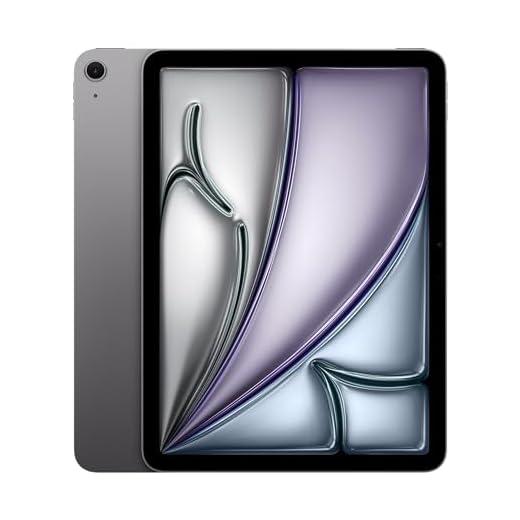


iPad Pro 13" (M4) — Ultimate Drawing Surface
You’ll get the most expansive, color-accurate canvas combined with pro-grade performance and accessory support. It’s the top pick if your primary work is illustration, painting, or detailed concept art and you want the best tablet experience.
Pros
- Large Ultra Retina XDR display for HDR and true-to-life color
- M4 hardware keeps complex art workflows fluid
- Support for Apple Pencil Pro and advanced accessories
- Excellent display brightness and contrast for color-critical work
Cons
- High price puts it in pro territory
- Heavier and less pocketable than smaller models
Who this is for
This is the iPad to choose if you treat drawing as a professional pursuit — concept artists, illustrators, and digital painters will appreciate the extra screen real estate and top-tier performance. It’s intended to replace or complement a desktop workstation for many workflows.
Why it stands out for drawing
- Ultra Retina XDR display provides exceptional HDR capability, brightness, and color accuracy
- M4 performance and optimized iPadOS perks make multi‑app workflows and high‑resolution canvases seamless
- Robust accessory ecosystem — Apple Pencil Pro, folios, and stands work together for a studio setup
On this model you’ll notice subtleties in color and contrast that can change your approach to shading and highlights. The larger canvas reduces the need for zooming and frequent panning, which speeds up painting sessions. Reviewers often comment that animation timelines and large layered files feel near‑desktop in responsiveness.
Practical workflow tips
- Use a quality folio or stand to position the tablet at a comfortable drawing angle for long sessions.
- Consider external storage or cloud backups for large project files and frequent versioning.
- If budget is a concern, evaluate whether you actually need the full XDR brightness and size — some creatives will be served well by the 11-inch Pro or 13-inch Air instead.
Overall, this model is the most future‑proof and capable canvas for creators who rely on the iPad as a primary professional tool.
iPad Pro 11" (M5) — Pro Performance Pocketable
You’ll get an extremely responsive ProMotion display, top-tier M5 performance, and features that make long creative sessions smoother. It’s great for artists who want professional speed in a still‑portable form factor.
Pros
- Ultra Retina XDR display with ProMotion for smooth brushes
- M5 chip handles pro workflows and AI accelerators
- Supports Apple Pencil Pro and advanced accessories
- Compact yet powerful for mobile pro work
Cons
- Premium price for the performance
- Accessories (Pencil, keyboard) sold separately
Who this is for
If you’re a professional or serious hobbyist who needs top responsiveness in a relatively compact device, this iPad Pro strikes a fine balance. It’s especially useful when you need pro-class performance away from a desktop.
Performance and display advantages
- Ultra Retina XDR display with high brightness and ProMotion (up to 120Hz)
- M5 chip with neural accelerators for demanding rendering and AI-assisted tasks
- LiDAR, Face ID, and Thunderbolt/USB‑C for fast transfers and accessories
The high refresh rate and color fidelity significantly improve the drawing experience — brush strokes feel immediate, and animations or scrubbing timelines are buttery smooth. If you do video editing, 3D model sketching, or use AI‑assisted creative tools, this model keeps up without slowdown.
Practical considerations
- Factor in the cost of the Apple Pencil Pro and a folio for an optimal studio experience.
- The 11-inch size is portable but might feel cramped for extensive layout work — consider the 13-inch Pro if you want a larger canvas.
- Battery life is excellent for mixed use but intensive render/export tasks will shorten runtime.
iPad Air 13" M2 — Big Canvas, Thin Body
You’ll benefit from a generous 13-inch Liquid Retina display and M2 performance that handles pro-level illustration. It’s an excellent middle ground if you want a big workspace without moving up to the full Pro feature set.
Pros
- Large 13-inch display for comfortable drawing
- M2 chip handles heavy workloads
- Great color accuracy and brightness
- Thin, portable for a larger tablet
Cons
- Larger size reduces one-handed portability
- Renewed units may show cosmetic variations
Who this is for
Choose the 13‑inch Air if you want the largest, most comfortable canvas in the Air line. It’s ideal for illustrators who sketch and finalize artwork on a single device, or for designers who like extra room for palettes and toolbars.
Why it works for drawing
- 13-inch Liquid Retina display with P3 wide color and True Tone
- Apple M2 chip for fast brush handling and multitasking
- USB‑C, Wi‑Fi 6E, and improved microphones and speakers for a full creative setup
The bigger screen makes a real difference for complex compositions: you can keep reference images, palettes, and a large canvas visible simultaneously. The M2 keeps things responsive when you use high‑resolution canvases, multiple layer effects, or run desktop-class creative apps.
Practical advice
- Consider pairing with an Apple Pencil Pro for tilt, haptic feedback, and lower latency.
- If you travel often, get a protective folio — the larger size needs more care in transit.
- Renewed purchases should be inspected for battery health and condition grading so you know what to expect out of the box.
iPad Air 11" M2 128GB Renewed Premium
You’ll get M2 performance in a lightweight, easy-to-hold form factor that suits both sketching and heavier illustration tasks. It’s a solid step up from older Airs for multitasking and handling larger files.
Pros
- M2 chip delivers fast rendering and multitasking
- 11-inch Liquid Retina display with accurate colors
- Good balance of weight and screen real estate
- 128GB storage for many apps and files
Cons
- Limited by 11-inch canvas for very detailed work
- Renewed condition may vary between sellers
Who this is for
You should pick this if you want a balance between the portability of a smaller iPad and the power to run complex art workflows. It’s especially useful if you move between cafés, studios, and home frequently.
Key strengths
- Apple M2 chip for snappy brush performance and multitasking
- Support for Apple Pencil and full pro illustration apps
- Light, comfortable design for longer hand-drawn sessions
The 11-inch screen gives you more working area than the mini while keeping the device light enough to use on your lap. The M2 helps a lot when you work with high‑resolution canvases or export multiple layered files. For most freelance illustrators and hobbyists, it’s a future‑proof option without stepping into Pro price tiers.
Limitations and workflow hints
- If you regularly output very large prints, consider a 13-inch Air or Pro for a larger composition area.
- For tidy workflows, pair it with cloud storage or an external SSD via USB‑C.
- Test any renewed unit’s battery health and warranty before committing.
iPad mini (8.3") A17 Pro — Ultra Portable
You get flagship-level speed in an ultraportable body that’s easy to carry everywhere. It’s ideal if your drawing style favors quick studies, concept sketches, and reference work on the move.
Pros
- Extremely portable — easy to hold one-handed
- Powerful A17 Pro chip for smooth drawing
- Excellent front camera with Center Stage
- USB-C and Wi‑Fi 6E for fast transfers
Cons
- Small screen limits complex, detailed compositions
- Less immersive for full-size illustrations
Who this is for
If you sketch while commuting, travel, or prefer a compact device you can hold comfortably for long sessions, this mini is a great match. You’ll enjoy fast app launches and low-latency Apple Pencil input in a pocketable package.
What stands out
- 8.3-inch Liquid Retina display with high pixel density
- Ultrafast A17 Pro chip for responsive brushwork
- Compact form factor that fits in small bags and purses
Because the screen is smaller, you’ll likely use this for thumbnails, concept iterations, and on-site reference drawing rather than final print-ready work. The device excels at quick creativity: you can capture a moment of inspiration, rough out ideas, and send files to a larger iPad or desktop later.
Practical tips
- Use the mini for ideation and roughing — move final polishing to a larger iPad if needed.
- A slim case with a folio can add hand comfort for longer sessions.
- Consider cloud syncing or a fast USB-C SSD to transfer larger art files to your main workstation.
iPad Air 5 (10.9") M1 Renewed
You get M1-class performance and a bright Liquid Retina display at a lower cost than the newest Pros. It’s a very capable drawing and note-taking tablet for most creators who want power without paying for every pro feature.
Pros
- M1 performance for smooth art apps
- Accurate P3 color and antireflective coating
- Supports Apple Pencil and Magic Keyboard
- USB-C and Wi‑Fi 6 for fast workflows
Cons
- Smaller canvas than larger Pro or Air 13
- Renewed units may vary in condition
Who this is for
If you want near‑pro performance for drawing without the premium Pro price, this is an excellent pick. You’ll appreciate how responsive brushes feel in Procreate and how well the M1 handles layered PSDs and big canvases.
Key features and everyday benefits
- 10.9-inch Liquid Retina display with True Tone and P3 wide color
- Apple M1 chip with Neural Engine for fast app performance
- USB-C, Wi‑Fi 6, and stereo landscape audio
You’ll find the display bright and color‑accurate enough for most illustration, concept, and sketch workflows. The M1 keeps pressure sensitivity, brush smoothing, and canvas zooming fluid even with several apps open. If you rely on cloud storage or external drives, the USB‑C port simplifies transfers.
Practical considerations
- Renewed models are budget friendly but check the seller’s condition grade and warranty.
- Battery life is solid for a day of sketching, but heavy sessions with screen brightness maxed will reduce runtime.
- If you plan to do large, professional print work, you may miss the larger canvas sizes and XDR-level contrast of Pro models.
You can think of this as the pragmatic choice: it gives you most of the benefits of Apple silicon for drawing while leaving room in your budget for accessories like the Apple Pencil and a protective folio.
Final Thoughts on the Best iPads for Drawing
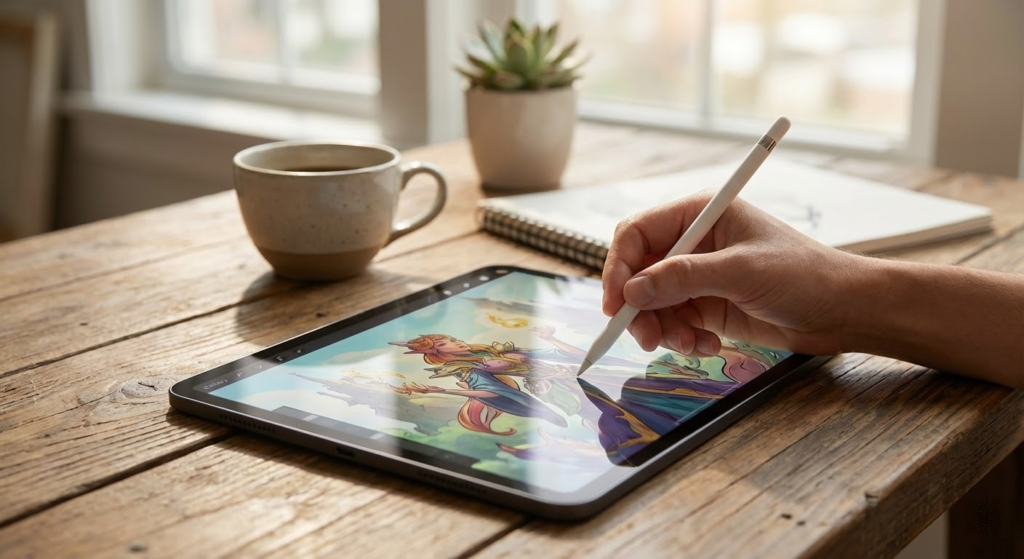
If you’re a professional illustrator or someone who treats drawing like a full-time job, go all-in on the iPad Pro 13" (M4). It gives the biggest, most color-accurate canvas, the power to handle huge layered files, and best-in-class accessory support — perfect for studio work, print-ready art, and long sessions.
If you want pro-level speed but need something you can actually tuck into a bag, choose the iPad Pro 11" (M5). It keeps nearly all the Pro features in a highly portable package, making it ideal for on-location concept art, client sketches, and heavy multitasking without lugging a 13-inch tablet.
How to Choose the Best iPads for Drawing
If you love drawing, illustrating, or taking visual notes, choosing the right tablet can completely change your creative workflow. When looking for the best iPads for drawing, it’s not just about screen size or price — factors like Apple Pencil compatibility, display quality, performance, and storage all play a huge role in your experience.
Below, we break down what really matters when picking an iPad for digital art.
Apple Pencil Compatibility Is Essential
The first thing to check when choosing an iPad for drawing is Apple Pencil support. Not all models are compatible with the same version, and this directly affects precision and comfort.
Apple Pencil offers pressure sensitivity and tilt recognition, which are crucial for sketching, shading, and detailed illustrations. If drawing is a priority, make sure the iPad fully supports Apple Pencil and offers low latency, so strokes appear instantly on the screen.
Display Quality Makes a Huge Difference for Artists
A high-quality display is one of the most important features when evaluating the best iPads for drawing. Look for sharp resolution, accurate colors, and good brightness levels.
Laminated displays are especially valuable for artists because they reduce the gap between the glass and the screen, making it feel more like drawing on paper. Technologies like wide color support and higher refresh rates also improve line smoothness and color accuracy, which are essential for professional-looking artwork.
Performance Matters for Drawing Apps
Drawing apps can be surprisingly demanding, especially when working with large canvases, multiple layers, or high-resolution brushes. A powerful processor ensures smooth performance without lag or crashes.
If you plan to use advanced illustration or animation apps, choose an iPad with a newer chip and enough power to handle multitasking. This will allow you to switch between apps, reference images, and layers without slowing down your workflow.
Storage Space Is More Important Than It Seems
Artwork files, time-lapse recordings, and design apps can quickly take up space. While cloud storage helps, having enough internal storage makes a big difference in day-to-day use.
For casual drawing and note-taking, lower storage options may work fine. However, if you create detailed illustrations or save many projects locally, opting for higher storage is a smart move when choosing among the best iPads for drawing.
Best Concentrated Whey Protein Powders
Screen Size Should Match Your Drawing Style
Screen size is largely a personal preference, but it impacts comfort and precision. Smaller iPads are more portable and easier to hold, making them great for sketching on the go. Larger screens provide more room for detailed work and complex compositions.
If you often work with fine details or use split-screen features, a bigger display can significantly improve productivity. For travel and casual sketching, a compact size may feel more natural.
Battery Life Supports Longer Creative Sessions
There’s nothing worse than running out of battery mid-drawing. A good iPad for artists should offer reliable battery life that lasts through long creative sessions.
While most iPads perform well in this area, battery life can vary depending on screen brightness and app usage. Choosing a model known for efficiency helps ensure you can draw, edit, and review your work without constant charging.
Accessories and Ecosystem Add Extra Value
Beyond the iPad itself, accessories can enhance your drawing experience. Keyboards, protective cases with stands, and textured screen protectors can make long sessions more comfortable.
Another advantage of choosing an iPad is the strong app ecosystem. There’s a wide variety of drawing, painting, and design apps available, making it easier to find tools that match your creative style and skill level.
Finding the Right Balance for Your Needs
The best choice ultimately depends on how and where you draw. Beginners may prioritize affordability and portability, while advanced artists often look for top-tier performance and display quality.
By considering pencil support, display technology, performance, storage, and screen size, you’ll be able to confidently choose among the best iPads for drawing and create art with more freedom and precision.
Check Out the Best iPads for Drawing
Still not sure which one to choose? Click the link below to see the best-selling products.
Also Check Out Other Helpful Articles
Take a look at more useful articles that can help you make more informed decisions.
- Best iPads for Drawing in 2026 (Top 6: Pro, Air and More)
- Best Kindle Cases in 2026 (Top 7: Waterproof, Fabric and More)

- Best Kindles in 2026 (Top 7: Scribe Colorsoft, Paperwhite Signature and More)
Video About the Best iPads for Drawing
We created a video on the topic. Just click to watch.
Related Articles

About the Author

Emily Clark is passionate about writing and enjoys exploring different topics through content creation. She believes in the power of words to connect and inform people.