Best Laptops with 4GB RAM in 2026 (Top 9: Lenovo, ASUS and More)

Last Updated on February 12, 2026
Looking for affordable performance? See the best laptops with 4gb ram that offer great value for basic tasks, browsing, and light work.
Yes, 4GB CAN still work — sometimes. If you mainly browse, stream, and use cloud apps, a smart 4GB laptop can save you money and stay light in your bag.
You should expect limits: fewer tabs, lighter multitasking, and modest local app performance. This roundup highlights 4GB machines that punch above their weight — big screens, touch options, or easy upgrade paths — so you get the most useful features without overspending.
Contents
- The Best Laptops with 4GB RAM
- Lenovo 15.6-inch FHD Chromebook N4120
- Lenovo 14-inch Chromebook Touchscreen
- Lenovo IdeaPad 3 15.6-inch Chromebook
- Samsung Galaxy Chromebook Go 14-inch
- Acer Gateway Chromebook 314 14-inch
- Phatom 15.6-inch DGBook A1 Laptop
- Lenovo IdeaPad Student 14-inch Laptop
- ASUS Vivobook Go Slim 15.6-inch
- 15.6-inch Jumper Laptop S7HI
- Final Thoughts on the Best Laptops with 4GB RAM
- How to Choose the Best Laptops With 4GB RAM
- Check Out the Best Laptops with 4GB RAM
- Also Check Out Other Helpful Articles
- Video About the Best Laptops with 4GB RAM
The Best Laptops with 4GB RAM
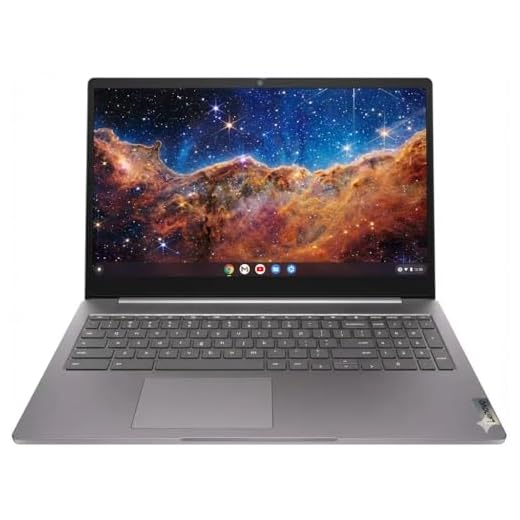




Lenovo 15.6-inch FHD Chromebook N4120
You get a spacious FHD display and an Intel N4120 quad-core that gives noticeably smoother multi-tab browsing than single-core Celeron designs. It's a great daily driver for productivity and media on Chrome OS.
Pros
- True 1920x1080 display for sharper text and media
- Quad-core N4120 improves responsiveness under load
- Privacy camera and good I/O for a Chromebook
- Wi‑Fi 6 support for faster wireless connectivity
Cons
- Heavier than some competitors at around 5.6 pounds
- Long-term storage architecture uses combined eMMC and SD solutions
Overview
This Lenovo 15.6" FHD Chromebook upgrades the budget formula with a quad-core Intel N4120, a full HD panel, and Chrome OS simplicity. It’s aimed at users who want a large-screen laptop for school, remote work, or streaming without the bloat of a full Windows install.
What stands out
The FHD display makes a real difference for reading, spreadsheets, and movies — you get clearer text and more on-screen real estate than HD panels. The N4120 quad-core helps with smooth tab switching and modest multitasking compared with older dual-core Celerons.
- 15.6" FHD (1920×1080) for comfortable productivity
- Chrome OS for fast, secure, low-maintenance computing
- Built-in privacy camera and HDMI output for presentations
Practical considerations
This is not a gaming machine, and 4GB RAM still defines the ceiling for truly heavy web workloads. If you value portability above all, the slightly heavier chassis may be noticeable; however, the trade-off is a larger screen and better thermals.
Recommendation: Use cloud storage and lightweight apps to maximize the Chromebook experience, and leverage Wi‑Fi 6 for faster remote connections when available.
Lenovo 14-inch Chromebook Touchscreen
You’ll enjoy a responsive touchscreen, a capable MediaTek Kompanio 520 SoC, and a tidy storage setup that includes extra card capacity. It’s a strong pick if you prefer a compact, touch-enabled Chromebook for everyday use.
Pros
- Responsive 14" FHD touchscreen for touch-first workflows
- MediaTek Kompanio 520 delivers solid web and app performance
- Support for expanded storage via card slot
- Wi‑Fi 6 and modern connectivity for reliable networking
Cons
- 4GB RAM can limit heavy multitasking
- Touchscreen models tend to use more battery under heavy use
Overview
This 14" Lenovo Chromebook pairs a touchscreen FHD panel with an eight-core MediaTek Kompanio 520 processor and Chrome OS. The hardware mix favors smooth multimedia playback, responsive touch interaction, and practical connectivity for business and students.
Key strengths
The touchscreen makes navigation and tablet-style tasks effortless, and the Kompanio 520 provides a noticeable uplift over very low-end Chromebooks when browsing and running Android apps. The option to expand storage with a card gives you flexibility if local storage becomes tight.
- 14" FHD touchscreen for crisp visuals and touch control
- 4GB LPDDR4X memory optimized for low-power efficiency
- Additional storage via 256GB card alongside onboard eMMC
Limitations and usage tips
If you regularly keep dozens of tabs open or run multiple Android apps concurrently, 4GB RAM will be a bottleneck. For best results, close unused tabs and leverage cloud storage for large media files.
Tip: Use the touchscreen for quick navigation and the physical keyboard for long typing sessions to balance comfort and speed.
Lenovo IdeaPad 3 15.6-inch Chromebook
You’ll find this Chromebook snappy for web-first workflows, long battery life, and a roomy 15.6-inch FHD screen. It’s best for users who live in the browser or rely on Google Workspace rather than heavy native apps.
Pros
- 15.6" FHD display provides clear visuals and space for multitasking
- Chrome OS keeps the system responsive and easy to maintain
- Good build and hinge design with convertible options
- Strong battery life for day-long use
Cons
- 4GB RAM limits heavy multitasking or Linux containers
- ARM/processor limitations restrict advanced apps or gaming
Overview
This 15.6" Lenovo IdeaPad 3 Chromebook is targeted at students and anyone who works primarily in the cloud. With an Intel Celeron N4500, 4GB of RAM, and Chrome OS, it emphasizes fast startup, long battery life, and seamless integration with Google services over raw compute power.
Benefits and typical use cases
You’ll appreciate the full-size keyboard and large FHD display when editing documents, attending video calls, or managing multiple browser tabs. Chrome OS ensures minimal maintenance — updates are automatic and the system remains responsive over time.
- Quick boot and near-instant resume
- Native support for Android apps from Google Play
- Lightweight file management with Google Drive
Limitations and practical tips
This Chromebook won’t replace a Windows or macOS laptop for resource-heavy development work, video editing, or gaming. The 4GB RAM is the practical ceiling for comfortable multitasking on Chrome OS; if you run many Linux containers or heavy web apps, consider an 8GB model.
User tip: Use cloud storage to avoid local storage constraints and enable Offline Docs for productivity when you’re without internet.
Samsung Galaxy Chromebook Go 14-inch
You’ll appreciate how portable and battery-efficient this Chromebook is for daily school or travel use. The 4GB RAM and 64GB storage keep things lightweight, but they also limit heavy local media projects.
Pros
- Very lightweight and slim design for mobility
- Up to ~12 hours battery life in typical use
- Military-tough design gives extra durability
- Chrome OS keeps the system secure and low maintenance
Cons
- 1366x768 screen resolution is modest compared with FHD rivals
- 4GB RAM and 64GB storage limit advanced multitasking and local file storage
Overview
The Samsung Galaxy Chromebook Go is a compact, travel-friendly Chrome OS laptop that focuses on portability, durability, and long battery life. With a 14" display, Intel Celeron N4500, 4GB LPDDR4X, and 64GB storage, it’s tailored to students and users who primarily rely on web apps.
Day-to-day strengths
You’ll find setup and maintenance straightforward: Chrome OS boots quickly, updates quietly, and integrates with Google services. The design is slim and durable — Samsung emphasizes a military-grade build that holds up well in bags and classrooms.
- Lightweight 14" chassis ideal for commuting or class
- Decent battery life for full-day use on a single charge
- Simple, secure Chrome OS environment
Things to consider
If you want crisp visuals for photo editing or prefer many side‑by‑side windows, the 1366x768 display may feel limiting compared with FHD alternatives. The limited RAM and storage suit cloud-first users but make heavy local multitasking or large local media storage a headache.
Practical advice: Rely on cloud folders and streaming media, and consider a microSD card or external SSD if you need more local space.
Acer Gateway Chromebook 314 14-inch
You’ll get a full HD 14" Chromebook with a proven Celeron N4500 and reliable Chrome OS experience. It’s a balanced pick for students and everyday users who prioritize screen clarity and dependable software updates.
Pros
- 14" Full HD display for sharper text and media
- Chrome OS offers fast boot and low maintenance
- Solid build and mainstream brand support
- Good price-to-features ratio for school or home use
Cons
- 4GB RAM restricts heavy multitasking or running many Android apps
- 64GB eMMC storage fills quickly without external expansion
Overview
The Acer Gateway Chromebook 314 blends a 14" Full HD display with Chrome OS simplicity. It runs on the Intel Celeron N4500 platform with 4GB LPDDR4X and 64GB eMMC — a familiar and dependable configuration for web-centric users.
Why it’s useful
A full HD panel on a compact chassis improves readability and media playback compared with lower-resolution budget Chromebooks. Chrome OS is a big win if you want something that starts fast, stays secure, and doesn’t require much upkeep.
- 14" Full HD (1920×1080) screen for cleaner text and sharper videos
- Chrome OS with built-in Google apps and automatic updates
- Convenient port selection and a comfortable keyboard for typing tasks
Considerations and real-world use
If you routinely run dozens of tabs or multiple Android applications simultaneously, the 4GB RAM will feel restrictive. For cloud-first workflows — Google Docs, Gmail, and streaming — this Chromebook provides a smooth experience at a budget-friendly price.
Pro tip: Keep large media on cloud storage and use an external SSD or microSD reader for offline file needs to preserve the internal eMMC space.
Phatom 15.6-inch DGBook A1 Laptop
You’ll find a 15.6" budget laptop that balances basic performance with easy storage upgrades. It’s a practical choice if you want to expand storage and avoid early obsolescence on a tight budget.
Pros
- 128GB SSD with clear expansion options up to 2TB
- Solid performance for web, streaming, and office apps
- Good build quality and accessible internals for upgrades
- Comfortable 15.6" screen and decent battery life
Cons
- Not suited for demanding games or heavy creative apps
- Trackpad and charger quality may be basic on some units
Overview
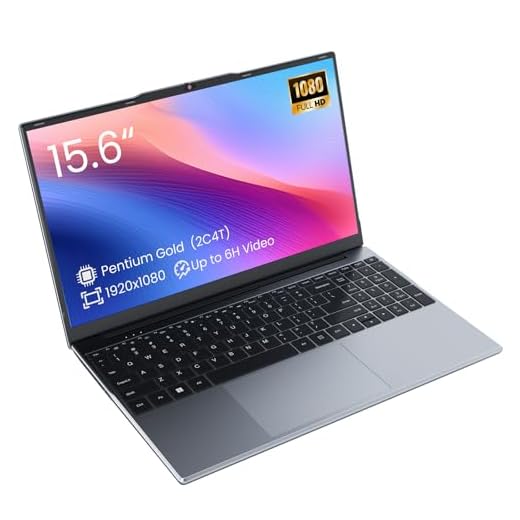
The Phatom DGBook A1 is an entry-level 15.6" laptop built for straightforward tasks: browsing, documents, and media. It uses an Intel Pentium / Gold class processor, 4GB RAM, and a 128GB SSD and stands out for offering an easy path to add more storage — a rare benefit in the budget category.
Practical advantages
The user-accessible panel and empty bay let you add a second drive quickly, which converts a limited initial configuration into a long-term everyday machine. Reviewers frequently mention that adding storage alleviates the common storage anxiety associated with cheap laptops.
- 15.6" FHD display suitable for streaming and multitasking
- Expandable storage options and user-accessible internals
- Basic cooling and solid-feeling chassis for the price
What to expect
This machine isn’t designed for heavy video editing or modern AAA gaming — it’s focused on predictable, reliable entry-level use. If you plan to upgrade, budget for a RAM/SSD addition where supported, and consider pairing it with an external mouse for better navigation.
User tip: If you buy this model, add a secondary SSD/HDD early to improve storage headroom and responsiveness as your library grows.
Lenovo IdeaPad Student 14-inch Laptop
You’ll get a compact IdeaPad with Windows 11 S and a Celeron-based CPU that handles school apps and light multitasking. Battery life and dock compatibility have mixed user feedback, so check your priorities before buying.
Pros
- Compact 14" footprint that’s easy to carry
- Includes 1-year Office 365 to start productivity quickly
- Type-C and RJ45 hub options increase connectivity
- Windows 11 S provides a secure, controlled environment
Cons
- Battery life reported as underwhelming in some reviews
- 128GB eMMC and 4GB RAM limit heavy usage and storage
Overview
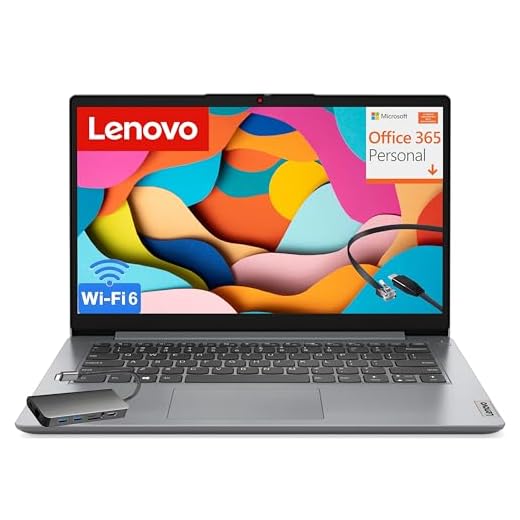
The Lenovo IdeaPad student model targets affordability and portability. With an Intel Celeron N4500, 4GB RAM, and 128GB eMMC, it runs Windows 11 Home in S mode and includes a 1-year Office 365 subscription — helpful for students who need immediate productivity tools.
Who should consider it
If you need a Windows environment for class-specific apps, remote learning, or light office work, this IdeaPad is a practical pick. It’s small, easy to transport, and comes bundled with Microsoft services that reduce setup friction.
- 14" display with a slim 0.7" chassis
- Wi‑Fi 6 for improved wireless performance on campus networks
- SD card reader and multiple ports for basic expansion
Drawbacks and real-world advice
The eMMC storage and 4GB RAM mean you’ll want to manage expectations around heavy multitasking and local storage of large files. Some users reported docking and battery issues — if long battery life or multi-monitor docking is critical for you, verify the exact configuration and test returns policy.
If possible, carry a compact USB-C power bank for long days, and keep larger files in cloud storage to free up the internal drive.
ASUS Vivobook Go Slim 15.6-inch
You get a thin, portable Windows 11 machine that handles basic browsing, document work, and streaming. Expect slowdowns with many tabs or heavy multitasking and limited upgrade options.
Pros
- Large 15.6-inch FHD screen for the price
- 128GB SSD gives snappier boot and app loads
- Thin, lightweight chassis ideal for students and travel
- Windows 11 in S mode adds security and simplicity
Cons
- Entry-level Celeron processor struggles with heavy multitasking
- 4GB RAM is limiting and not easily upgradable
Overview
You’re looking at an affordable, thin-and-light 15.6-inch laptop aimed at students and basic home use. It pairs a low-power Intel Celeron (N4500 lineage) with 4GB DDR4 and a 128GB SSD, running Windows 11 Home in S mode. The design is modern and portable, but performance is firmly in the entry-level tier.
Who this is for
If your typical day involves web browsing, email, streaming, and document editing, this machine will cover those tasks without fuss. It’s a sensible pick when price and portability matter more than raw power.
Key features and practical notes
- 15.6" FHD display (1920x1080) that makes reading and video playback more pleasant than lower-resolution budget screens
- 128GB SSD for faster boot and app load times compared with eMMC storage
- Windows 11 Home in S mode for a simplified, secure environment
Limitations and real-world expectations
You should not expect to run demanding apps, heavy browser loads, or multiple virtual desktops. With 4GB RAM you’ll notice slowdowns if you open many tabs or use complex web apps. Storage and RAM upgrades appear limited, so plan your workflow (cloud storage, lightweight apps) accordingly.
Practical tip: If you need extra space, carry a small high-speed USB drive or use cloud storage. If you value responsiveness and longer multitasking, consider models with 8GB RAM instead.
15.6-inch Jumper Laptop S7HI
You’ll get a lightweight 15.6-inch laptop that covers everyday productivity, light media, and school work. Expect modest performance from the entry processor and tight multitasking with 4GB RAM.
Pros
- Large 15.6-inch IPS display for comfortable viewing
- Portable and lightweight design for a 15-inch laptop
- Expandable storage option up to 1TB
- Includes Office 365 for immediate productivity
Cons
- Unknown/lesser-known brand limits warranty and support confidence
- 4GB RAM constrains heavier multitasking and browser use
Overview
This 15.6-inch Jumper S7HI is built as a value-oriented, portable laptop for students and business users who prioritize screen size and mobility over high-end performance. It ships with Windows 11 and Office 365 access, and offers expandable storage — a useful feature when base storage is limited.
What you’ll notice day-to-day
The IPS display and lightweight chassis make it comfortable for long study or work sessions away from a desk. Routine tasks like email, word processing, and video streaming run smoothly, but you will hit limits with large browser sessions or heavy multitasking.
Key specs and benefits
- 15.6" HD IPS display that balances size and portability
- 4GB RAM and 128GB storage (expandable to 1TB) for basic storage flexibility
- Good battery and Wi‑Fi support for on-the-go productivity
Drawbacks and practical advice
The Jumper S7HI is best seen as a budget choice: if you rely on many browser tabs, web apps, or multitask frequently you’ll find the 4GB RAM restrictive. Also consider that support and firmware updates may not be as polished as with mainstream brands. If you need long-term reliability and service, compare warranties and return policies before buying.
Final Thoughts on the Best Laptops with 4GB RAM
Top pick — Lenovo 15.6-inch FHD Chromebook N4120 (8.3/10)
Choose this if you want the most versatile 4GB Chromebook. Its roomy FHD screen and Intel N4120 quad-core give noticeably smoother multi-tab browsing and better media playback than single-core Celeron rivals. It’s the best choice for students, remote workers, or anyone who spends most of their time in the browser and wants a larger display for videos and documents.
Runner-up — Lenovo 14-inch Chromebook Touchscreen (8.0/10)
Pick this if you value portability and touch input. The MediaTek Kompanio 520 and responsive touchscreen make it excellent for everyday tasks, commuting, and classroom use. It’s compact, easy to carry, and offers expandable storage options if you need a little extra room for files.
How to Choose the Best Laptops With 4GB RAM
If you’re looking for a budget-friendly device that handles everyday tasks without trouble, laptops with 4GB RAM can still be a solid option. To make the best choice, it’s important to look beyond memory alone. Processor strength, storage type, screen quality, and battery life all play a major role in how well a laptop performs. Below is a complete guide to help you choose the best laptops with 4GB RAM for school, work, or casual use.
Understand What 4GB RAM Can Handle
RAM affects multitasking and how quickly apps respond. With 4GB RAM, you can comfortably do tasks like browsing the web, streaming videos, taking classes online, or using office apps.
However, it’s not ideal for heavy workloads, large design programs, or modern gaming. If your needs are simple and you stick to lightweight tools, 4GB RAM is enough — but choosing the right processor and storage will greatly improve your experience.
Choose a Processor That Matches Your Daily Work
Since RAM is limited, a good processor becomes essential. Look for models with:
- Intel Celeron or Pentium for basic tasks
- Intel Core i3 or AMD Ryzen 3 for smoother performance
- Mobile-optimized chips found in Chromebooks, which run efficiently even with low RAM
A higher-efficiency processor ensures your laptop doesn’t slow down when juggling browser tabs, video calls, or productivity tools.
Prefer SSD Storage for Faster Performance
When choosing a 4GB RAM laptop, the type of storage makes a huge difference. Always prefer an SSD (Solid State Drive) over an HDD.
Why an SSD?
- Apps open faster
- The system boots in seconds
- Lower risk of freezing or crashing
- Much quieter and more energy-efficient
Even a laptop with 4GB RAM feels significantly faster when paired with a 128GB or 256GB SSD.
Check the Operating System for Efficiency
Some systems run better with minimal resources:
- ChromeOS is extremely lightweight, making Chromebooks some of the best laptops with 4GB RAM for students and online workers.
- Windows laptops with 4GB RAM work best when using an SSD and a modern low-power processor.
- Linux-based systems are another good match if you prefer a simple, fast OS with low requirements.
Choosing the right system can extend the life and smoothness of a low-RAM laptop.
Decide on the Right Screen Size and Resolution
Your screen affects comfort and productivity. When shopping:
- 11–13 inches: compact, ideal for travel or school
- 14 inches: balanced size for work and portability
- 15.6 inches: best for watching videos or working at a desk
For resolution, Full HD (1080p) is preferred, but HD (720p) is acceptable for budget models. Better resolution means sharper text and improved multitasking.
Look for Long Battery Life if You Work on the Go
Low-power laptops usually offer good battery performance. Look for models that promise:
- 8 hours or more for school and office work
- 10+ hours if you’ll be traveling or working remotely all day
Chromebooks tend to deliver the longest battery life in the 4GB category.
Check Upgrade Options for Long-Term Use
Many budget laptops allow upgrades. If possible, choose one where you can later expand:
- RAM (up to 8GB or more)
- Storage (swap or add an SSD)
Even if you start with 4GB RAM, the ability to upgrade gives your laptop a longer lifespan and better overall performance.
Consider Connectivity and Ports
To make sure your laptop fits your workflow, check for:
- USB-A and USB-C ports
- HDMI for monitors or projectors
- Headphone jack
- Wi-Fi 5 or Wi-Fi 6
- Bluetooth
Good connectivity makes budget laptops far more versatile.
Check Out the Best Laptops with 4GB RAM
Still not sure which one to choose? Click the link below to see the best-selling products.
Also Check Out Other Helpful Articles
Take a look at more useful articles that can help you make more informed decisions.
- Best Laptops that Runs GTA V in 2026 (Top 9: Acer Predator, Razer Blade 14 and More)
- Best Samsung Chromebooks in 2026 (Top 6: Galaxy Chromebook 2, Plus and More)
- Best Samsung Laptops for Students in 2026 (Top 8: Galaxy Book, Chromebook and More)
Video About the Best Laptops with 4GB RAM
We created a video on the topic. Just click to watch.
Related Articles

About the Author

Lauren Baker finds joy in turning ideas into written content. She values clarity, relevance, and keeping readers engaged from start to finish.