Best Laptops with SSD in 2026 (Top 10: MacBook Air, ASUS TUF and More)

Last Updated on January 22, 2026
Looking for speed? Discover the ultimate selection of the best laptops with SSD storage that offer lightning-fast performance and reliable stability for work or play.
Stop waiting. You open your laptop and it’s READY. No long boots. No slow app loads. Just instant access to your work, photos and tabs.
SSDs change the whole feel of a laptop. You get FAST startups, snappier multitasking and quicker file transfers. Whether you edit photos, juggle dozens of tabs, or just hate waiting, an SSD makes your daily computing smoother.
Contents
- The Best Laptops with SSD
- MacBook Air 13-inch with M4
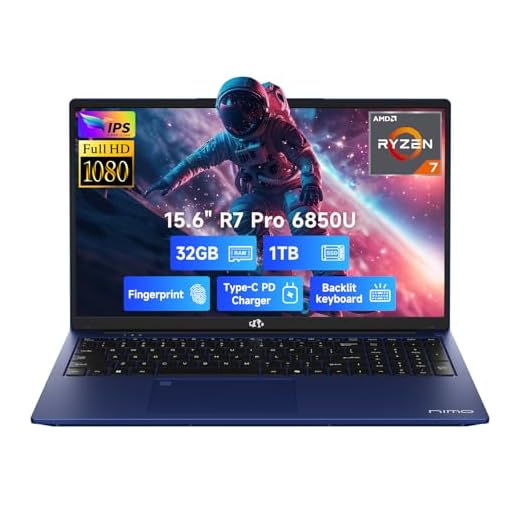
- NIMO 15.6-inch Ryzen 7 Pro Laptop
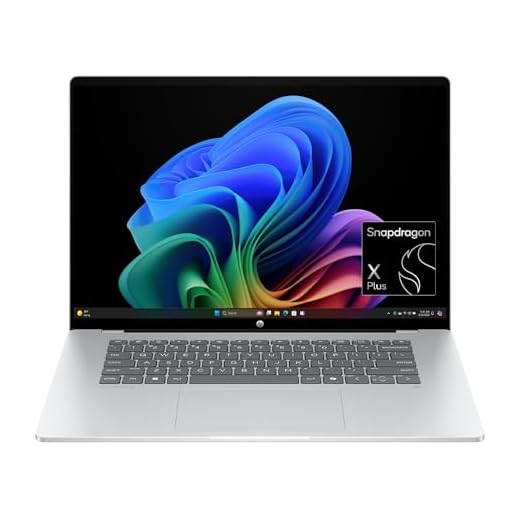
- HP OmniBook 5 16-inch AI Laptop
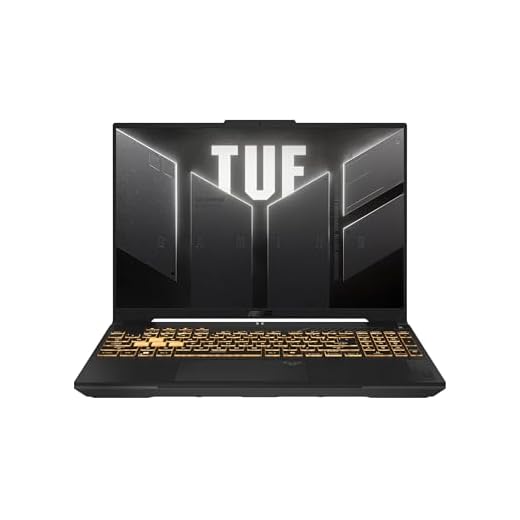
- ASUS TUF F16 16-inch Gaming Laptop
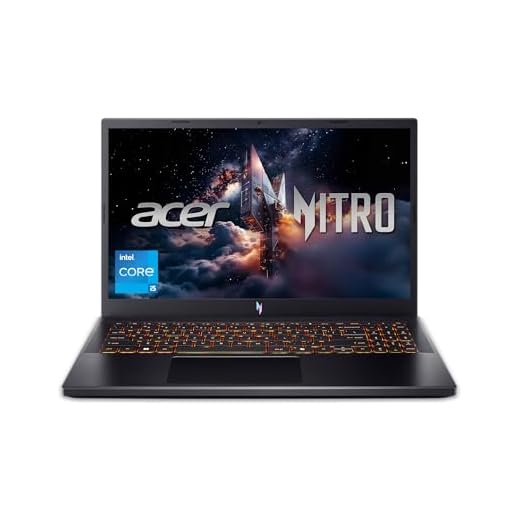
- Acer Nitro V 15 Gaming Laptop
- HP 17-inch Ryzen 5 Productivity Laptop
- Dell 15 Core i5 16GB Laptop
- HP Chromebook 14-inch Lightweight Chromebook
- Dell 15 DC15250 Everyday Laptop
- ASUS Vivobook Go Slim 15.6-inch
- Final Thoughts on the Best Laptops with SSD
- How to Choose the Best Laptops With SSD
- Check Out the Best Laptops with SSD
- Also Check Out Other Helpful Articles
- Video About the Best Laptops with SSD
The Best Laptops with SSD



MacBook Air 13-inch with M4
Pros
- Very fast M4 chip with excellent efficiency
- Outstanding battery life and fanless-like quiet operation
- High-resolution Liquid Retina display and solid build quality
- macOS ecosystem integration and reliable long-term support
Cons
- Few physical ports and limited expandability
- Upgrades (RAM/storage) not user-serviceable
- Higher cost compared with many Windows alternatives
Why the MacBook Air M4 stands out
If you value portability, reliability and battery life, this MacBook Air is hard to beat. The M4 system-on-chip delivers smooth performance whether you’re editing video, compiling code or juggling dozens of browser tabs, and it does so without the loud fans that lower-tier Windows laptops sometimes use.
Notable features and practical benefits
- Apple M4 chip tuned for performance-per-watt
- 13.6-inch Liquid Retina display with crisp color and contrast
- 16 GB unified memory and 256 GB SSD (base configuration options available)
- Touch ID, 12MP Center Stage camera and long software support
For everyday work and creative tasks, the machine feels snappy and consistent. You’ll notice long real-world runtimes and a premium unibody construction that’s both light and durable. Integration with iPhone/iPad and macOS services makes the device very convenient if you already live in Apple’s ecosystem.
Things to weigh before buying
Port selection is intentionally limited — you’ll likely need dongles or a dock if you use multiple external drives or displays regularly. The closed design also means you can’t upgrade memory or storage later, so choose configuration wisely. If you want a highly portable, future-proofed laptop for content creation and daily productivity, this is one of the best options.
NIMO 15.6-inch Ryzen 7 Pro Laptop
Pros
- High-end CPU (Ryzen 7 Pro) with excellent multitasking headroom
- 32 GB LPDDR5 RAM and 1 TB SSD out of the box
- AMD Radeon 680M for very capable integrated graphics
- Backlit keyboard and fingerprint reader for convenience
Cons
- Lesser-known brand — warranty and long-term support vary
- Some users report odd keyboard layout and minor software quirks
- No second internal M.2 slot on certain configurations
Who should consider this NIMO model
If you need strong CPU performance, lots of memory and a roomy SSD without paying flagship laptop prices, this is an attractive option. The Ryzen 7 Pro and 32 GB LPDDR5 give you desktop-like multitasking on a portable chassis.
Standout features and everyday benefits
- AMD Ryzen 7 Pro 6850U (8 cores) delivering strong multi-threaded performance
- 32 GB LPDDR5 RAM and 1 TB NVMe SSD for demanding multitasking and storage
- AMD Radeon 680M graphics for solid integrated GPU performance
- 15.6" FHD IPS display, backlit keyboard and fingerprint reader
You’ll notice fast app launch times, quick file transfers and smooth productivity workflows. Users who do light photo and video editing, many simultaneous browser tabs, or development work will find the system responsive and pleasant to use.
Caveats and practical tips
Be mindful that this is a smaller OEM brand: check warranty coverage and return policies before buying. A few customers noted unusual keyboard layouts and minor Windows account quirks out of the box, but most issues can be resolved with settings adjustments or a local account. If you value raw spec-per-dollar and are comfortable verifying support, this NIMO laptop offers compelling value and performance.
HP OmniBook 5 16-inch AI Laptop
Pros
- Exceptional battery life and fast charging
- 16-inch 2K OLED touchscreen with vivid colors
- Very lightweight and well-built for travel
- On-device AI features and HP AI Companion
- Sustainable materials in construction
Cons
- ARM-based platform can limit legacy x86 app compatibility
- No dedicated high-end GPU for demanding graphics work
- Some units reported missing keyboard backlighting
Why you might choose this laptop
The OmniBook 5 focuses on mobility and long runtimes while delivering a bright, touch-enabled OLED 16-inch display. If your day involves lots of email, web meetings and note-taking, you’ll appreciate how little time you spend tethered to a charger.
Key features and what they mean for you
- 16-inch 2K OLED touchscreen with fast response and strong contrast
- Snapdragon X Plus processor with a dedicated AI engine
- 16 GB RAM and 512 GB NVMe SSD for everyday multitasking and storage
- 65 W USB-C fast charging; 0–50% in ~30 minutes
The touchscreen plus on-device AI companion aims to speed up routine tasks (summaries, notes, quick actions) without sending data to the cloud. The hardware is engineered toward efficiency rather than raw desktop-class performance, so you get great battery life and quiet operation in a slim chassis.
Limitations and practical insight
You should expect excellent battery endurance and light productivity performance, but don’t buy this as a drop-in replacement for power-hungry desktop apps that require native x86 performance. If you rely on specialized Windows desktop software that hasn’t been optimized for ARM or requires certain drivers, compatibility checks are prudent.
Many users praise the display and build — one reviewer noted it felt “as solid as a Mac” — but a few early units lacked keyboard backlighting. If creative work or gaming is a priority, consider a model with a dedicated GPU instead. Otherwise, this is a strong pick for travelers and students who value battery, screen quality, and portability.
ASUS TUF F16 16-inch Gaming Laptop
Pros
- Strong cooling with Arc Flow Fans and multiple heat pipes
- 16:10 FHD+ 144Hz display with good color coverage
- 16 GB DDR5 and 512 GB PCIe Gen4 SSD out of the box
- Military-grade durability and useful I/O
Cons
- Relatively heavy and large for daily commuting
- Battery life is average under load
- Some may find the design bulky for non-gaming use
Who should consider the TUF F16
If your workflow mixes gaming, streaming and productivity and you want a laptop that keeps cool and performs consistently, the TUF F16 is a logical choice. The 16" 16:10 aspect ratio gives a little extra vertical space for productivity while still delivering a fast refresh rate for games.
Standout hardware and benefits
- 13th Gen Intel Core H-series processor for sustained performance
- NVIDIA GeForce RTX 4050 laptop GPU with Optimus support
- 16 GB DDR5 memory and 512 GB PCIe Gen4 SSD
- Advanced cooling: multiple heat pipes, anti-dust design and four exhaust vents
The cooling system is designed to keep clocks higher for longer, which helps when streaming or running CPU/GPU-intensive workloads. Audio and display are also tuned for immersive experiences with Dolby Atmos and Hi-Res support.
Practical trade-offs
You get a lot of hardware for the price, but you’ll carry extra weight compared with ultraportable devices. If you travel frequently and prefer a lighter machine, this may not be ideal. For desktop-replacement performance in a relatively affordable chassis, however, it’s a strong, durable option that’s ready for competitive and casual gaming alike.
Acer Nitro V 15 Gaming Laptop
Pros
- NVIDIA GeForce RTX 4050 for capable 1080p gaming
- 165 Hz IPS display for smooth motion
- 512 GB Gen4 SSD gives fast load times
- Good price-to-performance ratio and upgradeability
Cons
- Only 8 GB RAM in base configuration — upgrade recommended
- Fans can get loud under load
- LCD panel is bright but not as vivid as OLED
Gaming and everyday performance
The Nitro V 15 targets gamers who want a modern GPU and high refresh rate without paying flagship prices. With an Intel i5 H-series CPU and RTX 4050 GPU, you’ll be able to play many current titles at 1080p with playable frame rates and crisp visuals on the 165 Hz panel.
Key hardware highlights
- Intel Core i5-13420H processor for mid-range gaming and multitasking
- NVIDIA GeForce RTX 4050 Laptop GPU (6 GB VRAM)
- 15.6" FHD 165 Hz IPS display
- 8 GB DDR5 RAM (user-upgradeable) and 512 GB Gen4 SSD
In real-world use, the laptop is responsive for both games and productivity tasks, but the 8 GB RAM ceiling will limit heavier multitasking and content creation workloads. Many reviewers and users recommend adding an additional memory stick to reach 16 GB for a more comfortable experience.
What to expect day-to-day
If you’re building a budget gaming setup, this laptop gives you a solid foundation: upgrade RAM early, watch thermals under long sessions (fans are noticeable), and you’ll have a capable portable machine for gaming, streaming and light content creation. If your priorities are color-critical media work or very quiet operation, consider pricier models with better displays or custom cooling.
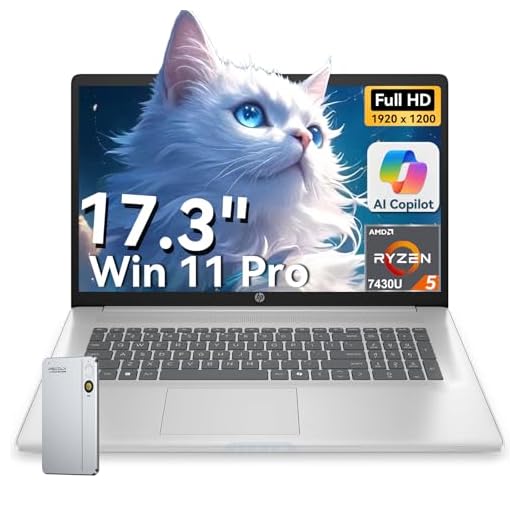
HP 17-inch Ryzen 5 Productivity Laptop
Pros
- Large 17.3" FHD IPS display for improved productivity
- Generous 32 GB RAM and 1 TB NVMe SSD
- Windows 11 Pro and Copilot AI features for business workflows
- Numeric keypad and a comfortable keyboard for data entry
Cons
- Relatively heavy and less portable than smaller laptops
- Integrated GPU limits serious gaming or graphics work
- Battery life can be shorter on the larger display
Who this laptop is designed for
If your daily workflow involves spreadsheets, multiple browser tabs, virtual meetings and local file storage, the 17-inch HP model gives you the screen space and memory to stay productive. The 32 GB RAM and 1 TB SSD reduce the need for external drives or frequent cloud swapping.
Useful specs and benefits
- AMD Ryzen 5 7430U CPU for efficient multitasking
- 17.3" FHD IPS display that reduces scrolling and window switching
- 32 GB RAM and 1 TB NVMe SSD for smooth, local performance
- Windows 11 Pro with Copilot AI features for productivity boosts
The machine is built for desk-first use: you’ll enjoy seeing more content at once and less reliance on swapping between apps. The integrated Radeon graphics handle light photo editing and video playback well, but if your work requires GPU acceleration (3D rendering, heavy video encoding), consider a discrete-GPU model.
Practical advice
Expect better desktop-like performance than typical 14–15" ultraportables, but also expect to carry something larger and heavier. If you frequently travel, test whether the weight and footprint fit your bag. For office or home-office setups, this is a cost-effective way to get a comfortable working area without buying an external monitor.
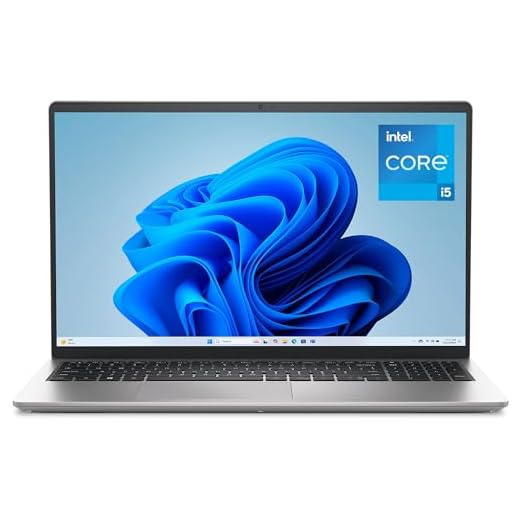
Dell 15 Core i5 16GB Laptop
Pros
- 16 GB RAM supports comfortable multitasking
- 512 GB SSD for fast system responsiveness and storage
- 120 Hz FHD panel improves smoothness for scrolling and video
- Relatively lightweight for a 15" laptop
Cons
- Integrated Intel UHD graphics limit gaming and GPU-heavy editing
- Battery life can be modest in real-world use
- Not targeted at power users who need high-end GPUs
Balanced specs for mainstream use
This Dell configuration balances price and performance: you've got enough memory and storage to run multiple apps, browser tabs and typical productivity workloads with minimal slowdowns. The 120 Hz display adds a perceptible smoothness to everyday interactions.
Important specifications
- Intel Core i5 (13th Gen U-series) for efficient performance
- 16 GB DDR4 RAM and 512 GB SSD for storage and responsiveness
- 15.6" FHD 120 Hz display with built-in FHD camera
In real use, you’ll find the laptop snappy for document work, video conferencing and general content consumption. Integrated graphics can play light games and handle media playback fine, but they won’t match discrete GPU machines for gaming or 3D rendering.
Who should buy it
Choose this model if you want a dependable, midrange Windows laptop that won’t bottleneck common workflows. If you foresee intensive gaming, 3D work or heavy video rendering, you’ll need a machine with a dedicated GPU and stronger cooling.
HP Chromebook 14-inch Lightweight Chromebook
Pros
- Simple, secure Chrome OS with fast boot times
- Lightweight and portable form factor
- Good battery life for day-long use
- Sustainable materials and EPEAT Gold registered
Cons
- Limited onboard storage compared to Windows laptops
- Fewer ports and no backlit keyboard on some units
- Lower-resolution HD screen on this model
Why choose a Chromebook
Chromebooks are streamlined for web-based work and learning, which makes them easy to manage and maintain. If most of your tasks are cloud-based — Google Docs, web research, email and video calls — you’ll appreciate how quickly the device boots and updates.
Core features that matter
- 14" HD micro-edge display and lightweight chassis
- Intel N100 processor, 8 GB RAM and 128 GB UFS storage
- Chrome OS with integrated Google services and security updates
- 45 W USB-C charging with decent battery life
The user experience is focused and low-friction: setup is simple and you get predictable performance for apps and browser tabs. The device is especially well-suited to students and casual users who value portability and battery life over raw power.
Limitations to consider
Storage is modest, so plan to use cloud storage or external drives for large files. If you need Windows-only apps or advanced local editing tools, a Chromebook won’t replace a full Windows laptop. For basic productivity, education and travel-friendly use, it’s an excellent, affordable option.
Dell 15 DC15250 Everyday Laptop
Pros
- 512 GB SSD provides ample local storage and quick boots
- 120 Hz FHD display offers smoother motion than typical budget screens
- Clean, simple design with an ergonomic keyboard
- Affordable price for typical home or office use
Cons
- Battery life is average — expect to charge during the day
- Core 3 processor limits heavier multitasking and media work
- Not the lightest option for frequent travel
Everyday value and where it fits
If your primary needs are web browsing, office apps and streaming, the Dell 15 DC15250 is a practical, inexpensive option. It delivers a full-size 15.6" display, a comfortable keyboard and a respectable 512 GB SSD for fast responsiveness.
What you'll notice in daily use
- Intel Core 3 series processor for entry-level productivity
- 15.6" FHD display at a 120 Hz refresh rate
- 8 GB DDR4 RAM and 512 GB SSD for snappy storage performance
- Built-in HD camera and ergonomic keyboard
The machine is simple to set up and works well as a family or student laptop. The battery life is sufficient for short to medium sessions, but heavy browsing or streaming will force a recharge sooner than ultraportable models.
Buying considerations
This model hits a sweet spot if you want a straightforward Windows laptop on a tight budget. If you need long all-day battery life, stronger CPU performance or lighter weight for travel, consider stepping up to models with newer processors and battery optimizations.
ASUS Vivobook Go Slim 15.6-inch
Pros
- Extremely affordable street price
- Thin and lightweight design for portability
- Runs Windows 11 S mode for simplified security
- Low power draw helps battery stretch for light tasks
Cons
- Limited RAM (4 GB) and slow responsiveness under load
- Small built-in storage (128 GB) and limited upgrade potential
- Can struggle with more than a few browser tabs or apps
Who this is for
If your budget is tight and you only need a machine for email, basic schoolwork or light streaming, the Vivobook Go Slim delivers essential functionality at a very low price. It’s a practical choice as a secondary device or for someone who primarily uses cloud services.
What you get in the box
- 15.6-inch 1080p display suitable for documents and video
- Intel dual-core N4500 or similar entry-level processor
- 4 GB DDR4 RAM, 128 GB SSD, Windows 11 in S mode
The machine is compact and easy to carry; you’ll appreciate the price and form factor. However, you should be realistic about day-to-day performance: opening many tabs, running heavier web apps or multitasking will expose the RAM and CPU limits quickly.
Practical considerations and tips
If you buy this, plan to rely on cloud storage and lightweight apps. Some users solved storage constraints with an external USB SSD or low-profile USB stick. If you expect to keep the laptop for years and run more demanding workloads, consider spending more for a model with 8 GB RAM and a larger SSD. For students and basic users, though, it can be a cost-effective temporary solution.
Final Thoughts on the Best Laptops with SSD
Pick the MacBook Air 13-inch with M4 if you want the best combination of battery life, silent operation and a premium macOS experience. It’s ideal if you travel, do creative work on the go, or simply want a laptop that wakes and runs without fuss. The M4 delivers smooth responsiveness, excellent screen quality and long battery life — perfect for writers, designers and anyone who values portability.
Choose the NIMO 15.6-inch Ryzen 7 Pro Laptop if you need raw multitasking power and local storage at a strong value. Its Ryzen 7 Pro CPU, 32 GB of RAM and 1 TB SSD make it the better pick for heavy spreadsheet work, multi-app workflows, large file handling and light content creation. It’s the practical choice when you want near-desktop performance without a premium price.
Best Laptop With Dedicated Graphics Card
How to Choose the Best Laptops With SSD
Solid-state drives have transformed the laptop market by offering faster speeds, better durability, and a smoother overall experience. If you’re searching for the best laptops with SSD, it’s important to know which features truly make a difference. Below are the key factors to consider before making your choice.
Choose the Right SSD Type for Speed and Reliability
Not all SSDs are the same. The type of drive inside your laptop greatly influences performance, boot time, and how quickly apps open.
SATA SSDs are the most affordable and still much faster than traditional HDDs. They’re great for everyday tasks such as browsing, working with documents, or streaming.
NVMe SSDs, especially those using the PCIe interface, offer significantly faster read and write speeds. If you multitask heavily, edit videos, or work with large files, an NVMe drive delivers much better responsiveness.
For the best long-term performance, look for models with capacities starting at 256GB or higher — especially if you store media files or install multiple apps.
Pick the Processor That Matches Your Workload
The processor determines how efficiently your laptop handles tasks. For the best experience with SSD-equipped laptops, choose a CPU that complements the speed of the drive.
For light everyday use, Intel Core i3 or AMD Ryzen 3 is enough. If you need stronger performance for office apps, multitasking, or creative work, go for Intel Core i5/i7 or AMD Ryzen 5/7. These processors pair extremely well with fast NVMe SSDs, ensuring smooth performance in both productivity and entertainment.
Aim for at Least 8GB of RAM for Smooth Performance
The combination of RAM and SSD speed is what makes a laptop feel fast. While SSDs handle quick data access, RAM manages active tasks.
A minimum of 8GB RAM is ideal for students, office users, and general web browsing. If you work with design software, coding tools, or run many apps at once, choose 16GB or more to avoid slowdowns.
Check the Display Size and Resolution for Your Lifestyle
The best laptops with SSD come in a wide range of screen sizes, each suited to different needs.
- 13–14 inches: Great for portability and travel, offering a compact design without sacrificing productivity.
- 15–16 inches: A balanced option ideal for work, entertainment, and multitasking.
- 17 inches: Perfect for users who need a larger workspace, such as video editors or gamers.
Resolution also matters. Full HD (1080p) offers sharp, clear visuals and is the standard for most users. Creators may prefer 2K or 4K for more detail and color accuracy.
Battery Life: Look for at Least 8 Hours of Use
A fast SSD is only part of the equation — you also need a battery that lasts. The best laptops with SSD should provide at least 8 hours of battery life for everyday activities. Power users, travelers, and remote workers should look for laptops that promise 10–12 hours or more.
Consider Connectivity and Upgrade Options
Your laptop’s ports determine how easily you can connect accessories and external devices. Look for:
- USB-C or Thunderbolt for fast data transfer and charging
- HDMI for external monitors
- USB-A for legacy devices
- microSD or SD card slots if you work with cameras
If you plan to keep your laptop for many years, check whether the SSD or RAM is upgradeable. Some models allow you to swap components later, extending the device’s lifespan.
Choose a Build Quality That Matches Your Usage
Whether you travel daily or work mostly from home, durability matters. Lightweight metal bodies offer better resistance to scratches and impacts, while plastic builds tend to be more affordable.
For frequent travelers, a laptop with a thin, sturdy chassis and a backlit keyboard can greatly improve comfort and productivity on the go.
Bonus Tip: Look for Laptops With Dual-Drive Support
Some of the best laptops with SSD also support an additional HDD or secondary SSD. This setup gives you the speed of an SSD for apps and system files, plus the capacity of a larger drive for storing videos, photos, and backups. It’s the ideal combination for professionals who need both speed and space.
Check Out the Best Laptops with SSD
Still not sure which one to choose? Click the link below to see the best-selling products.
Also Check Out Other Helpful Articles
Take a look at more useful articles that can help you make more informed decisions.
- Best Laptops that Runs GTA V in 2026 (Top 9: Acer Predator, Razer Blade 14 and More)
- Best Samsung Chromebooks in 2026 (Top 6: Galaxy Chromebook 2, Plus and More)
- Best Samsung Laptops for Students in 2026 (Top 8: Galaxy Book, Chromebook and More)
Video About the Best Laptops with SSD
We created a video on the topic. Just click to watch.
https://youtu.be/Ayj14z8cRbU
Related Articles
About the Author

Lauren Baker finds joy in turning ideas into written content. She values clarity, relevance, and keeping readers engaged from start to finish.