Best PCs to Play Warzone in 2026 (Top 9: RTX 5070TI, Ryzen 9 and More)

Last Updated on February 17, 2026
Looking for the ultimate gaming rig? Discover the best PCs to play Warzone and dominate the battlefield with high FPS and stunning graphics.
You WILL stop blaming lag for your bad plays.
Load into Warzone with stable FPS and fewer excuses. A good PC gives you smoother aim, cleaner streams, and less rage.
Picture spawning at Verdansk with 144+ FPS and no stutter. Your squad hears you clearly and your stream doesn’t drop. That kind of stability wins matches — and feels great.
Contents
- The Best PCs to Play Warzone
- iBUYPOWER Y40 Ryzen 9 RTX5070Ti 32GB
- Alienware Aurora Core Ultra RTX5070 32GB
- CyberPowerPC Gamer Xtreme i9 RTX5070 32GB
- Lenovo Legion Tower 5i Core Ultra RTX5070Ti
- MSI Codex Z2 Ryzen 7 RTX5070 32GB
- CyberPowerPC Gamer Xtreme i7 RTX5060Ti
- CyberPowerPC Gamer Master Ryzen 7 RTX5060Ti
- CyberPowerPC Gamer Xtreme i5 RTX5060
- MSI Codex R2 i5 RTX5060 Budget PC
- Final Thoughts on the Best PCs to Play Warzone
- How to Choose the Best PCs to Play Warzone
- Check Out the Best PCs to Play Warzone
- Also Check Out Other Helpful Articles
- Video About the Best PCs to Play Warzone
The Best PCs to Play Warzone

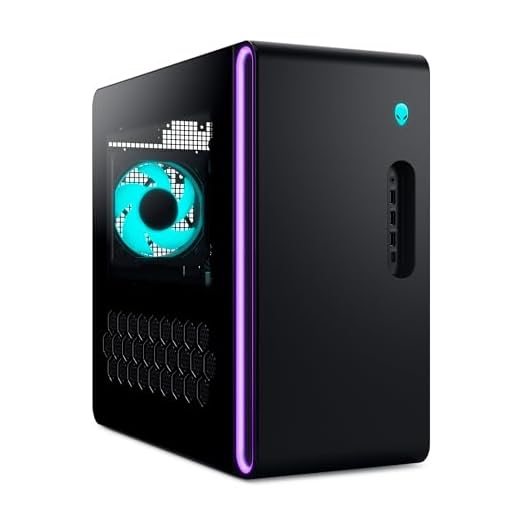


iBUYPOWER Y40 Ryzen 9 RTX5070Ti 32GB
You’ll get enthusiast CPU performance combined with an RTX 5070 Ti and 32GB of RAM—ideal if you stream, create content, or play at high resolutions. The included liquid cooling and roomy case make it a stable daily-driver.
Pros
- Ryzen 9 7900X excels in both gaming and content creation
- RTX 5070 Ti offers high FPS at 1440p and strong 4K capability
- 32GB DDR5 and 2TB NVMe deliver smooth multitasking and storage
Cons
- Higher cost for the premium components
- Some minor case fit-and-finish notes reported by users
High-performance components for serious users
This iBUYPOWER model puts a Ryzen 9 7900X together with an RTX 5070 Ti, 32GB DDR5, and a 2TB NVMe SSD. That combination gives you excellent single-threaded gaming performance plus multi-threaded headroom for streaming and editing.
- 32GB DDR5 for heavy multitasking and streaming
- 2TB NVMe for large game libraries and media projects
- 240mm liquid CPU cooling to keep temperatures in check
Day-to-day and gaming experience
You’ll notice fast load times, quick scene transitions when streaming, and superb in-game responsiveness. The system is built for long sessions; cooling and airflow are designed to maintain performance under continuous load.
Limitations and real-world notes
The main trade-off is price: you’re paying for top-tier components and the bundled cooling solution. Some users mention small cosmetic trim fit issues, but these don’t affect performance.
Bottom line and tips
If you want a high-powered prebuilt that covers both gaming and productivity, this is a strong candidate. Make sure to register any bundled software and update drivers to maximize stability and FPS in Warzone.
Alienware Aurora Core Ultra RTX5070 32GB
You’ll benefit from Alienware’s tuned thermals and low-noise design while getting robust GPU and CPU performance for competitive gaming. It’s a polished option if you want premium OEM build quality and support.
Pros
- Strong Intel Core Ultra CPU with high single-threaded throughput
- RTX 5070 provides excellent performance at 1440p
- 1000W Platinum PSU gives headroom for upgrades
Cons
- Included keyboard and mouse are entry-level
- Premium price compared with some competing prebuilts
Premium OEM engineering
Alienware’s Aurora blends an Intel Core Ultra 7 platform with an RTX 5070, 32GB of DDR5, and a 1TB SSD in a chassis optimized for acoustics and airflow. If you prioritize a quiet system with strong out-of-the-box performance, this is tailored to that need.
- Tuned cooling and acoustics for long sessions
- 1000W Platinum PSU for future GPU upgrades
- AlienFX lighting and clear panel for a premium look
Gameplay and day-to-day use
You’ll appreciate how the system maintains high framerates while limiting noise, which is useful for streaming or playing in shared spaces. The entire setup feels responsive and capable of handling large projects and intensive gaming alike.
Upgrade and support considerations
Dell/Alienware support and warranty can be a benefit if you prefer OEM servicing over DIY repairs. The PSU and internal layout make GPU upgrades straightforward, but be mindful of physical clearance with the case’s layout.
Final recommendation
If you want a no-compromise prebuilt from a well-known OEM with good thermal design and upgrade headroom, this Aurora is one of the strongest picks in this roundup.
CyberPowerPC Gamer Xtreme i9 RTX5070 32GB
You get flagship-level CPU and GPU performance that keeps frame rates high even under heavy multitasking or streaming. The large SSD and 32GB of RAM make it a strong choice for demanding players and creators.
Pros
- Top-tier Intel i9 reduces CPU bottlenecks
- RTX 5070 provides excellent 1440p and capable 4K gaming
- 32GB DDR5 gives headroom for streaming and multitasking
Cons
- Higher price compared to mid-range builds
- Larger chassis and heavier unit may limit desk placement
Built for high-refresh competitive play
This configuration pairs an Intel Core i9-14900KF with an NVIDIA GeForce RTX 5070 and 32GB of DDR5 RAM. It’s aimed at players who want consistently high framerates while streaming, recording, or running chat/overlays during matches.
- Powerful CPU to avoid bottlenecking modern GPUs
- RTX 5070 for high-settings 1440p and solid 4K performance
- Large 2TB NVMe SSD for games and media
In-game feel and thermals
You’ll notice very stable frame delivery in fast-paced shooters and minimal frame drops during intense firefights. The system’s cooling and cable management are tuned for sustained loads; fans ramp predictably and noise remains reasonable.
Who should buy this
If you’re serious about competitive Warzone play while streaming or editing video, this machine gives you the performance chops without immediate upgrades. It’s a good pick if you want a near top-tier experience without building a custom rig from scratch.
Practical advice
Keep an eye on GPU driver updates and consider configuring a quality-of-life streaming profile (bitrate, encoder selection) to take full advantage of the CPU/GPU balance here.
Lenovo Legion Tower 5i Core Ultra RTX5070Ti
You’ll get a refined prebuilt with good thermals, solid performance, and Lenovo’s software ecosystem for easy management. It’s a great pick if you value quiet operation and room to expand components.
Pros
- Intel Core Ultra 7 with strong single and multi-core performance
- Lenovo-tier build quality and sensible airflow
- 32GB RAM and 1TB SSD suitable for demanding workloads
Cons
- Premium price compared with some similarly specced units
- Included basic peripherals will likely be replaced by users
Design and performance blend
The Legion Tower 5i mixes Intel’s Core Ultra 7 platform with an NVIDIA RTX 5070 Ti and 32GB of DDR5 for a refined gaming and creative experience. You’ll enjoy smooth frame delivery, particularly at 1440p, while running background apps like streaming software.
- Legion Coldfront cooling for quieter thermals
- Lenovo software (Legion Space and Nahimic) for fine tuning
- Wi‑Fi 6E and modern I/O for low-latency networking
What it feels like to use
In everyday play you’ll notice quiet fans, quick responsiveness, and stable temperatures even during long multi-hour sessions. The 1TB SSD is plenty for a selection of big AAA titles while giving fast load and boot times.
Expandability and who this is for
You can easily upgrade storage, GPU, or add PCIe cards down the line. If you value a polished OEM experience with good warranty support and tuning utilities, this machine is a smart choice.
Quick recommendations
Use Lenovo’s update tools to keep drivers current, and consider swapping the bundled keyboard/mouse with a competitive-grade set if you’re playing Warzone at a high level.
MSI Codex Z2 Ryzen 7 RTX5070 32GB
You’ll get an AMD Ryzen 7 paired with an RTX 5070 and 32GB of RAM, giving you headroom for high settings and content work. It’s a well-rounded prebuilt for players who want both power and convenience.
Pros
- Strong Ryzen 7 CPU for multi-threaded tasks
- RTX 5070 delivers reliable 1440p performance
- 2TB NVMe and 32GB RAM for large libraries and multitasking
Cons
- Some users may not like the default RGB lighting
- Compact case may restrict large aftermarket coolers
Performance profile
This MSI Codex Z2 combines AMD’s Ryzen R7 8700F with an NVIDIA RTX 5070, 32GB DDR5, and a 2TB NVMe drive. The result is snappy performance in both single-player and multiplayer titles and excellent multitasking when you stream or edit.
- 32GB DDR5 for future-proof multitasking
- 2TB NVMe for extensive game libraries
- USB Type-C and plentiful rear I/O for peripherals
In-play behavior and thermals
You’ll see consistent framerates at 1440p and capable performance at 4K with tuned settings. The included ARGB air cooling handles the thermal load well for the stock configuration.
Who should consider this machine
If you want a prebuilt that covers gaming and productivity without immediate upgrades, this is a pragmatic choice. Its storage and memory specs are generous compared with many rivals at the same price.
Setup tips
Disable or tune RGB if it’s distracting and keep system drivers up to date for best performance in competitive shooters like Warzone.
CyberPowerPC Gamer Xtreme i7 RTX5060Ti
You get a strong balance of CPU and GPU power that handles modern titles at high settings without fuss. The build is plug-and-play, quiet under load, and gives you room to upgrade later.
Pros
- Powerful i7 and RTX 5060 Ti combo for high-frame gaming
- Good out-of-box value compared with DIY builds
- Quiet operation and clean cable management
Cons
- 16GB RAM may need upgrading for heavy multitasking
- White case may show dust and fingerprints
Why this rig works for Warzone
You’ll find this CyberPowerPC configuration strikes a strong balance between raw GPU performance and CPU headroom. It pairs a modern Intel Core i7 with an RTX 5060 Ti and a 1TB PCIe 4.0 SSD so game load times and frame rates remain solid at 1080p and good at 1440p.
- Strong CPU-GPU pairing for sustained high FPS
- Fast NVMe storage for quick boot and game loads
- Wi‑Fi ready and Windows 11 preinstalled
Real-world benefits and user experience
In practice, you’ll notice smooth gameplay in multiplayer shooters and minimal stuttering while streaming or recording. The system arrives mostly plug-and-play with decent cable management and customizable RGB lighting if you care about looks.
Limitations and upgrade path
If you push into high refresh 1440p or plan heavy streaming plus gaming, you’ll want to upgrade RAM to 32GB and consider a second storage drive. The included keyboard and mouse are adequate but not premium; you may want better peripherals for competitive play.
Practical tips
If you want the best Warzone experience from this PC, increase RAM to 32GB and ensure GPU drivers and Windows updates are current. You can expect reliable, quiet performance for months of competitive play.
CyberPowerPC Gamer Master Ryzen 7 RTX5060Ti
You’ll get a Ryzen 7 CPU paired with an RTX 5060 Ti that targets both gaming and productivity well. It’s a balanced machine for competitive play, streaming, and content work without extreme cost.
Pros
- AMD Ryzen 7 gives strong multi-threaded performance
- RTX 5060 Ti handles high settings comfortably
- Wi‑Fi 6 and modern I/O make connectivity easy
Cons
- 8GB VRAM on some configs may constrain future high-res settings
- Larger chassis and weight may be a consideration
Performance and architecture
This Gamer Master model centers on an AMD Ryzen 7 8700F with an RTX 5060 Ti and 16GB DDR5. The Ryzen CPU helps in multitasking, streaming, and games that use multiple threads, while the GPU sustains high frame rates at 1080p and solid performance at 1440p.
- Multi-core CPU ideal for streaming and background tasks
- RTX 5060 Ti for smooth high-setting gameplay
- Modern connectivity including Wi‑Fi 6
Practical gameplay benefits
In multiplayer shooters you’ll notice consistent framerates and snappy responsiveness. The 1TB NVMe SSD keeps load times short and system responsiveness high; you can alt-tab and run background applications with little disruption.
Upgrade considerations
If you plan on futureproofing for ultra 1440p or ray tracing at higher fidelity, plan to add more VRAM-capable GPUs down the line or increase system RAM to 32GB. The case and PSU generally allow straightforward component swaps.
Final impressions
If you favor an AMD platform—whether for content work or gaming—this is a sensible pick that gives you headroom and solid out-of-the-box performance for Warzone and similar competitive titles.
CyberPowerPC Gamer Xtreme i5 RTX5060
You get efficient 1080p to 1440p gameplay for a very competitive price. It’s a solid entry-level to mid-range gaming desktop that’s easy to upgrade when you need more power.
Pros
- Very competitive price-to-performance ratio
- Quiet operation and clean out-of-box build
- Good upgradeability with extra connectors
Cons
- 8GB VRAM GPU limits some ultra settings at higher resolutions
- Comes with basic included peripherals
What you get at this price
This CyberPowerPC pairs an Intel Core i5-13400F with an RTX 5060 (8GB) and 16GB of DDR5 RAM to deliver smooth performance in Warzone at 1080p and decent settings at 1440p. It’s intended for gamers who want strong frame rates without spending on top-tier components.
- Budget-friendly RTX 5060 8GB for modern games
- 1TB PCIe 4.0 NVMe SSD for fast storage
- Wi‑Fi ready with Windows 11 Home included
How it feels in play
You’ll experience fast load times and reliable framerates on medium-to-high settings. The unit is surprisingly quiet and arrives with thoughtful cable management so thermals remain stable during long sessions.
When to upgrade
If you plan to stream while gaming or push ultra settings at 1440p, upgrade the GPU or increase system RAM. The chassis and PSU leave room to swap in higher-tier GPUs and add more storage when you’re ready.
Quick setup advice
Keep drivers updated and consider enabling performance modes in Windows before jumping into competitive matches. For most players, this PC delivers strong returns for the price.
MSI Codex R2 i5 RTX5060 Budget PC
You’ll get a solid entry-level machine that handles Warzone well at 1080p and medium-to-high settings. It’s an economical pick that’s easy to upgrade when your needs grow.
Pros
- Very competitive price for an RTX-equipped desktop
- Compact design with ARGB accents
- 80+ Gold PSU and reliable MSI build quality
Cons
- 16GB RAM is adequate but not future-proof
- Fans can get louder under sustained load
Value-focused performance
The MSI Codex R2 pairs an Intel Core i5-14400F with an RTX 5060 and 16GB of DDR5 to deliver reliable 1080p gaming at high refresh. It’s targeted at players who want a turnkey system without breaking the bank.
- 1TB NVMe for fast system responsiveness
- ARGB fan cooling with MSI tuning
- Wi‑Fi 6E and solid I/O selection
Practical gaming experience
You’ll be able to run Warzone at high frame rates on 1080p monitors and enjoy smooth load times. The system stays reasonably cool thanks to its air-cooling solution, though acoustic levels increase under heavier loads.
Upgrade path and considerations
If you plan to move to 1440p high-refresh or stream regularly, consider upgrading RAM to 32GB and budgeting for a GPU upgrade later. The compact chassis may limit the largest GPU options, so check GPU length before buying upgrades.
Final take
For budget-conscious gamers who still want modern GPU performance, this MSI Codex R2 is a strong pick and offers one of the better price-to-performance ratios in this roundup.
Final Thoughts on the Best PCs to Play Warzone
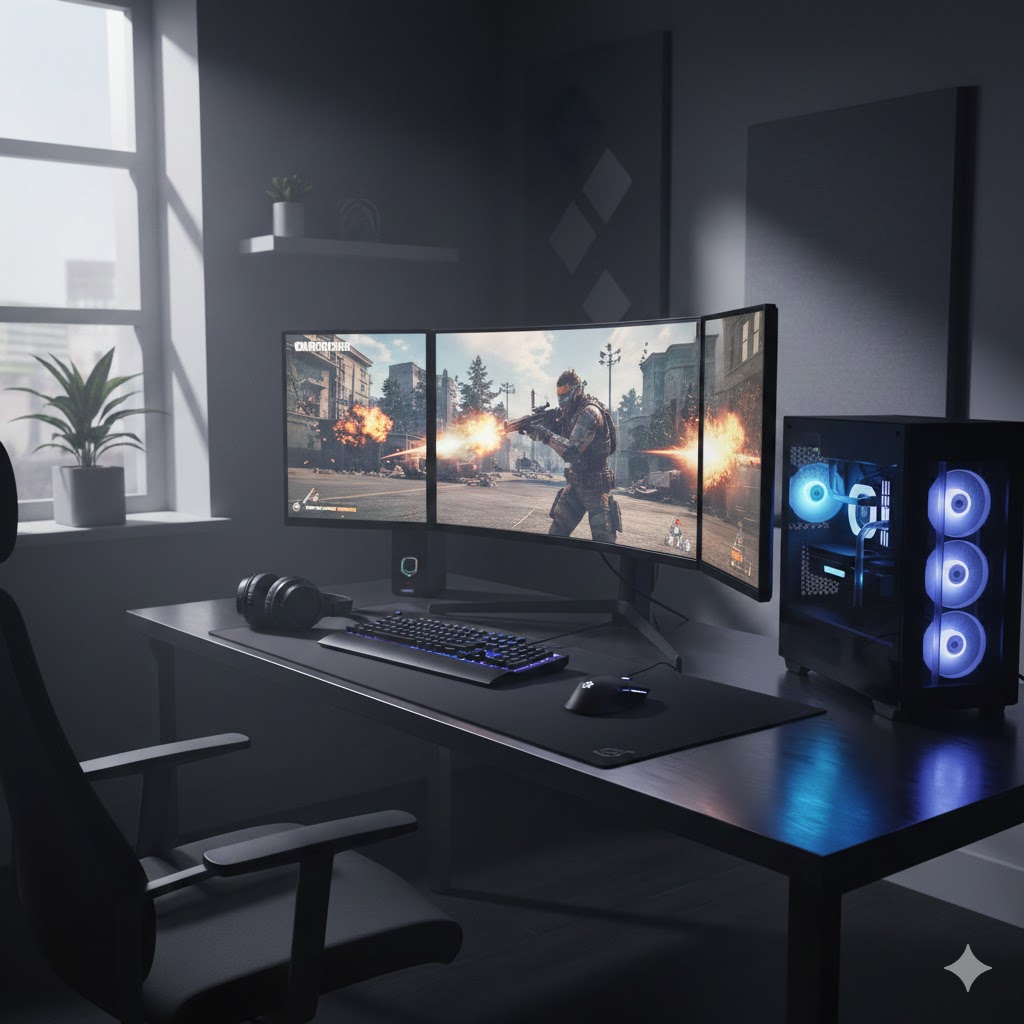
Pick the iBUYPOWER Y40 Ryzen 9 RTX5070Ti 32GB as your top choice if you want raw power. It pairs an enthusiast Ryzen 9 with an RTX 5070 Ti and 32GB of RAM, plus liquid cooling and a roomy case. That makes it ideal if you play at high resolutions, stream or record gameplay, and want a stable daily driver that handles multitasking and content creation.
Choose the Alienware Aurora Core Ultra RTX5070 32GB if you prefer a polished, quiet, premium OEM experience. You’ll get tuned thermals, low-noise operation, and strong CPU/GPU performance for competitive play. It’s the better pick if you value refined acoustics, reliable support, and a plug-and-play build for tournament nights or long sessions.
How to Choose the Best PCs to Play Warzone
Call of Duty: Warzone is fast-paced, visually intense, and highly competitive — which means your PC needs to keep up. To enjoy smooth gameplay, fast reaction times, and sharp visuals, it’s essential to understand which components matter most. Below is a complete guide to help you choose the best PCs to play Warzone, whether you’re building a setup from scratch or buying a ready-to-use machine.
Start with a Powerful Processor (CPU) for Stable FPS
Warzone relies heavily on a solid CPU to handle physics, player movement, map loading, and background processes. A strong CPU ensures consistent FPS during intense gunfights and crowded areas.
Look for:
- At least 6 cores and 12 threads
- Clock speeds around 4.0 GHz or higher
- Modern generations from series such as Intel Core i5/i7 or AMD Ryzen 5/7
A more powerful processor gives you better frame stability and reduces stuttering, especially when paired with a capable GPU.
Choose a Graphics Card Designed for Competitive Gaming
The GPU is the star of any gaming PC. Warzone’s graphics can be demanding, especially if you play at 1440p or 4K. To reach high FPS, your graphics card should support modern rendering technologies and run the game on medium to ultra settings without bottlenecks.
Good GPU options include:
- Mid-range: suitable for 1080p high FPS gameplay
- High-end: ideal for 1440p or 4K with higher graphic settings
The stronger the card, the easier it is to maintain stable performance even during chaotic battles.
Get at Least 16GB of RAM for Smooth Multitasking
Warzone is a memory-heavy game, especially when running alongside voice chat apps, overlays, browsers, and background tools. While 8GB might handle lighter titles, it’s not enough for competitive Warzone.
Recommended:
- 16GB RAM for consistent performance
- 32GB RAM if you stream, edit gameplay footage, or run multiple apps
Having enough RAM reduces loading times and prevents frame drops.
Prioritize SSD Storage for Faster Loads and Better Responsiveness
Warzone’s maps and textures are large, making fast storage essential. An SSD speeds up everything — from launching the game to loading into matches.
Look for:
- NVMe SSD for best performance
- At least 500GB, since Warzone updates are large
- Optionally add a secondary drive for other games
Fast storage also helps with smooth rendering of textures during movement.
Keep the System Cool with a Quality Cooling Setup
High-performance components generate heat, and overheating can cause throttling, which kills FPS. To maintain a competitive edge, your PC must stay cool even during long gaming sessions.
Key cooling tips:
- Consider dual-fan or triple-fan GPU models
- Choose a tower with strong airflow
- Use air or liquid cooling for the CPU
- Keep cables tidy to improve airflow
Cooler hardware performs better and lasts longer.
Pick a Power Supply with Enough Wattage and Good Efficiency
A reliable power supply is essential for system stability. Gaming components draw more power during intense matches, so having a PSU that can handle spikes prevents crashes.
Aim for:
- 80 Plus certified PSU
- Enough wattage to support your CPU + GPU combo
- Room for future upgrades
Stable power ensures no interruptions during critical moments in Warzone.
Consider the Monitor You’ll Pair with the PC
Even the best PC won’t shine if the monitor can’t keep up. For Warzone, a high refresh rate is a game changer, improving smoothness and reaction speed.
Ideal monitor specs:
- 144Hz or higher refresh rate
- 1ms response time
- 1080p for competitive play, 1440p for improved visuals
Your monitor and PC should complement each other for the best results.
Prebuilt or Custom: Which Is Better?
Prebuilt PCs are convenient, tested, and ready to use. They’re great for players who don’t want to assemble a system themselves.
Custom PCs allow full control over components, better upgrade paths, and often better price-to-performance.
Both can deliver excellent gameplay — as long as the core specs meet the game’s requirements.
Check Out the Best PCs to Play Warzone
Still not sure which one to choose? Click the link below to see the best-selling products.
Also Check Out Other Helpful Articles
Take a look at more useful articles that can help you make more informed decisions.
- Best Laptops that Runs GTA V in 2026 (Top 9: Acer Predator, Razer Blade 14 and More)
- Best Samsung Chromebooks in 2026 (Top 6: Galaxy Chromebook 2, Plus and More)
- Best Samsung Laptops for Students in 2026 (Top 8: Galaxy Book, Chromebook and More)
Video About the Best PCs to Play Warzone
We created a video on the topic. Just click to watch.
Related Articles


About the Author

Lauren Baker finds joy in turning ideas into written content. She values clarity, relevance, and keeping readers engaged from start to finish.