Best Pens for Tablets in 2026 (Top 7: Metapen, Digiroot and More)

Looking for precision tools? Discover the best pens for tablets that offer seamless writing and drawing experiences for creative professionals and students.
STOP tapping with your finger. You’re better than that. A proper stylus makes handwriting smoother, sketches cleaner, and scrolling less awkward.
Smudges, lag, and awkward grips are boring. Pick a pen that matches your device and your habits. Whether you want pencil-like feel, pixel-level accuracy, or a cheap multi-pack for family chaos—there’s a right pen here.
Contents
- The Best Pens for Tablets
- STAEDTLER Noris Classic EMR Stylus
- Metapen A8 Fast-Charge Magnetic iPad Pencil
- MEKO 2-in-1 Precision Disc Stylus Pair
- Digiroot 2-in-1 Disc and Fiber Stylus
- Bopomofo Five-Pack 2-in-1 Stylus Set
- Evach Active Stylus with 1.5mm Tip
- 3-Pack Precision Disc Tip Stylus Set
- Final Thoughts on the Best Pens for Tablets
- How to Choose the Best Pens for Tablets
- Check Out the Best Pens for Tablets
- Also Check Out Other Helpful Articles
- Video About the Best Pens for Tablets
The Best Pens for Tablets



STAEDTLER Noris Classic EMR Stylus
You get a battery-free EMR stylus that feels like a real pencil and offers true palm rejection. Its ergonomic hexagonal body and included replacement tips make it ideal for long writing sessions and note-taking on supported devices.
Pros
- EMR technology — no charging or pairing required
- Natural pencil-like hexagonal grip for extended use
- Built-in eraser function on many models
- Includes replacement points and a replacement tool
Cons
- Compatibility is limited to EMR-enabled devices — check device list
- Rubbery nibs may feel different than paper for some users
Overview
If you prefer a stylus that behaves like a traditional pencil, you’ll find this option compelling. It uses electromagnetic resonance (EMR) so it doesn’t require batteries or Bluetooth pairing, and it supports palm rejection and high responsiveness on compatible devices. The hexagonal shape is designed for comfortable, familiar handling during extended note-taking or sketching sessions.
What you’ll notice day-to-day
- Effortless use: no charging or pairing — just pick it up and start writing
- Palm rejection so your hand can rest on the screen naturally
- Replaceable tips and an included tool to keep the stylus lasting longer
Strengths and practical trade-offs
You’ll benefit from a very natural writing experience, especially if you’re migrating from paper to digital. The integrated eraser on many models speeds up corrections and mimics the physical pencil workflow. However, this stylus requires a device with EMR support — not every tablet or laptop will recognize it. Also, the rubbery feel of the nib may not match the tactile feedback some artists prefer.
Ideal user
This is an excellent pick if you regularly write, annotate, or sketch on EMR-capable devices and value a battery-free, pencil-like feel. Make sure to verify your device’s compatibility chart before purchasing so you can take full advantage of the pen’s features.
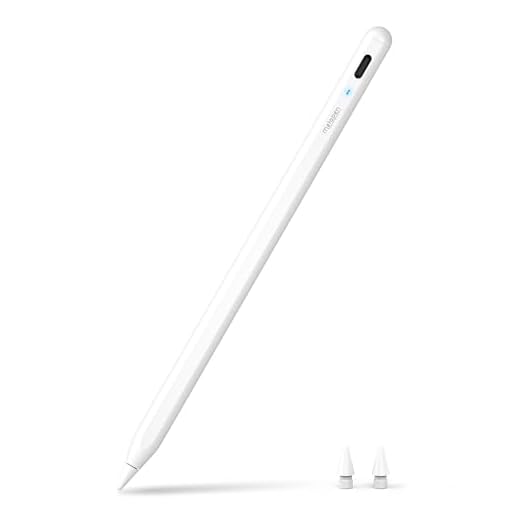
Metapen A8 Fast-Charge Magnetic iPad Pencil
You’ll get pixel-level 0.1mm accuracy, quick 4-minute fast charging, and magnetic attachment for iPad models that accept side magnets. It’s a strong budget alternative when you want Apple Pencil–like responsiveness without the higher price.
Pros
- High reported pixel-level precision (0.1 mm) and responsiveness
- Fast 4-minute charging for quick top-ups
- Magnetic attachment for compatible iPad models
- Simple tap-to-power behavior — no complex pairing
Cons
- Magnet strength may be weaker on some iPad models
- Advanced features like tilt/pressure may be limited vs. OEM pencils
Overview
This stylus aims to deliver a near-Apple-Pencil experience for many iPad users at a fraction of the cost. It advertises pixel-level accuracy and a fast-charge capability that can give you a lot of runtime from a short charging period. The magnetic attachment is convenient for iPads that support it, though magnet strength can vary by model.
Features that matter in daily use
- Pixel-precise tip for small handwriting and detailed lines
- Very fast 4-minute charge time — helpful when you’re low on battery
- Magnetic side attachment and an LED status indicator for quick power checks
Real-world performance and caveats
You’ll likely find it responsive for note-taking, annotating, and casual sketching. Users report that it feels comfortable in the hand and keeps a stable charge. However, it may not fully replace high-end styluses for professional artists because tilt and advanced pressure behavior can be limited. The magnetic hold can also be weak on certain base-model iPads, so you might need a small case or a stand to keep it secure when not in use.
Who should consider this pen
If you want a fast-charging, accurate stylus for everyday tablet tasks and occasional artwork without paying premium prices, this is a strong contender. If you need full compatibility with pro-level software features (advanced pressure curves, tilt, or certified accessory support), evaluate those specific needs against this stylus’ capabilities before committing.
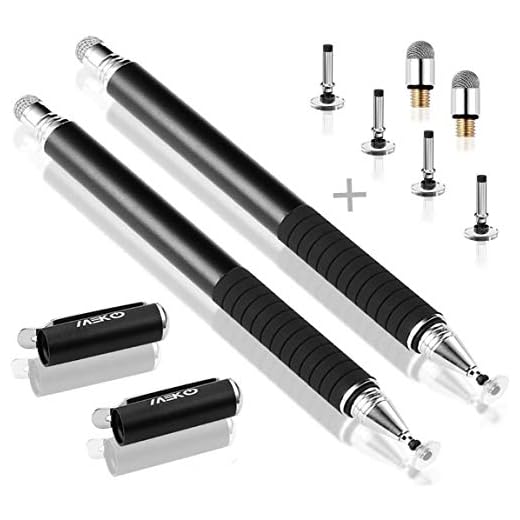
MEKO 2-in-1 Precision Disc Stylus Pair
You get a sturdy metal-bodied 2-in-1 stylus with disc and fiber tips plus multiple replacements that deliver consistent performance. It’s a practical, well-built choice for everyday note-taking and sketching across devices.
Pros
- High-quality metal construction — feels premium
- Comes with 6 replacement tips for longevity
- Precision disc tip enables accurate drawing
- No charging or drivers required
Cons
- Disc tip can be less precise for very fine art tasks
- Caps and tips are small parts that can be misplaced
Overview
This MEKO pair is a practical two-in-one stylus solution that emphasizes durability and value. Both pens combine a precision disc tip for accurate pointing with a fiber tip for broader strokes. The stainless steel and aluminum construction gives them a substantial, pen-like feel that many people prefer for extended sessions.
What you’ll benefit from
- Sturdy metal build for a professional feel and longer lifespan
- Multiple replacement discs and fibers included so you don’t run out quickly
- Simple compatibility: works with any capacitive touchscreen without pairing
Real-world considerations
You’ll find the disc tip well-suited to handwriting, markup, and basic illustration but it won’t replace a pressure-sensitive stylus for professional digital painting. The included replacements make the bundle great value, but be mindful of losing small caps or tips. Overall responsiveness is solid and the low-friction disc protects your screen well.
Who should buy it
Pick these if you want a dependable, durable stylus pair for daily use across phones, tablets, and laptops — especially useful when you want spare pens to share or keep in multiple bags.
Digiroot 2-in-1 Disc and Fiber Stylus
You’ll get both a clear-disc tip for precision and a fiber tip for general use, plus multiple replacements in the box. It’s a reliable, low-friction tool for drawing and navigation on many capacitive screens.
Pros
- Clear disc offers precise sightline for accurate strokes
- Includes multiple replacement disc and fiber tips
- Solid build quality with pleasant weight and balance
- Works across phones, tablets, and laptops
Cons
- Disc can be fragile — replacement may be needed after heavy use
- Not pressure-sensitive like active styluses
Overview
This 2-in-1 stylus gives you a precision clear-disc tip for fine pointing and a fiber tip for smoother, broader strokes. The disc allows you to see exactly where the tip lands, which helps with accurate selection, detailed sketching, and fine handwriting on capacitive screens. The package typically includes several spare discs and fiber tips so you can keep using it longer without worry.
Key features at a glance
- Clear disc tip for pixel-precise targeting and reduced parallax
- Fiber tip for general navigation and softer screen contact
- Several replacement tips included to extend usable life
Practical use and durability notes
You’ll notice low friction and good responsiveness when drawing or annotating; many reviewers praise the disc for enabling precise lines comparable to older Wacom-style styluses. The stylus has a pleasing heft that helps with control. Keep in mind the disc assembly is a mechanical piece — it can be damaged by rough handling, so plan to swap in replacements if you drop it often.
Who it’s for
Choose this stylus if you need a reliable universal option for precise touch-screen work without buying a device-specific active pen. It’s especially useful for students, note-takers, and casual artists who value precision and a ready supply of replacement tips.
Bopomofo Five-Pack 2-in-1 Stylus Set
You’ll receive five 2-in-1 styluses that cover both disc and fiber tip needs, making them excellent for sharing or keeping backups. They’re inexpensive, easy to use, and work reliably for everyday tasks across many touchscreen devices.
Pros
- Five styluses in a single pack — excellent value
- 2-in-1 tips for flexibility (disc and fiber)
- No charging or pairing — works out of the box
- Good sensitivity for general use and gaming
Cons
- Build quality is basic compared to metal-bodied styluses
- Disc tip precision and durability vary by unit
Overview
This five-pack is built for people who want quantity and versatility on a small budget. Each pen offers a disc tip for precise work and a fiber tip for broader strokes, so you can switch depending on the task. The set is aimed at casual users, classrooms, or households where multiple people need a stylus.
Notable features
- Pack of five styluses — perfect for sharing, replacing, or keeping extras handy
- 2-in-1 design covers both fine-point and smooth navigation needs
- Lightweight construction makes them comfortable for quick tasks
Practical advice and limitations
You’ll appreciate having spares — the disc tips can wear or break with heavy use, and having backups removes downtime. These pens are great for signing documents, basic drawing, and note-taking, but they won’t offer pressure sensitivity or the advanced features found in dedicated active styluses. Expect some variability in feel and longevity across units because of the lower price point.
Recommended user
If you need multiple styluses for classroom settings, group workshops, or as inexpensive replacements, this pack is a strong value. If you’re a professional illustrator or rely on tilt/pressure features, look toward higher-end active pens instead.
Evach Active Stylus with 1.5mm Tip
You get a lightweight, ultra-fine-tip stylus that works without Bluetooth and charges quickly. It’s best for note-taking and casual sketching, but it lacks palm rejection and has compatibility gaps on some newer iPads.
Pros
- Ultra-fine 1.5mm tip for precise strokes
- No Bluetooth pairing required — plug and play
- Long single-charge runtime (around 8 hours)
- Lightweight and comfortable for short sessions
Cons
- No palm rejection — may register unintended touches
- Not fully compatible with some newer iPad models
Overview
You’re looking at an affordable active stylus that aims to deliver precise pen-like strokes with its 1.5mm ultra-fine tip. The body is slim and featherlight, so it feels familiar if you prefer a traditional pen weight. The stylus charges via Micro-USB and advertises roughly eight hours of continuous use.
Key features and what they mean for you
- 1.5mm ultra-fine tip for greater visual precision and finer line control
- Battery-powered active tip (about 8 hours per full charge, ~60 minutes charging)
- No Bluetooth or pairing needed — works immediately on many capacitive screens
Practical strengths and limitations
You’ll appreciate the fine tip when doing handwriting, annotating PDFs, or drawing simple sketches. Because it doesn’t use Bluetooth it’s easy to start using right away and you won’t need to worry about pairing glitches. On the flip side, you should be prepared for limited feature parity with brand-name active pens — there’s no palm rejection, so you’ll need to keep your palm off the screen or use a glove; and compatibility with some newer iPad models is inconsistent.
Who should consider this stylus
If you want an inexpensive active-feel pen for casual note-taking, forms signing, or quick sketches without the fuss of pairing, this is a practical option. If you need full pressure sensitivity, palm rejection, tilt support, or guaranteed compatibility with the newest iPad generations, you’ll want to consider a higher-end EMR or OEM solution instead.
3-Pack Precision Disc Tip Stylus Set
You’ll get a cheap three-pack that works for basic signing and navigation on capacitive screens. The disc tips provide reasonable precision but build quality and durability are limited at this price point.
Pros
- Extremely affordable three-pack for multiple users
- Works immediately with phones, tablets, and Chromebooks
- Fine disc tips help with signature capture and basic drawing
Cons
- Fragile disc tips and caps are easy to damage or misplace
- Quality varies and lifespan can be short under heavy use
Overview
This inexpensive 3-pack is aimed at buyers who need multiple styluses for basic tasks like signing forms, navigating an interface, or occasional note-taking. Each pen features a precision disc tip to improve pointing accuracy compared to blunt rubber-tipped alternatives.
What to expect in everyday use
- Ready-to-use: no Bluetooth or charging required
- Reasonable accuracy for signatures and simple sketches
- Low-cost spares are handy for travel or when sharing devices
Durability and user tips
You’ll find these pens do the job for light daily use, but the disc is relatively fragile and caps are easy to lose. If you accidentally remove the clear plastic disk from the tip you may render that pen unusable — keep that disk intact. They’re a practical temporary solution, but you should upgrade if you need longevity or finer artistic control.
Best fit
Choose the 3-pack if you want the cheapest way to provide multiple people with styluses for basic touchscreen work. For frequent drawing, professional use, or devices that require EMR, pick a more robust or device-specific stylus.
Final Thoughts on the Best Pens for Tablets
If you use an EMR-compatible tablet and you want the most natural pencil-like feel for long note-taking or sketching sessions, get the STAEDTLER Noris Classic EMR Stylus. It's battery-free, offers true palm rejection, and feels like a real pencil — ideal for students and anyone who writes a lot.
If you use an iPad (with magnetic side attachment) and want Apple Pencil–level responsiveness without the Apple price, choose the Metapen A8 Fast-Charge Magnetic iPad Pencil. It gives pixel-precise accuracy and a lightning-fast 4-minute top-up — perfect for artists and precise annotators.
(Quick fallback: if you need a budget multi-pack for the household, the Bopomofo five-pack or the MEKO 2-in-1 are solid, inexpensive backups.)
How to Choose the Best Pens for Tablets
Using a stylus can completely change how you interact with a tablet, whether you’re taking notes, drawing, editing photos, or navigating with more precision. But not all styluses are the same. To find the best pens for tablets, it’s important to understand compatibility, sensitivity, comfort, and extra features that directly impact your experience.
Check Compatibility With Your Tablet Model
The first and most important step is making sure the pen works with your tablet. Some styluses are designed for specific operating systems or brands, while others are universal.
Certain tablets support advanced active pens with features like pressure sensitivity and palm rejection, while others only work with basic capacitive styluses. Always verify whether the pen is compatible with your tablet to avoid losing important functionalities.
Active vs. Passive Pens: Understand the Difference
Stylus pens generally fall into two categories: passive and active. Passive pens don’t require batteries or charging and work on most touchscreen devices. They’re best for simple navigation, tapping, and basic writing.
Active pens, on the other hand, connect digitally to the tablet and unlock advanced features such as pressure sensitivity, tilt recognition, and palm rejection. If you plan to draw, design, or take detailed notes, active pens usually deliver a much better experience.
Pressure Sensitivity Matters for Writing and Drawing
Pressure sensitivity determines how the line thickness or opacity changes based on how hard you press the pen against the screen. The higher the sensitivity levels, the more natural and precise the result feels.
For artists and designers, high pressure sensitivity is essential for creating detailed sketches and realistic strokes. For note-taking, even moderate sensitivity can improve handwriting accuracy and comfort.
Look for Palm Rejection Technology
Palm rejection allows you to rest your hand on the screen while using the pen without causing unwanted marks or touch inputs. This feature is especially important for writing and drawing sessions that last longer.
Without palm rejection, you may find yourself constantly adjusting your hand position, which can interrupt your workflow. Tablets that support advanced styluses usually offer this feature for a more natural, paper-like feel.
Tip Material and Replaceable Nibs Improve Precision
The tip of the pen directly affects accuracy and screen feel. Fine tips offer better precision for writing and detailed illustrations, while softer tips may feel smoother but less exact.
Many of the best pens for tablets include replaceable nibs, which extend the life of the stylus and allow you to customize the feel based on your preference. This is especially useful for frequent users.
Battery Life and Charging Options
Some stylus pens require regular charging, while others rely on replaceable batteries or have no power needs at all. Active pens typically offer several hours or even days of use on a single charge.
Wireless charging or magnetic attachment can be a convenient bonus, making it easier to keep the pen powered and ready. If you use your tablet daily, long battery life can make a big difference.
Ergonomics and Comfort for Long Sessions
Comfort is often overlooked but plays a huge role, especially for extended use. A pen with a balanced weight and ergonomic shape reduces hand fatigue and improves control.
Grip texture also matters. Matte or rubberized finishes tend to offer better handling, particularly during long writing or drawing sessions.
Extra Features That Add Value
Some stylus pens come with additional features like programmable buttons, gesture controls, or tilt support for shading. These extras can speed up workflows and enhance productivity, especially for creative professionals.
While not essential for everyone, these features can be a deciding factor when comparing the best pens for tablets, depending on how you plan to use your device.
By evaluating compatibility, sensitivity, comfort, and functionality, you’ll be able to choose a tablet pen that truly fits your needs and makes your tablet more powerful and enjoyable to use.
Check Out the Best Pens for Tablets
Still not sure which one to choose? Click the link below to see the best-selling products.
Also Check Out Other Helpful Articles
Take a look at more useful articles that can help you make more informed decisions.
- Best Cost-Benefit Tablets in 2026 (Top 10: Xiaomi, Samsung and More)
- Best Tablets for Reading in 2026 (Top 6: Kindle, iPad and More)
- Best Tablets for Heavy Gaming in 2026 (Top 7: iPad Pro, ASUS ROG Flow and More)
Video About the Best Pens for Tablets
We created a video on the topic. Just click to watch.
Related Articles

About the Author

Ashley Turner enjoys crafting content that is easy to read and meaningful. She believes good writing starts with understanding the reader.