Best Tablets in 2026 (Top 8: iPad Pro, Samsung Galaxy Tab and More)

Last Updated on January 31, 2026
Discover the best tablets available on the market for work, gaming, and entertainment. Check out our expert selection to find the perfect device for your needs.
Tablets are your new Swiss Army knives. You can sketch, edit, stream, and work — all on a thin, lit-up rectangle that fits on your lap.
Whether you9re hunched over a cafe table, flying between meetings, or curled up on the couch, there9s a tablet that suits your routine. You9ll get big-screen power, true portability, or just something cheap and cheerful for media — without the fluff.
Contents
- The Best Tablets
- iPad Pro 11-inch (M5) — Pro-Level Machine
- Samsung Galaxy Tab S11 Ultra — Ultimate Large Tablet
- iPad Air 11-inch (M3) — Lightweight Powerhouse
- iPad mini (A17 Pro) — Ultraportable Power
- iPad 11-inch (A16) — Balanced Performer
- Samsung Galaxy Tab S10 FE+ — Large-Screen All-Rounder
- Amazon Fire HD 10 — Budget Media Tablet
- Amazon Fire HD 8 — Compact Budget Tablet
- Final Thoughts on the Best Tablets
- How to Choose the Best Tablets for Your Needs
- Check Out the Best Tablets
- Also Check Out Other Helpful Articles
- Video About the Best Tablets
The Best Tablets


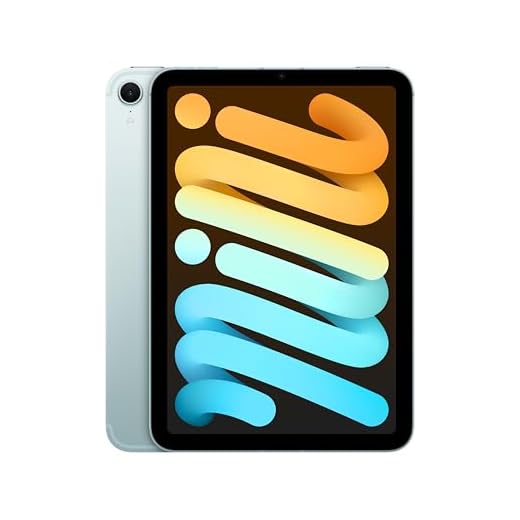


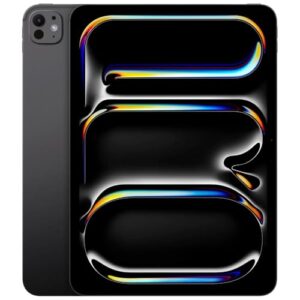
iPad Pro 11-inch (M5) — Pro-Level Machine
You’ll gain desktop-class performance, an Ultra Retina XDR display, and advanced AI/ML capabilities that accelerate creative and productivity tasks. This tablet excels when you need serious power in a portable form factor and plan to use pro apps regularly.
Pros
- M5 chip with neural accelerators for AI-driven tasks
- Ultra Retina XDR display with superb brightness and contrast
- Excellent multitasking and accessory ecosystem (Pencil, keyboards)
Cons
- High price relative to non-Pro models
- Accessories required to unlock full productivity potential
The 11-inch iPad Pro with the M5 chip is built for professionals who demand top-tier performance and a best-in-class display. You’ll notice dramatic improvements in rendering, realtime effects, and AI-assisted workflows thanks to dedicated neural accelerators. The Ultra Retina XDR screen is optimized for HDR content and color-critical work, making it suitable for photo and video professionals who need accurate results on the go.
Why it stands out
- Apple M5 silicon for maximum CPU/GPU throughput and on-device AI
- Ultra Retina XDR display designed for HDR grading and vivid media playback
- LiDAR, advanced cameras, and a refined accessory ecosystem for laptop-like productivity
Expect a premium experience: it excels with pro apps, multitasking, and creative workflows. If you plan to replace a laptop for editing, design, or professional presentations, this model gives you the headroom you’ll need. The trade-off is cost—both for the tablet and the accessories that convert it into a full workstation.
Practical considerations
- Pairing with the Apple Pencil and a keyboard case turns the device into a versatile mobile studio.
- For casual users the power is overkill; this is aimed at creators, developers, and professionals.
If your work demands the fastest tablet available and you value display quality, this model delivers industry-leading capability in a compact package.
Samsung Galaxy Tab S11 Ultra — Ultimate Large Tablet
You’ll get an enormous Dynamic AMOLED display, excellent S Pen support, and a powerhouse chipset that blurs the line between tablet and laptop. This is ideal if you want the largest, most capable Android tablet for drawing, editing, and multitasking.
Pros
- 14.6" Dynamic AMOLED 2X display with high resolution
- Large battery (11600 mAh) and strong multitasking performance
- S Pen with advanced drawing and note features; robust AI tools
Cons
- Very large and less pocketable than smaller tablets
- Higher price and Wi‑Fi–only variants limit mobile connectivity
The Galaxy Tab S11 Ultra is designed for users who want the maximum tablet experience Samsung can offer. You’ll immediately notice the massive, bright Dynamic AMOLED 2X display that’s perfect for video editing, illustration, and immersive media consumption. The bundled ecosystem, including a refined S Pen and Galaxy AI features (Note Assist, Drawing Assist), makes it a compelling choice for creators and power users.
What makes it special
- 14.6" WQXGA+ display with 120Hz refresh for smooth interactions and detailed visuals
- Large 11,600 mAh battery for extended sessions of work or entertainment
- Powerful chipset for seamless multitasking and demanding apps
Because of its size and capabilities, the tablet functions well as a laptop replacement for many users when paired with a keyboard. The large battery and high-performance internals lend themselves to long editing sessions, complex multitasking, and professional sketching. Note that many S11 Ultra models are Wi‑Fi only in certain markets, so check connectivity options if you need cellular data.
Practical tips
- Use split-screen and DeX-like workflows to replicate a desktop environment when needed.
- Carry a protective case—the large screen benefits from extra protection during travel.
If you want the biggest, most capable Android tablet for creative work, the S11 Ultra is hard to beat.
iPad Air 11-inch (M3) — Lightweight Powerhouse
You’ll get near-pro performance in a lighter, more portable package that suits creatives and professionals on the go. The M3 chip and Liquid Retina display make demanding apps and multitasking feel very responsive for most workflows.
Pros
- M3 chip delivers strong performance for creative apps
- Lightweight 11-inch form factor for portability
- Wi‑Fi 6E and modern I/O including USB‑C
Cons
- Accessories add significant extra cost
- Not as long a battery life as larger iPad Pro models under heavy load
The 11-inch iPad Air with the M3 chip is designed for users who need serious performance without the bulk of a Pro model. You’ll notice faster photo/video edits, smoother multitasking, and better future-proofing thanks to Apple Intelligence features. The compact size makes it ideal for commuters, students, or anyone who wants a powerful device that’s easy to carry.
Standout capabilities
- Apple M3 silicon for accelerated CPU/GPU tasks, on-device ML, and efficient performance
- Liquid Retina display that reproduces color accurately for creative work and media
- Touch ID, advanced cameras, and USB-C for modern connectivity
The Air is a strong mid-point: it handles professional apps for many creators, but if your workflow involves heavy 3D rendering or the highest-end video work, a top-tier Pro may still be preferable. Battery life is solid for a day of mixed use, but intense workloads will reduce runtime more quickly than lighter tasks.
Practical advice
- If you want near-Pro power in a portable chassis, this is an excellent choice.
- Budget for a keyboard or Apple Pencil if you plan to replace a laptop or do serious note-taking.
In short, the iPad Air offers a compelling combination of power and portability for a wide range of users.
iPad mini (A17 Pro) — Ultraportable Power
You’ll have a pocketable device that still packs serious power for browsing, reading, light gaming, and note-taking. The A17 Pro chip and compact liquid retina display make it a top choice if portability is your priority without sacrificing performance.
Pros
- Extremely portable 8.3" form factor
- A17 Pro chip delivers impressive speed for a mini
- Great for reading, commuting, and one-handed use
Cons
- Smaller screen limits productivity for heavy multitasking
- Accessories like cases and Pencil add expense
The iPad mini with the A17 Pro is for you if portability is essential. You’ll get a device that’s easy to hold, slips into a small bag or large pocket, and still runs demanding apps smoothly. The compact Liquid Retina display is remarkably sharp for its size, and the improved chip means gaming and app performance punch well above what the size implies.
Key strengths
- 8.3" Liquid Retina display that’s easy to view and excellent for reading or short-form video
- A17 Pro performance in an ultraportable package
- Optional cellular and strong battery life for on-the-go reliability
Because it’s small, the mini is an ideal second device for travel, reading, or quick note-taking with an Apple Pencil. It won’t replace a larger iPad for heavy multitasking or detailed design work, but if your priority is one-handed comfort and convenience, it’s a standout.
Use-case suggestions
- Keep it as your daily reading companion or portable media player.
- Use it as a dedicated device for travel with offline content loaded and a compact case.
The mini strikes a rare balance: nearly every modern app runs smoothly while remaining genuinely pocketable.
iPad 11-inch (A16) — Balanced Performer
You get a smooth, responsive experience for browsing, media, schoolwork, and light creative tasks. Battery life and performance are well balanced for most users who want Apple reliability without the Pro price tag.
Pros
- Very fast A16 performance for everyday tasks
- High-quality Liquid Retina display and stereo sound
- All-day battery life and solid camera set
Cons
- Not as powerful as M-series iPads for heavy pro workflows
- Accessories (Pencil/keyboard) sold separately
The 11-inch iPad with the A16 chip is aimed at users who want fast, dependable performance without stepping up to the Pro line. You’ll appreciate the snappy app launches, smooth multitasking, and a display that makes streaming and reading comfortable for long sessions. The design is familiar and portable, making it easy to slip into a bag for work or school.
What you’ll notice first
- A16 chip that handles multitasking, streaming, and most games with minimal lag
- 11-inch Liquid Retina display that’s bright and color-accurate for videos and reading
- Touch ID, USB-C, and a full set of cameras for video calls and casual photos
The second paragraph gives practical benefits and limits. If you do photo or video editing occasionally, you’ll find the device capable, but you’ll hit its ceiling on sustained pro workloads (large video renders, heavy desktop-class apps). Storage and accessory costs can add up, so consider whether you need the extra capacity or a keyboard/Pencil for your workflow.
Tips and real-world use
- If you mainly stream, browse, sketch casually, or handle schoolwork, this tablet is an efficient daily driver.
- For heavy creative professionals or those who need the absolute fastest performance, an M-series iPad may be a better long-term choice.
Overall, this model is a practical pick if you want a modern iPad experience at a mid-range price: fast, reliable, and comfortable for most everyday uses.
Samsung Galaxy Tab S10 FE+ — Large-Screen All-Rounder
You’ll enjoy a roomy 13.1-inch display, included S Pen compatibility, and strong everyday performance that suit both productivity and media consumption. It’s a great compromise if you want more screen real estate without paying flagship S-series prices.
Pros
- Large 13.1" high-resolution display ideal for multitasking
- S Pen support expands creative and note-taking use
- Good performance for media, gaming, and productivity
Cons
- May be bulky for one-handed use
- Not quite as fast as flagship Samsung Tab S models
The Galaxy Tab S10 FE+ gives you a large canvas for entertainment and productivity without pushing into flagship pricing. You’ll get a vibrant 13.1-inch display that’s excellent for split-screen multitasking, watching movies, and sketching with the S Pen. The included book-cover keyboard option adds laptop-like utility for typing and longer sessions of work.
Highlights for everyday use
- 13.1" 2560 x 1600 display for crisp text and detailed visuals
- S Pen compatibility for drawing, annotations, and fast note-taking
- Decent performance and battery life for sustained multimedia use
For creators and students who value screen space, this tablet is very practical: you can draft documents while referencing research side-by-side or sketch concepts with comfortable pen input. It’s lighter on cost than flagship alternatives but still provides a polished Samsung experience, including good integration with other Galaxy devices.
Who benefits most
- Users who prefer a tablet that can double as a lightweight laptop with a keyboard.
- Anyone who wants expansive screen real estate for reading, drawing, or multitasking.
If you want top-tier raw performance or the absolute thinnest design, consider flagship options; otherwise this strikes a strong balance between features and price.
Amazon Fire HD 10 — Budget Media Tablet
You’ll get a bright Full HD screen and competent performance for video, reading, and light gaming at a very wallet-friendly price. It’s ideal when you want a dedicated media device without premium costs, though the app ecosystem is more limited than mainstream Android/iPadOS.
Pros
- 10.1" 1080p display for crisp video playback
- Good battery life and solid day-to-day responsiveness
- Affordable price for families and casual users
Cons
- Amazon app ecosystem is more restrictive than Google/Apple
- Ads and lockscreen promotions unless you pay to remove them
This Fire HD 10 targets anyone who primarily consumes media and wants a large, affordable tablet. You’ll appreciate the 1080p panel’s clarity for movies and TV shows, and the octa-core processor with 3 GB RAM keeps streaming and light multitasking smooth. The Fire OS experience is tightly integrated with Amazon services, so it’s especially convenient if you’re invested in that ecosystem.
Key features at a glance
- 10.1" Full HD (1920 x 1200) display with aluminosilicate glass
- Octa-core processor, 3 GB RAM, and expandable storage via microSD on supported models
- Long battery life tuned for extended streaming sessions
Because the platform prioritizes Amazon services, you’ll find a curated selection of apps and easy access to Prime Video, Audible, and Kindle. Keep in mind the tablet may show lockscreen ads by default, and sideloading some apps requires extra steps. If you accept those trade-offs, the Fire HD 10 is a strong budget pick for watching, reading, and casual play.
Who should buy this
- You want an inexpensive, large-screen device mainly for media and light web use.
- You prefer the convenience of Amazon services and Prime content integration.
If you need more advanced apps or a fully open Android experience, consider alternatives; otherwise this tablet delivers a lot for the price.
Amazon Fire HD 8 — Compact Budget Tablet
You’ll find it suitable for light reading, streaming, and simple apps at a very low price point. Performance and software limitations mean it’s best as a secondary or child’s device rather than a primary productivity tablet.
Pros
- Very affordable and lightweight for kids or secondary use
- Decent 8" HD screen for reading and casual videos
- Good battery life for everyday light use
Cons
- Performance can feel sluggish under heavier apps
- Lockscreen ads and a limited app store experience
The Fire HD 8 is targeted at users who need a compact, ultra-affordable tablet for basic media and light app use. You’ll appreciate the portability and low cost if you want a device for kids, a kitchen tablet for recipes, or a travel media player. The hardware is modest—fine for streaming, reading, and simple games—but you will notice limitations if you push it with demanding apps.
What to expect
- 8" HD (1280 x 800) display suitable for books, videos, and casual browsing
- 3 GB RAM and 32 GB storage (expandable on many models) for day-to-day use
- Long battery life geared toward continuous media playback
Expect a solid experience for straightforward tasks, but be prepared for occasional slowdowns and the curated Fire OS environment. The default setup may include lockscreen promotions unless you opt out, and some popular apps may require sideloading or aren’t available in the Amazon Appstore.
Practical recommendations
- Buy this as a low-cost device for kids, travel, or a dedicated media player.
- If you need a primary tablet for work or heavy apps, consider spending more for a faster platform.
Overall, it’s hard to beat the price if your needs are basic and you’re comfortable within Amazon’s ecosystem.
Final Thoughts on the Best Tablets
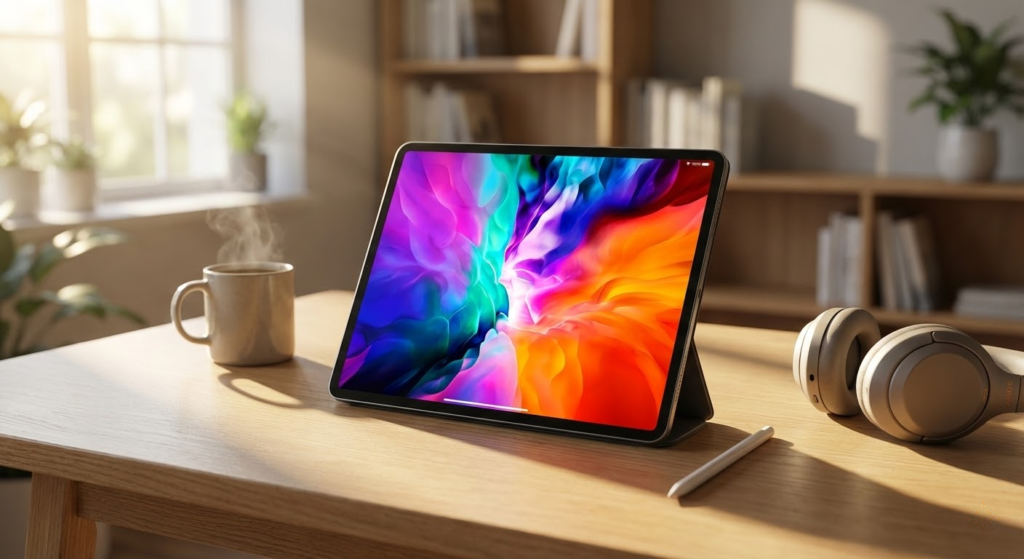
If you need PRO-level performance for video editing, complex photo work, or zippy multitasking, pick the iPad Pro 11-inch (M5). You9ll get desktop-class speed, an Ultra Retina XDR display, and robust AI/ML features that accelerate creative apps. Ideal if you use pro software, pair with the Apple Pencil and keyboard, and want the smoothest iPadOS experience.
If your priority is a huge canvas and the most capable Android experience, choose the Samsung Galaxy Tab S11 Ultra. Its enormous Dynamic AMOLED screen, top-tier chipset, and best-in-class S Pen support make it perfect for illustrators, heavy multitaskers, and anyone who wants a laptop-replacing Android tablet.
How to Choose the Best Tablets for Your Needs
Tablets are incredibly versatile devices, sitting perfectly between smartphones and laptops. Whether you want one for entertainment, studying, work, or creativity, choosing among the best tablets requires looking at more than just screen size. Performance, operating system, display quality, battery life, and accessories all play a big role in making the right choice.
Below are the main factors you should consider before buying a tablet.
Choose the Right Operating System for Your Usage
The operating system directly impacts how you interact with a tablet, the apps you can install, and how productive or flexible the device will be.
Some systems focus on simplicity and smooth performance, making them ideal for media consumption and casual use. Others offer deeper customization, multitasking features, and compatibility with a wider range of apps. There are also operating systems designed to integrate closely with laptops and desktops, which is helpful if you already use devices from the same ecosystem.
When comparing the best tablets, think about whether you prioritize ease of use, customization, productivity tools, or app variety.
Performance Matters: Processor and RAM Make the Difference
A tablet’s processor determines how fast it handles tasks like browsing, streaming, gaming, or running productivity apps. Entry-level processors are suitable for reading, watching videos, and light app use. More powerful processors are essential for multitasking, creative work, and demanding applications.
RAM is just as important. Tablets with lower RAM may struggle when multiple apps are open, while models with higher RAM offer smoother transitions and better multitasking. For basic use, moderate RAM is sufficient, but for work or advanced tasks, higher RAM is strongly recommended.
Storage Capacity: Avoid Running Out of Space
Storage affects how many apps, photos, videos, and files you can keep on your tablet. Some models come with fixed internal storage, while others allow expansion via memory cards.
If you mainly use streaming services and cloud storage, smaller capacities may be enough. However, if you download large apps, movies, or work files, choosing a tablet with more internal storage—or expandable storage—will save you headaches later. Storage size is a key factor when evaluating the best tablets for long-term use.
Display Size, Resolution, and Technology
The screen is one of the most important features of a tablet. Larger displays are great for watching movies, drawing, or multitasking, while smaller screens are more portable and easier to hold for long periods.
Resolution also plays a big role in visual quality. Higher resolutions provide sharper text and more detailed images, which is especially important for reading, editing photos, or watching high-definition content.
Display technology matters too. Some screens focus on consistent colors and viewing angles, while others deliver deeper contrast, richer blacks, and more vibrant colors. If visual quality is a priority, this feature should not be overlooked.
Battery Life for All-Day Use
Battery life determines how long you can use your tablet without constantly reaching for a charger. Tablets with larger batteries generally last longer, but efficiency also depends on the processor and screen technology.
If you plan to use your tablet for travel, work, or school, look for models known for lasting a full day of mixed use. For lighter usage, battery demands are less critical, but longer autonomy is always a plus when comparing the best tablets.
Cameras and Audio: Often Overlooked but Important
While tablets are not primarily known for photography, cameras still matter for video calls, online classes, and document scanning. Front-facing camera quality is especially important for meetings and remote learning.
Audio quality is another factor to consider. Tablets with well-tuned speakers offer a much better experience for watching videos, gaming, and video calls, reducing the need for headphones or external speakers.
Accessories: Keyboards, Pens, and More
Many of the best tablets support accessories that significantly expand their functionality. Keyboards can turn a tablet into a productivity tool, while stylus pens are essential for note-taking, drawing, and design work.
If you plan to use your tablet for work or creativity, check accessory compatibility before buying. Not all tablets support the same add-ons, and some accessories work better than others depending on the model.
Connectivity Options and Extra Features
Finally, consider connectivity features such as Wi-Fi standards, Bluetooth versions, and optional mobile data support. Tablets with cellular connectivity allow internet access anywhere, which is ideal for users who are always on the move.
Other features like biometric security, multitasking modes, and software updates can also influence your decision. Paying attention to these details will help you choose one of the best tablets that fits your lifestyle and daily needs perfectly.
Check Out the Best Tablets
Still not sure which one to choose? Click the link below to see the best-selling products.
Also Check Out Other Helpful Articles
Take a look at more useful articles that can help you make more informed decisions.
- Best Cost-Benefit Tablets in 2026 (Top 10: Xiaomi, Samsung and More)
- Best Tablets for Reading in 2026 (Top 6: Kindle, iPad and More)
- Best Tablets for Heavy Gaming in 2026 (Top 7: iPad Pro, ASUS ROG Flow and More)
Video About the Best Tablets
We created a video on the topic. Just click to watch.
Related Articles



About the Author

Sara Taylor has always loved storytelling. With a natural curiosity, she brings fresh perspectives to every article she works on.