Best Tablets With 8GB RAM in 2026 (Top 6: Lenovo, Samsung and More)

Looking for high performance? Check out our selection of the best tablets with 8gb ram to boost your productivity and gaming experience. See the full list!
Stop juggling apps. You shouldn’t have to close tabs to take notes or watch a show.
Pick a tablet with 8GB RAM and you get smoother multitasking, better creative apps, and fewer annoying pauses. Short on time? These picks make your day flow.
Contents
- The Best Tablets With 8GB RAM
- Lenovo Idea Tab Pro 12.7-inch Student Tablet
- Samsung Galaxy Tab S10 Lite 10.9-inch Tablet
- Lenovo Tab Plus 11.5-inch Entertainment Tablet
- Samsung Galaxy Tab A9+ 11-inch Family Tablet
- Samsung Galaxy Tab A11+ 11-inch Performance Tablet
- CHUWI Hi10 X2 10.1-inch Windows Tablet
- Final Thoughts on the Best Tablets With 8GB RAM
- How to Choose the Best Tablets with 8GB RAM
- Check Out the Best Tablets With 8GB RAM
- Also Check Out Other Helpful Articles
- Video About the Best Tablets With 8GB RAM
The Best Tablets With 8GB RAM
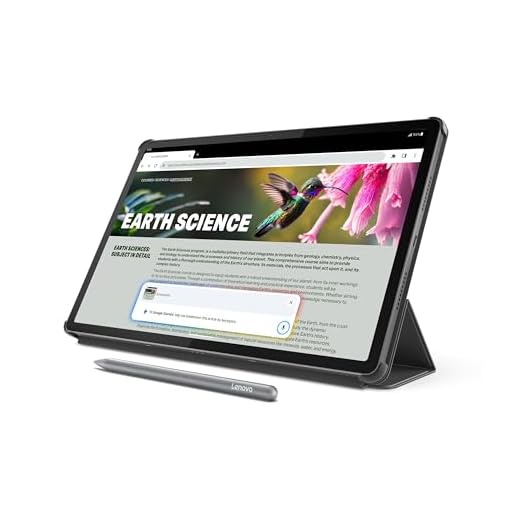


Lenovo Idea Tab Pro 12.7-inch Student Tablet
You’ll find a large, high-resolution 12.7" display and a capable Dimensity 8300 chipset that handle multitasking, note-taking, and media editing with ease. Included pen and AI features like Google Gemini make it especially useful for study, research, and creative projects.
Pros
- Large 12.7" 3K display with low blue light hardware
- Includes Lenovo Tab Pen Plus and folio case
- Google Gemini and useful AI tools for study workflows
Cons
- Some chargers may require Lenovo-specific adapters for fastest charging
- Folio case can add bulk for travel
Who benefits most from this tablet
Students, content creators on a budget, and anyone who values pen input will get the most from this device. The big display and bundled accessories mean you can replace a basic laptop for note-taking and coursework without buying extras.
Key features that stand out
- 12.7" 3K LCD with Low Blue Light hardware helps reduce eye strain during long study sessions.
- MediaTek Dimensity 8300 with 8GB RAM supports demanding apps, split-screen multitasking, and long streaming sessions.
- Bundled Tab Pen Plus and folio case add immediate utility for note-taking and protection.
Practical considerations and trade-offs
You’ll enjoy long battery life for lectures and study blocks, and the AI features accelerate research, summarization, and creative prompts. Be mindful that very fast charging may require a Lenovo 65W charger to hit top speeds, and the folio case, while protective, increases carry weight.
Example workflows
Use the pen to annotate PDFs during class, have Google Gemini help draft outlines or study notes, and rely on the large display for split-screen reference and writing. For students who juggle reading, note-taking, and occasional creative work, this tablet streamlines daily tasks without a premium price tag.
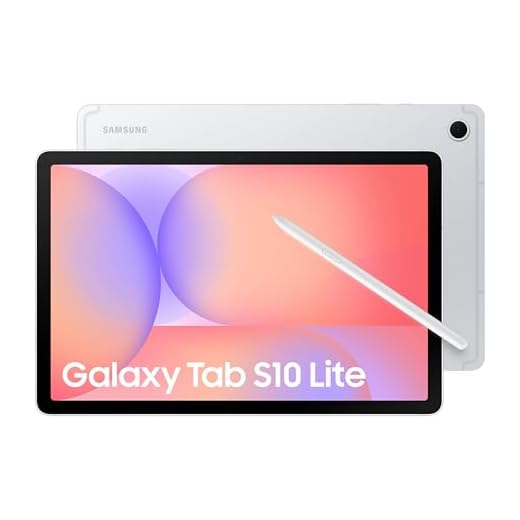
Samsung Galaxy Tab S10 Lite 10.9-inch Tablet
This tablet pairs a comfortable 10.9" display with S Pen support and a capable Exynos chipset, making it strong for note-taking, document work, and light creative tasks. Battery life and software features like Circle to Search enhance everyday productivity and convenience.
Pros
- S Pen support for precise note-taking and drawing
- Good balance of performance and battery life
- High-resolution display with Vision Booster for varied lighting
Cons
- Not as powerful as flagship S-series in raw GPU performance
- Some users may miss AMOLED-level contrast
Intended use and audience
You should pick this tablet if you want a productive companion for meetings, classes, or creative notes without carrying a full laptop. The S Pen makes handwriting and quick annotations feel natural, and the software adds practical productivity shortcuts.
Important features at a glance
- 10.9" LCD with 2112×1320 resolution provides crisp text and good color for documents and media.
- Exynos 1380 and 8GB RAM are well-matched to multitasking, browser-based work, and light editing.
- Included S Pen and AI tools (Circle to Search, note workflows) improve how you capture and process information.
Strengths and limitations
You’ll like the tactile S Pen experience and the tablet’s longevity on a single charge. If you rely on heavy-duty video editing or the fastest GPUs for gaming, you’ll find the S10 Lite less suitable than higher-end S-series models. The LCD panel delivers bright, reliable color but not the deep blacks of AMOLED.
Practical tips for users
Use the tablet as a lightweight laptop replacement with a compact keyboard for travel, or as a second screen for quick tasks. The S Pen makes it ideal for students and professionals who annotate PDFs or sketch ideas on the fly.
Lenovo Tab Plus 11.5-inch Entertainment Tablet
This tablet leans hard into audiovisual performance: an 11.5" 2K display paired with eight JBL speakers and Dolby Atmos creates a genuinely immersive experience. It’s a great pick if you prioritize watching shows, listening to music, or using the fold-out kickstand for hands-free viewing.
Pros
- Outstanding speaker system (8 JBL speakers) with Dolby Atmos
- Sharp 2K 90Hz display for smooth playback and scrolling
- Included folio case and 45W charger add tangible value
Cons
- Some preinstalled bloatware you may want to remove
- Display brightness is good but not class-leading outdoors
Who should consider this tablet
You should consider this if you want a mid-priced Android tablet that focuses on media consumption. It’s designed to be a portable entertainment hub for streaming, gaming at mid settings, and group listening sessions.
What you get and why it matters
- 11.5" 2K IPS display with 90Hz refresh makes video playback and UI interactions feel fluid.
- Eight JBL speakers tuned with Dolby Atmos deliver wide, room-filling sound that outperforms most tablets in this price bracket.
- MediaTek Helio G99 with 8GB RAM balances power and efficiency for apps, streaming, and casual games.
Benefits, trade-offs, and practical tips
You’ll enjoy loud, high-quality audio and smooth video playback without spending flagship money. The included folio case and charger are thoughtful extras; however, Lenovo’s preinstalled apps can be inconvenient until you remove or disable them. If you watch content frequently in bright sunlight, consider a secondary device or shade—the noon-day brightness is solid but not best-in-class.
Real-world usage example
Use the tablet in Bluetooth speaker mode to stream a movie while cooking, switch to the 175° kickstand for bedside viewing, or pair it with a controller for extended gaming sessions. For many people this feels like a premium media experience without the premium price.
Samsung Galaxy Tab A9+ 11-inch Family Tablet
You get a roomy 11" display and a smooth UI experience that works well for kids, reading, and streaming. The tablet balances price and capability, making it a strong choice for family-shared devices or students who need a dependable Android tablet.
Pros
- Large 11" 1920×1200 screen with up to 90Hz refresh
- Good battery life and expandable storage via microSD
- Solid daily performance for media, schooling, and apps
Cons
- Lower-tier display tech compared with premium panels
- Widevine DRM level may limit some high-res streaming
Who this is for
If you need a dependable family tablet with a big display for videos, e-books, and light productivity, this model fits the bill. It’s especially useful if you want a device that’s easy for kids to use and durable enough for daily handling.
Core features explained
- 11" 1920×1200 display and a 90Hz refresh make scrolling and media playback feel snappy.
- Options for 8GB RAM and 128GB storage (plus microSD expansion) give you breathing room for apps and offline media.
- Quad speakers provide a more immersive soundstage than single-speaker tablets.
Strengths, caveats, and tips
You’ll appreciate the balance of screen size, performance, and price—perfect for digital textbooks or streaming. For serious creators or those needing pro-level color accuracy, this won’t replace a professional display. If you plan to stream subscription content in maximum resolution, verify DRM support and streaming app compatibility before buying.
Practical usage idea
Set this up as a shared household device: one user profile for kids with parental controls and another for adults with media and productivity apps. It’s an especially good bedside or living-room tablet where screen size and battery life matter more than ultra-high-end specs.
Samsung Galaxy Tab A11+ 11-inch Performance Tablet
This model is a practical, well-rounded choice when you want reliable performance, expandable storage, and solid speakers in an affordable package. It’s tuned toward everyday use: streaming, light gaming, and family tasks rather than high-end content creation.
Pros
- Expandable storage and headphone jack remain available
- Good general performance with 8GB RAM for multitasking
- Long battery life and Dolby Atmos speakers
Cons
- Software includes non-removable bloatware on some builds
- Display quality is competent but not flagship-level
Who should pick this tablet
You should choose this tablet if you want a no-nonsense, family-ready device that covers the basics well: streaming, browsing, social apps, and occasional gaming. It’s a sensible upgrade path if flagship tablets are outside your budget but you still want modern features.
What it offers and why it matters
- 11" 1920×1200 display and Dolby Atmos speakers create pleasant viewing and listening experiences for shared media time.
- 8GB RAM paired with expandable storage gives you room for apps and offline content without frequent storage juggling.
- Physical conveniences like a headphone jack and microSD slot are rare in some modern tablets and keep your options open.
Strengths and weaknesses in practice
You’ll appreciate the combination of practical features and a lightweight chassis, especially for travel or family use. That said, the tablet can feel software-cluttered due to preinstalled Samsung/Google apps that you may only be able to disable rather than remove. Power users wanting the absolute best display or top-tier GPU performance will want to look higher up the range.
Usage suggestions
Install a few essential apps, set up kid profiles if needed, and use the microSD slot for offline media before a trip. If you value a distraction-free interface, spend a little time disabling unused apps and tweaking settings to match your routine.
CHUWI Hi10 X2 10.1-inch Windows Tablet
You get a surprisingly capable Windows experience for the price, with an Intel Core i3 and 8GB of RAM that handle common productivity tasks and web work smoothly. Battery life and display quality are adequate for everyday use, though you shouldn’t expect flagship-level brightness or gaming performance.
Pros
- True Intel Core i3 performance for light multitasking
- Good value for Windows on a small form factor
- Included case and useful port selection (USB 3.2, HDMI, Type-C)
Cons
- Screen resolution and brightness are modest (1280×800)
- Battery life and display uniformity can be inconsistent
Where this tablet fits
You’re looking at a budget-focused Windows tablet that prioritizes real desktop compatibility over tablet-grade silicon. If your workflow is web browsing, Office apps, light photo editing, or running occasional legacy Windows software, this device delivers more usable performance than typical Atom/N-series tablets.
Key features and what they mean for you
- Intel Core i3 (up to 3.9GHz) and 8GB RAM provide snappy app switching and acceptable responsiveness when you multitask.
- 256GB SSD gives you roomy local storage for documents and media without relying on external drives.
- Useful ports (Micro HDMI, USB 3.2, Type-C) let you connect external displays, drives, and peripherals for a laptop-like setup.
Practical benefits and limitations
You’ll appreciate being able to drive a 4K display for presentations or a second monitor for productivity, and the aluminum-like chassis feels more premium than the price suggests. That said, the 1280×800 display limits sharpness for intensive reading or photo work, and you’ll notice backlight or brightness inconsistencies in some units.
Real-world insight
If you need a lightweight Windows device to run full desktop apps on the go without spending flagship money, this is a sensible pick. Expect roughly a half-day of mixed use and solid compatibility with Linux and Windows tools if you ever want to dual-boot or test alternative OS setups.
Final Thoughts on the Best Tablets With 8GB RAM
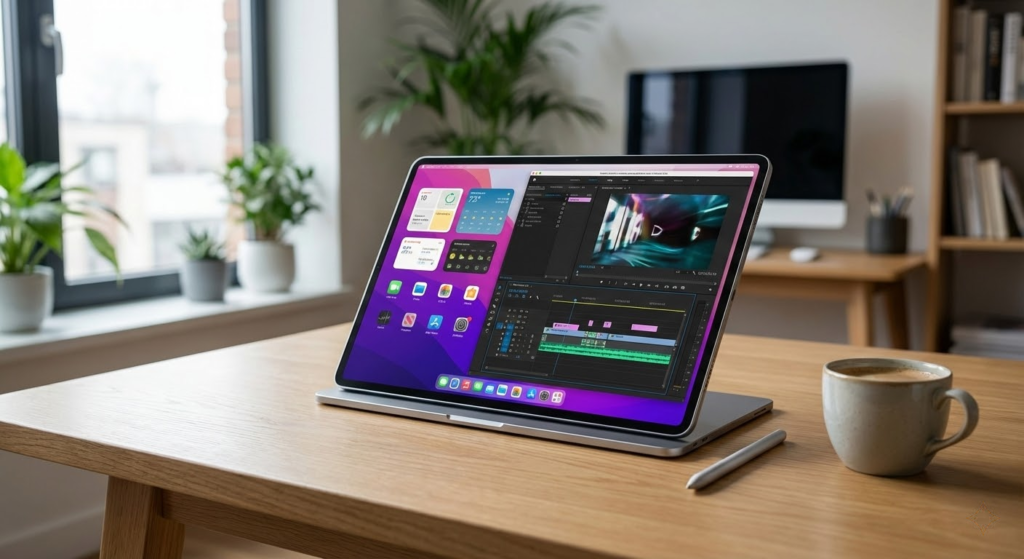
Top pick: Lenovo Idea Tab Pro 12.7-inch — Best for students, creators, and power multitaskers. With a large 12.7" display, a capable Dimensity 8300 chipset, included pen, and AI features like Google Gemini, it handles note-taking, editing, and research without breaking a sweat. Choose this if you want a single tablet to do heavy study sessions, creative work, and media editing.
Runner-up: Samsung Galaxy Tab S10 Lite 10.9-inch — Best for everyday productivity and note-taking. Its comfortable 10.9" size, S Pen support, and thoughtful software tools (like Circle to Search) make it ideal if you prioritize handwriting, document work, and long battery-backed study or commuting sessions.
How to Choose the Best Tablets with 8GB RAM
If you want smooth performance, fast multitasking, and a device that won’t feel outdated anytime soon, choosing one of the best tablets with 8GB RAM is a smart move. This amount of memory is ideal for productivity, entertainment, and even more demanding tasks. Below, you’ll find the key factors to consider before buying.
Best Laptops that Runs Genshin Impact
Why 8GB of RAM Makes a Real Difference in Tablets
RAM directly affects how responsive a tablet feels. With 8GB of RAM, you can switch between apps effortlessly, keep multiple browser tabs open, and use heavier applications without constant reloads.
Tablets with this memory capacity are especially useful for users who work remotely, study online, edit photos or videos, or simply want a lag-free experience for years to come. Compared to models with 4GB or 6GB, 8GB offers noticeably better longevity and performance stability.
Choose the Right Operating System for Your Usage
The operating system shapes how you interact with your tablet and what apps you can use. The main options available today are iPadOS, Android, and Windows-based systems.
Each platform has its own strengths. Some focus on simplicity and app optimization, while others prioritize flexibility, customization, or desktop-like productivity. When comparing the best tablets with 8GB RAM, think about the apps you rely on most and how you plan to use the device daily.
Processor Performance Still Matters — Even with 8GB RAM
While RAM is crucial, it works best when paired with a capable processor. A strong chipset ensures faster app launches, smoother animations, and better handling of demanding tasks like gaming or creative work.
For basic activities such as streaming and browsing, mid-range processors are sufficient. However, if you plan to edit videos, use design apps, or play graphics-intensive games, a more powerful processor will make a noticeable difference in overall performance.
Storage Capacity: Don’t Overlook Internal Space
Even with plenty of RAM, limited storage can quickly become a problem. Apps, system updates, documents, and media files add up fast.
Many of the best tablets with 8GB RAM come with internal storage options starting at 128GB, which is a good baseline for most users. If you work with large files or download a lot of content, consider higher storage capacities or models that support expandable storage.
Display Quality Is Key for Comfort and Productivity
The screen is one of the most important aspects of a tablet. A high-quality display improves everything from reading and streaming to drawing and multitasking.
Look at screen size based on how you plan to use the tablet. Larger displays are great for productivity and media consumption, while smaller ones are more portable. Resolution also matters—Full HD or higher ensures sharper text and images. Display technologies like AMOLED or high-quality IPS panels offer better color accuracy and viewing angles.
Battery Life Should Match Your Daily Routine
A powerful tablet isn’t very useful if it constantly needs charging. Battery capacity, combined with software optimization, determines how long the device can last away from an outlet.
If you use your tablet throughout the day for work, classes, or entertainment, aim for models that offer all-day battery life under mixed usage. Fast charging support is also a valuable bonus, especially for busy routines.
Connectivity and Accessories Can Expand Functionality
Modern tablets often go beyond basic usage when paired with the right features. Support for keyboards, stylus pens, and external displays can transform a tablet into a productivity tool.
Connectivity options such as Wi-Fi standards, Bluetooth versions, and optional cellular support are also worth checking. These features can significantly enhance the experience, especially for users who work on the go.
Build Quality and Software Updates Matter Long-Term
Finally, consider the overall build quality and software support. A well-built tablet feels better in daily use and tends to last longer. Regular software updates improve security, performance, and compatibility with new apps.
When you combine solid construction, long-term updates, and strong hardware, you’re more likely to end up with one of the best tablets with 8GB RAM that will serve you reliably for years.
By balancing performance, display quality, battery life, and usability, you can confidently choose a tablet that meets both your current needs and future expectations.
Check Out the Best Tablets With 8GB RAM
Still not sure which one to choose? Click the link below to see the best-selling products.
Also Check Out Other Helpful Articles
Take a look at more useful articles that can help you make more informed decisions.
- Best Tablets With 8GB RAM in 2026 (Top 6: Lenovo, Samsung and More)
- Best Tablets With 4GB RAM in 2026 (Top 6: iPad mini, Lenovo Tab and More)
- Best Tablets With 6GB RAM in 2026 (Top 6: Galaxy Tab, iPad Pro and More)
Video About the Best Tablets With 8GB RAM
We created a video on the topic. Just click to watch.
Related Articles

About the Author

Sara Taylor has always loved storytelling. With a natural curiosity, she brings fresh perspectives to every article she works on.