Best Touch Pens in 2026 (Top 10: Magnetic, Fast-Charge and More)

Looking for precision and comfort on your screen? Discover the best touch pens designed for drawing, note-taking, and navigating your favorite devices seamlessly.
You can ditch poking the screen with your finger—your tablet deserves a real pen. Precise notes, neater handwriting, and smoother sketches all start with the right stylus. NO LAG matters.
Shopping for a stylus can feel like a maze. Some are tiny tweaks, others behave almost like an Apple Pencil. This quick roundup points you to the best picks fast, without the fluff.
Contents
- The Best Touch Pens
- Made-for-Amazon Stylus for Fire Tablets
- 3X Fast Charge iPad Pencil — Wide Compatibility
- Fast-Charge iPad Stylus — Broad Compatibility
- Magnetic Fast-Charge iPad Pencil — Precise
- Fast-Charge iPad Pencil with Tilt and Palm Rejection
- Tilt-Sensitive Fast-Charge iPad Stylus
- 5-Pack Precision 2‑in‑1 Touchscreen Styluses
- MEKO 3‑in‑1 Universal Touchscreen Stylus Set
- 2‑in‑1 Universal Stylus Trio — Colorful Set
- Budget 3-Pack High-Sensitivity Touch Styluses
- Final Thoughts on the Best Touch Pens
- How to Choose the Best Touch Pens for Your Needs
- Check Out the Best Touch Pens
- Also Check Out Other Helpful Articles
- Video About the Best Touch Pens
The Best Touch Pens


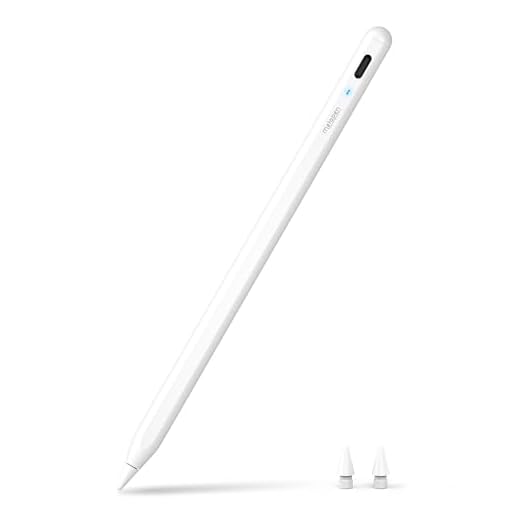


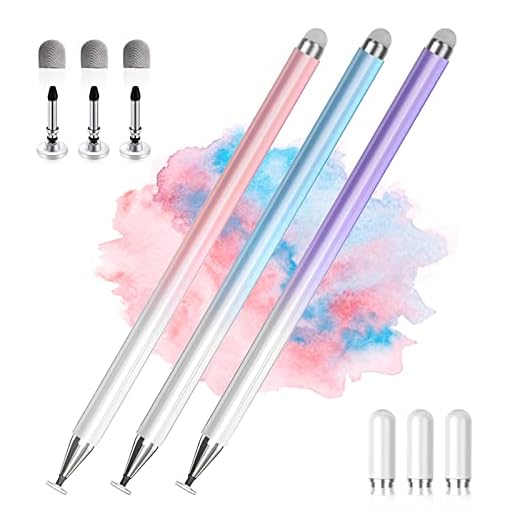

Made-for-Amazon Stylus for Fire Tablets
Designed specifically for Fire Max and Fire HD tablets, it gives accurate, lag-free input and works without pairing. It’s the most reliable third-party option if you primarily use an Amazon tablet for note-taking and casual sketching.
Pros
- Made-for-Amazon compatibility ensures consistent performance
- No pairing — quick setup with standard battery
- Good writing feel and low latency
- Lightweight and comfortable for long sessions
Cons
- Relies on replaceable battery rather than rechargeable solution
- Limited advanced pressure sensitivity for professional artists
Overview
This stylus is tailored to work with Amazon Fire Max 11 (2023) and Fire HD 10 (13th Gen) tablets. If you use a Fire tablet as your primary device, this accessory is designed to integrate smoothly with the device ecosystem and common note/drawing apps.
Key features and benefits
You’ll notice immediate responsiveness and a pen-like feel that improves on finger input. Notable points include:
- No Bluetooth pairing — insert the battery and start using it
- Smooth strokes for handwriting, PDF markup, and casual drawing
- Comfortable ergonomics for extended note-taking sessions
Real-world use and limitations
When paired with full app ecosystems (especially after sideloading Google apps as some users do), the stylus becomes a capable productivity tool for students and professionals alike. However, because it uses a replaceable battery, you won’t get the convenience of USB charging and you may need spares on-hand. Advanced digital-artist features remain limited compared with high-end active styluses.
Recommendation
Choose this stylus if you own a compatible Fire tablet and want a straightforward, reliable pen for annotating, journaling, and light drawing without dealing with compatibility headaches.
3X Fast Charge iPad Pencil — Wide Compatibility
Delivers a credible Apple Pencil-like experience with fast charging, magnetic attachment, and reliable tracking. It’s an excellent middle ground for users who want robust active stylus features without the high price tag.
Pros
- Very fast charging and long battery life
- Magnetic attachment works with newer iPads
- Responsive, low-latency writing and drawing
- Includes extra tips and charging accessories
Cons
- Not officially Apple-certified — compatibility check recommended
- Power-user artists may notice subtle differences vs. OEM pencil
Overview
This stylus aims to replicate many conveniences of the Apple Pencil: rapid charging, magnetic attachment, and smooth, low-latency strokes for note-taking and general drawing. It supports iPads from 2018 onward and is priced to attract budget-conscious buyers who still want active stylus features.
Notable strengths
In everyday use you’ll benefit from its practical performance:
- Very fast charging (3X claim) so short top-ups keep you working
- Magnetic adherence for convenient storage on compatible iPad edges
- Smooth and responsive tracking suitable for detailed note-taking and casual sketches
Considerations and real usage notes
Although it performs impressively for the price, it isn’t Apple-certified and some advanced behaviors (subtle pressure curves or very precise tilt shading) can differ from OEM devices. Users consistently report great out-of-the-box behavior for common apps, and many praise the included extras like spare tips.
Who should consider it
If you need a reliable active stylus that covers most daily tasks — from note-taking to light illustration — without spending a lot, this model is one of the strongest options. Verify model compatibility with your exact iPad generation to ensure magnetic attachment and advanced features behave as expected.
Fast-Charge iPad Stylus — Broad Compatibility
A dependable, no-frills alternative to the Apple Pencil that delivers low-lag writing, reliable palm rejection, and very fast charging. It’s a smart pick when you want Apple Pencil-like behavior without the premium price.
Pros
- Very affordable compared with OEM pencils
- Fast charging and good battery life
- Wide compatibility across 2018–2025 iPad models
- Responsive with low latency for note-taking
Cons
- Occasional auto power-off reported by some users
- Not fully feature-matched to Apple Pencil (advanced pressure/tilt may vary)
Overview
You’re looking at a low-cost stylus built for iPads from 2018 through 2025 that focuses on everyday note-taking, markup, and casual drawing. It emphasizes fast charging and broad compatibility so you can skip pairing headaches and still get precise input.
What it does well
This pen is purpose-built to replace finger input for most classroom, productivity, and light illustration tasks. It offers:
- Fast charging (2X fast-charge claim) that gets you back to work quickly
- Smooth, low-latency strokes suitable for handwriting and basic sketches
- Palm rejection that lets you rest your hand while writing
Practical use and limitations
You’ll appreciate how comfortable it feels for extended note sessions and that it works out of the box with many iPad models. However, if you need pro-level pressure sensitivity or advanced tilt control for professional drawing apps, this pen can’t fully match the Apple Pencil’s highest-end behavior. Several users noted it occasionally powers off and needs a quick tap to wake, which is a minor annoyance in day-to-day use.
Who should buy it
If you want near-Apple Pencil performance for notes, schoolwork, or casual sketching without spending much, this is a great value. It’s especially sensible as a backup stylus or a hand-me-down for family members who don’t need full pro features.
Magnetic Fast-Charge iPad Pencil — Precise
A lightweight, precise pencil that offers pixel-level accuracy and quick charging — a good choice for students and hobbyists. It’s easy to use and performs well for everyday note-taking and fine-line sketches.
Pros
- Very precise (0.1 mm claim) with low latency
- Magnetic attachment for convenient storage
- Fast charge for quick top-ups
- Comfortable and lightweight design
Cons
- Magnets can be weak on some iPad models
- LED indicator can be bright in low-light situations
Overview
This metapen A8-style iPad pencil targets users who want high precision without paying for the official Apple Pencil. It promises pixel-level accuracy (0.1 mm) and fast charging, plus a magnetic attachment for convenience on supported iPad edges.
Features you’ll notice
The defining strengths are responsiveness and portability. It offers:
- High accuracy for small handwriting and fine strokes
- Magnetic attachment to the iPad for quick storage
- Fast charge and long runtime for daily use
Practical experience and caveats
If you mainly take notes, annotate PDFs, or do light sketching, you’ll find it performs very well. Some users report the magnet is not as strong as Apple’s, so it might not hold reliably in all scenarios. The bright LED can be distracting in dark rooms, but it’s a minor trade-off compared to overall usefulness.
Who benefits most
Students, casual artists, and professionals who need a precise, inexpensive stylus will get the most out of this pen. If you rely on perfect magnetic attachment or need advanced tilt/pressure features, consider higher-end alternatives.
Fast-Charge iPad Pencil with Tilt and Palm Rejection
A strong mid-range option that balances responsiveness, tilt sensitivity, and palm rejection for everyday productivity and sketching. It’s a sensible buy if you want Apple Pencil-like features at a fraction of the cost.
Pros
- Good compatibility across recent iPad models
- Tilt sensitivity and palm rejection included
- Comfortable grip and responsive tracking
- Fast charge and decent battery life
Cons
- Pressure sensitivity may not match OEM precision
- Some variance in advanced feature behavior across apps
Overview
This stylus aims to provide a near-Apple Pencil experience with features such as palm rejection, tilt sensitivity, and fast charging. It’s built for broad iPad compatibility (2018–2025) and intended for users who want more than a passive capacitive pen.
Key strengths
The pen performs well for note-taking, annotation, and sketching. Highlights include:
- Tilt support for more natural shading and strokes
- Palm rejection for writing comfort and accuracy
- Quick charge times and reliable battery life for daily use
Real-world considerations
While it delivers many active stylus strengths, you may notice differences in pressure curve resolution or app-by-app behavior compared with official Apple hardware. Still, for most users the experience is smooth and consistent, delivering excellent value for the price.
Final thoughts
If you want an active stylus that adds tilt and palm rejection without paying OEM prices, this is a pragmatic and effective choice for students, note-takers, and casual artists.
Tilt-Sensitive Fast-Charge iPad Stylus
A reliable, easy-to-use pen with tilt sensitivity and palm rejection that’s geared toward teachers and students. It delivers a natural feel for writing and drawing at a very approachable price point.
Pros
- Tilt sensitivity improves shading and natural strokes
- Palm rejection works well for handwriting
- Multiple color choices and comfortable grip
- Quick charging and long battery life
Cons
- May lack pro-level pressure granularity
- Compatibility must be checked for latest iPad models
Overview
This stylus focuses on comfort and natural drawing behavior, adding tilt sensitivity and solid palm rejection for a pen-like experience. It’s pitched at broad iPad compatibility (2018–2025), making it useful in classrooms and home study setups.
Notable strengths
You’ll appreciate features that make everyday use feel smooth and intuitive:
- Tilt sensitivity that enhances shading and natural strokes
- Palm rejection so you can rest your hand while writing
- Compact form factor with multiple color choices for personalization
Limitations and real-world notes
While its tilt and palm rejection are notable at this price, it won’t fully replace high-end active styluses if you require professional pressure curves for complex digital art. Still, many educators and students report excellent day-to-day performance and durable build quality.
Use cases
This pen is a strong pick for teachers, students, and casual note-takers who want extra drawing expressiveness without spending significantly more on premium styluses.
5-Pack Precision 2‑in‑1 Touchscreen Styluses
A handy multi-pack of light, responsive styluses that work on phones, tablets, and touch-enabled laptops. Great for classrooms, households, or teams that need spare pens at low cost.
Pros
- Five pens for a very low price
- Replaceable tips and multi-angle-friendly tips
- Works without charging or pairing
- Durable alloy bodies and smooth glide
Cons
- Not intended for pro-level drawing or pressure sensitivity
- Some users prefer active pens for detailed illustration
Overview
The Bopomofo 5-pack is clearly targeted at group settings — classrooms, families, or teams — where multiple styluses are needed. Each pen is a 2-in-1 design that provides good sensitivity and a comfortable feel for general touchscreen tasks.
Advantages in practical use
You’ll get broad usability and convenience with this kit:
- Five separate styluses to distribute or keep as spares
- No charging or pairing required — works immediately
- Lightweight alloy construction that holds up to everyday handling
Limitations and expectations
These pens substitute your finger very well for navigation and simple drawing, but they don’t provide the nuanced pressure curves or tilt detection that an active stylus would. If you’re performing professional illustration work, this pack is more of a backup or educational tool.
Who should consider it
If you need multiple reliable styluses for a classroom, meeting room, or a multi-device household, this pack is a cost-effective and durable option.
MEKO 3‑in‑1 Universal Touchscreen Stylus Set
A practical 3-in-1 stylus set that covers most touchscreen tasks — tapping, precise pointing, and broader gestures — at a very low price. It’s dependable for casual use but lacks software-level pressure features.
Pros
- Three tip styles for varied tasks
- Includes replacement tips and protective cap
- Affordable two-pack with solid build
- Good for phones, tablets, and kiosks
Cons
- Tips (especially rubber) will wear with heavy use
- No active pressure sensitivity or tilt support
Overview
The MEKO 3-in-1 stylus set is aimed at users who need a flexible, inexpensive solution for multiple devices. Each pen combines rubber tips with a transparent disc tip for fine selection and drawing.
What makes it useful
You’ll find it flexible for different touchscreen interactions and practical as a spare or travel option. Key benefits include:
- Multiple tip types: broad rubber tip, fine rubber tip, and transparent disc for precision
- Replacement tips included so you can extend lifespan
- Metal body that feels more durable than cheap plastic alternatives
Limitations and realistic expectations
These pens are passive capacitive styluses, so they don’t provide true pressure sensitivity or tilt-based shading. The rubber tips will eventually wear and need replacement if you do heavy drawing, but the included spares help mitigate that.
Best use cases
If you want a versatile pen set for everyday navigation, note scribbles, and casual coloring apps — or want extras to keep in backpacks and purses — this set is an excellent low-cost choice.
2‑in‑1 Universal Stylus Trio — Colorful Set
A no-nonsense 3-pack of dual-ended styluses that work on virtually any capacitive touchscreen. They shine for basic navigation, games, and light drawing but are not replacements for active pens in pro apps.
Pros
- Good compatibility with phones and tablets
- Two usable ends gives flexibility
- Comes in a three-pack for sharing or backups
- Includes extra tips in some bundles
Cons
- End caps and small parts can come off easily
- No advanced pressure or tilt features
Overview
This inexpensive 2-in-1 universal stylus pack gives you three pens in different colors and is designed to work across iOS, Android, and other touch devices. It’s targeted at users who need simple, reliable fingertip replacement.
Strengths and day-to-day performance
Expect consistent and simple performance for common tasks:
- Dual-ended design lets you choose between two tip sizes
- Lightweight, pencil-like length and balance for comfortable handling
- Suitable for games, navigation, and general note-taking
Caveats and durability
Some buyers report that small caps and tips can get lost if not secured, and these pens do not offer pressure sensitivity or tilt features. They do, however, provide great value when you need usable styluses for multiple people or devices.
Ideal buyer
Buy this set if you want inexpensive, dependable styluses to keep on desks, in bags, or to share among family members for basic touchscreen work.
Budget 3-Pack High-Sensitivity Touch Styluses
A simple, inexpensive 3-pack that works instantly on most capacitive screens and includes two tip sizes for different tasks. It’s ideal when you need spares or replacements but not for advanced digital art.
Pros
- Extremely affordable three-pack
- Two tip sizes suited for precision or broader gestures
- Lightweight aluminum bodies with attractive colors
- Extra nibs included in many bundles
Cons
- Basic passive stylus — no active features
- Tips will wear and need replacement over time
Overview
This ChaoQ 3-pack is built for affordability and convenience — three styluses in three colors that are compatible with phones, tablets, and laptops with capacitive screens. It’s a good grab-and-go solution when you need multiple units.
What you’ll like
The package targets everyday users with practical benefits:
- Dual-size tips (5mm and 6.6mm) for different tap precision needs
- No charging or pairing required — instant use
- Lightweight construction and pleasant colors for easy identification
What to expect long-term
These are passive styluses, so you won’t get pressure sensitivity or tilt detection. The soft rubber tips are consumable parts and will eventually need replacement, but the included extras and low price make that easy to manage.
Best use scenarios
Ideal for basic navigation, light drawing, gaming, and as inexpensive backups for classrooms or shared devices.
Final Thoughts on the Best Touch Pens
If you use an Amazon Fire tablet, go with the Made-for-Amazon Stylus for Fire Tablets. It’s designed for Fire Max and Fire HD models, gives accurate, lag-free input, and works without pairing—ideal for quick notes, casual sketching, and reliable everyday use on Fire devices.
If you use an iPad and want a true Apple Pencil–like experience without the high price, choose the 3X Fast Charge iPad Pencil — Wide Compatibility. It delivers fast charging, magnetic attachment, and solid tracking, making it the best value pick for serious note-takers and hobby artists who want advanced features at a lower cost.
How to Choose the Best Touch Pens for Your Needs
Using the right touch pen can completely change the way you interact with your devices. Whether you’re taking notes, drawing, editing photos, or simply navigating the screen more comfortably, choosing among the best touch pens depends on understanding a few key features that impact precision, compatibility, and comfort.
Check Compatibility with Your Devices
Before anything else, make sure the touch pen works with your device. Some touch pens are universal and designed for capacitive screens, making them compatible with most smartphones and tablets. Others are built specifically for certain operating systems or brands and may rely on advanced screen technology.
If you plan to use the pen across multiple devices, a universal model is usually the most practical option. For more specialized tasks, device-specific pens often offer enhanced responsiveness and extra features.
Tip Type and Precision Make a Big Difference
The tip of a touch pen directly affects accuracy and control. Rubber tips are common and work well for basic navigation, scrolling, and tapping. Disc tips provide better visibility of the contact point and improved precision, which is helpful for writing or light sketching.
For users who need maximum accuracy—such as artists or designers—fine tips are ideal. They allow more detailed strokes and a more natural writing or drawing experience on the screen.
Pressure Sensitivity Improves Writing and Drawing
Pressure sensitivity is an important feature if you plan to draw, sketch, or take handwritten notes. Touch pens with this capability can detect how hard you press on the screen, adjusting line thickness and opacity accordingly.
While not all touch pens include pressure sensitivity, those that do offer a much more realistic and fluid experience, especially for creative or professional use.
Battery-Free vs. Rechargeable Touch Pens
Some of the best touch pens are completely battery-free, relying on simple capacitive technology. These are lightweight, easy to use, and require no charging, making them ideal for everyday tasks.
Rechargeable touch pens, however, often include advanced features like palm rejection, shortcut buttons, and higher precision. If you don’t mind charging your pen occasionally, these models can significantly enhance productivity and accuracy.
Comfort and Ergonomic Design Matter
Since touch pens are often used for extended periods, comfort is essential. Look for models with an ergonomic shape, balanced weight, and a non-slip grip. A well-designed pen reduces hand fatigue and provides better control during long writing or drawing sessions.
Pen length and thickness also play a role—choosing a size that feels natural in your hand will improve overall usability.
Palm Rejection for a More Natural Experience
Palm rejection allows you to rest your hand on the screen while using the pen without causing unwanted inputs. This feature is especially useful for note-taking and drawing, as it mimics the feeling of writing on paper.
If your device and pen support palm rejection, it’s a major advantage for accuracy and comfort, particularly for students and professionals.
Extra Features That Add Value
Many modern touch pens include additional features such as programmable buttons, eraser functions, or tilt support for shading effects. While not essential for everyone, these extras can make a big difference depending on how you plan to use the pen.
If you frequently switch between tasks or apps, shortcut buttons can help speed up your workflow and improve efficiency.
Durability and Tip Replacement Options
A good touch pen should be built to last. High-quality materials and replaceable tips can extend the lifespan of the pen and maintain consistent performance over time.
Replaceable tips are especially important if you use your pen daily, as worn tips can reduce precision and scratch screen protectors.
By evaluating compatibility, precision, comfort, and extra features, you’ll be able to confidently choose among the best touch pens available and find the one that perfectly matches your daily tasks and creative goals.
Check Out the Best Touch Pens
Still not sure which one to choose? Click the link below to see the best-selling products.
Also Check Out Other Helpful Articles
Take a look at more useful articles that can help you make more informed decisions.
- Best Cost-Benefit Tablets in 2026 (Top 10: Xiaomi, Samsung and More)
- Best Tablets for Reading in 2026 (Top 6: Kindle, iPad and More)
- Best Tablets for Heavy Gaming in 2026 (Top 7: iPad Pro, ASUS ROG Flow and More)
Video About the Best Touch Pens
We created a video on the topic. Just click to watch.
Related Articles


About the Author

Ashley Turner enjoys crafting content that is easy to read and meaningful. She believes good writing starts with understanding the reader.