Best TVs Under 300 Dollars in 2026 (Top 8: Hisense, Amazon and More)

Looking for the best tvs under 300? Discover high-performance budget options that offer excellent picture quality and smart features without breaking the bank.
Think a 55-inch 4K TV can’t cost less than your monthly coffee habit? Think again.
You can get vivid color, smart apps, and even gaming features without selling a kidney. These budget sets surprise you in all the right ways — especially if you know what to look for.
Contents
- The Best TVs Under 300 Dollars
- Hisense 55-inch E6 Hi-QLED 4K Fire TV
- Hisense 55-inch A7 Series 4K Fire TV
- Samsung 43-inch Crystal UHD U8000F
- Amazon Fire TV 55-inch 4-Series
- TCL 50-inch S5 UHD 4K Fire TV
- Roku 50-inch Select Series 4K TV
- Insignia 50-inch 4K UHD Fire TV
- Toshiba 43-inch C350 4K Fire TV
- Final Thoughts on the Best TVs Under 300 Dollars
- How to Choose the Best TVs Under 300
- Check Out the Best TVs Under 300 Dollars
- Also Check Out Other Helpful Articles
- Video About the Best TVs Under 300 Dollars
The Best TVs Under 300 Dollars





Hisense 55-inch E6 Hi-QLED 4K Fire TV
You’ll notice vivid color and strong HDR performance thanks to Hi-QLED and Dolby Vision support, making movie and sports viewing more engaging. Gaming benefits from Game Mode Plus and VRR, though occasional network-related freezes have been reported in some outdoor or weak-WiFi setups.
Pros
- Hi-QLED color for punchy, lifelike images
- Dolby Vision and Dolby Atmos support
- Game Mode Plus with VRR for smoother gameplay
- AI light sensor and responsive Fire OS
Cons
- Occasional streaming freezes tied to network conditions
- Built-in speakers are fine but not immersive
Who should consider this TV
If you want the best possible color and HDR experience in a budget-friendly 55-inch set, this model stands out. It combines enhanced color technologies with Dolby Vision and Atmos, which is rare in this price tier.
Important features and benefits
- Hi-QLED Color for a wider and more saturated color gamut
- Dolby Vision HDR and Dolby Atmos for improved picture and audio realism
- Game Mode Plus with Variable Refresh Rate to reduce stutter during gameplay
- AI light sensor that adjusts picture settings to room lighting
These features mean you’ll get deeper, more engaging images and a more immersive audio experience than many other sub-$300 sets.
Limitations and practical tips
Some users report occasional freezing during streaming, especially in outdoor setups or where Wi‑Fi is weak — try a wired connection or a Wi‑Fi extender if you experience hiccups. The onboard speakers do a respectable job for everyday TV, but a compact soundbar will elevate movies and sports. Overall, this TV is a strong pick if you prioritize color, HDR, and gaming features at an affordable price.
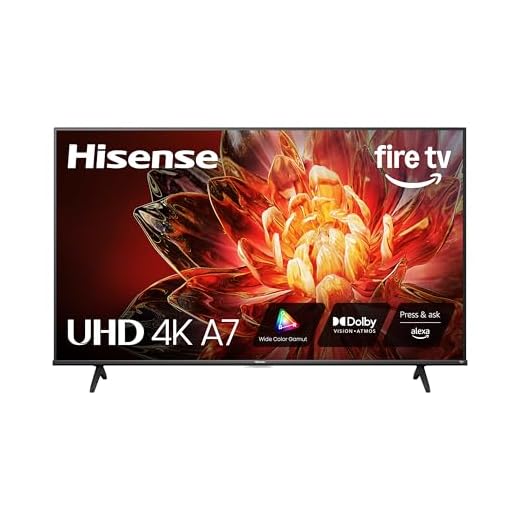
Hisense 55-inch A7 Series 4K Fire TV
You’ll benefit from Wide Color Gamut and Dolby Vision that make content look richer and more cinematic for the price. The TV handles streaming and everyday gaming well, and it offers excellent value if you care about color depth without paying premium prices.
Pros
- Wide Color Gamut for richer, truer colors
- Dolby Vision and Dolby Atmos support
- Smooth 4K performance with responsive Fire OS
- Good value for a 55-inch Dolby-capable set
Cons
- Speakers are serviceable but a soundbar improves immersion
- Not the deepest blacks compared to higher-end panels
Strengths at a glance
This A7 Series delivers the kind of color performance you’d normally expect from higher-priced TVs. Wide Color Gamut technology plus Dolby Vision makes a noticeable difference on movies, streaming originals, and well-mastered 4K content.
Features that affect daily viewing
- Wide Color Gamut with advanced phosphors for deeper, more accurate hues
- Dolby Vision HDR and Dolby Atmos for cinematic visuals and improved audio
- Game Mode Plus with low-latency features for casual gaming
- Fast setup and intuitive Fire TV interface
As a result, you’ll likely be impressed by how vibrant shows and movies appear straight out of the box.
Practical considerations
If you’re an audio enthusiast, plan to add a soundbar to fully appreciate the Dolby Atmos potential. The panel offers excellent color but doesn’t match the absolute contrast of premium QLED/OLED displays — in dim-room movie viewing you may notice less inky black levels. For most buyers who prioritize vivid color and streaming convenience, this offers exceptional bang for the buck.
Samsung 43-inch Crystal UHD U8000F
You’ll get dependable 4K upscaling and a refined, minimalist design backed by Samsung’s software and support. Setup requires the SmartThings app, which some users find cumbersome, but the result is a clean picture and good connectivity for everyday viewing.
Pros
- Strong 4K upscaling and color processing
- Slim, attractive MetalStream design
- Good out-of-box picture and reliable performance
- Lightweight and easy to place or mount
Cons
- Initial setup requires a smartphone app (SmartThings)
- HDR impact is modest compared to higher-end Samsung models
Brand strengths and what they mean for you
Samsung brings polished software, consistent updates, and a reliable display pipeline to this mid-range model. You’ll benefit from effective 3D color mapping and 4K upscaling that lift non-4K content.
Features to expect during regular use
- Crystal Processor 4K for upscaling and color tuning
- Lightweight build and elegant styling suited to living rooms and bedrooms
- Built-in smart features with access to many streaming apps
Together these features give you a TV that looks and feels premium relative to its price tag.
Considerations before buying
Setup can be less immediate because Samsung encourages SmartThings account integration and phone-based setup — this adds steps that may frustrate less tech-inclined users. Audio and HDR feel competent but not class-leading, so if you want cinematic blacks or deeper sound, plan to augment with external speakers. For most buyers who value brand reliability and good everyday picture quality, this model is a smart buy.
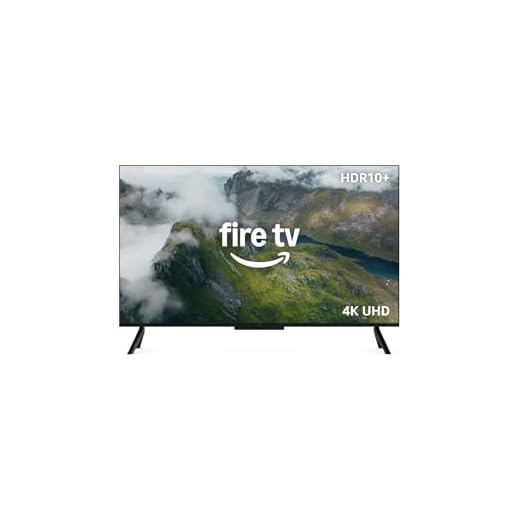
Amazon Fire TV 55-inch 4-Series
You get a bright, punchy 4K display with HDR10+ support and a responsive Fire TV experience. The set balances picture quality, sound, and smart features well for the price, and it even supports cloud gaming and Dolby Audio for added value.
Pros
- 4K with HDR10+ for better contrast
- Fast processor and snappy UI
- Dolby Audio support and good built-in sound
- Works well for casual cloud gaming
Cons
- Not as contrast-rich as QLED models
- Some advanced settings and gaming features are limited
Overview
This 55-inch Fire TV is aimed at buyers who want a large-screen 4K experience without spending premium dollars. It brings HDR10+ support, a faster processor than older budget models, and Amazon’s mature Fire TV interface with familiar voice controls.
What you’ll notice in daily use
- Brighter panels and improved HDR handling compared to entry-level sets
- Dolby Audio support that gives clearer dialogue and a fuller soundstage for an internal speaker setup
- Quick app loading and smooth navigation thanks to a faster processor
The result is a TV that feels responsive when switching apps and watching streamed 4K content, and it works well if you play occasional cloud-streamed games.
Limitations and practical advice
This model won’t match the deep black levels or color richness of higher-end QLED or OLED screens, so don’t expect cinematic contrast in dim rooms. If you game competitively, check the TV’s input lag and whether you need a separate gaming monitor for serious play. For most living rooms, though, pairing this TV with a budget soundbar and enabling game mode when needed gives a smooth everyday experience.
TCL 50-inch S5 UHD 4K Fire TV
You’ll get an enjoyable streaming experience with Fire TV integration, Dolby Vision, and decent motion handling for sports and fast-paced content. The TV is a practical all-rounder for streaming enthusiasts who want Dolby features without paying top-tier prices.
Pros
- Dolby Vision and Dolby Atmos support
- Fire TV integrated for easy streaming access
- Motion Rate 240 improves fast-action scenes
- Good value at the price point
Cons
- Panel peak brightness and blacks are mid-tier
- Audio is decent but benefits from a soundbar
What makes it a streaming winner
This TCL model is built around the streaming experience: a 4K panel, Fire TV integration, and Dolby Vision for a noticeably better image on well-mastered content. If your viewing diet is Netflix, Prime Video, or fast-paced sports and shows, this set will keep up.
Key capabilities and day-to-day benefits
- Dolby Vision HDR and Dolby Atmos support for richer visuals and improved audio staging
- Motion Rate 240 to help keep sports and action scenes feeling smooth
- Built-in Alexa and Fire TV for quick access to apps and voice control
These points make the TV feel optimized for modern streaming lifestyles, especially if you value simple setup and straightforward app access.
Practical limitations and setup tips
The panel won’t match high-end displays for peak brightness or absolute black levels, so viewing in very dark rooms will reveal its limits. To get the most from Dolby Atmos, pair the TV with a soundbar that supports upward-firing or virtualized height channels. For everyday watching and streaming, though, this model gives excellent value and a pleasing, feature-rich experience.
Roku 50-inch Select Series 4K TV
You’ll appreciate a clean, intuitive Roku interface that makes finding apps and live channels straightforward. The 4K HDR picture is solid for the price and the included voice remote and lost-remote finder are practical daily conveniences.
Pros
- Simple, clutter-free Roku smart platform
- Accurate colors and solid 4K HDR performance
- Responsive remote with voice search and private listening
- Good out-of-box experience and fast setup
Cons
- Bluetooth headphone behavior can be inconsistent
- Not as feature-rich or powerful as premium models
What makes this a reliable pick
Roku’s Select Series focuses on delivering a no-nonsense smart TV experience: fast setup, predictable updates, and access to thousands of streaming channels. You’ll spend less time digging through menus and more time watching.
Features that matter to you
- 4K resolution with HDR10 for improved detail
- Roku Smart Picture that optimizes incoming signals automatically
- Enhanced voice remote and lost-remote finder to reduce everyday friction
- Bluetooth headphone mode for private listening
These features make it easy to stream live news, sports, or movies without wrestling with a complicated interface.
Practical notes and user tips
If you use Bluetooth headphones, be aware some models pair better than others — you may need to test compatibility to avoid audio handoff quirks. Sound quality is good for onboard speakers but a soundbar will noticeably improve movie and music playback. Overall, this is a great TV if you want convenience, reliability, and a friendly interface rather than the highest-end image processing.
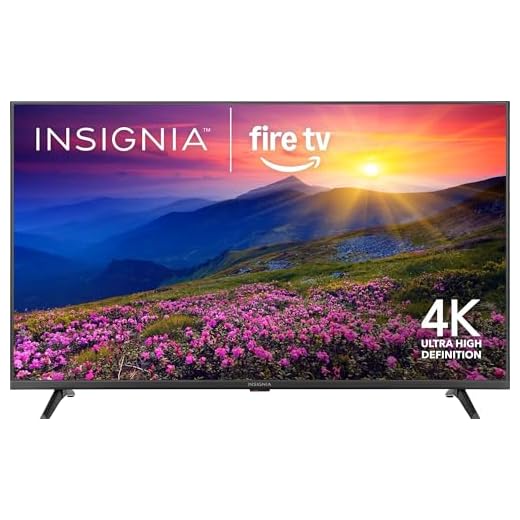
Insignia 50-inch 4K UHD Fire TV
You get a genuine 4K HDR picture and the convenience of Fire TV built in for a very low price. Expect crisp resolution and an Alexa voice remote, but occasional app glitches (notably with some streaming apps) can interrupt viewing.
Pros
- Very affordable 50-inch 4K HDR
- Built-in Fire TV with Alexa remote
- Lightweight and easy to mount or move
- Good upscaling for non-4K content
Cons
- Occasional app stability issues (Hulu reported)
- Limited advanced picture processing compared to premium sets
Why consider this set
If you want the biggest screen you can afford without sacrificing 4K, this model delivers a straightforward solution. You’ll get a sharp Ultra HD panel with HDR10 support and the Fire TV platform baked in so you can start streaming right away.
Key features and what they mean for you
- 4K Ultra HD (2160p) resolution for a crisp picture
- HDR10 support to improve contrast and color detail
- Fire TV OS with Alexa voice remote for simple navigation
- Lightweight chassis that’s easy to wall-mount or place on a stand
This combination means you can set it up quickly, use voice control to find shows, and enjoy noticeably better clarity than a 1080p set.
Practical trade-offs and tips
You shouldn’t expect the deeper contrast, motion handling, or color volume of mid-to-high-end QLED or OLED TVs. If you’re building a dedicated home theater, plan to pair this with a soundbar and accept that fine-grain picture tuning options are limited. A useful tip: if you encounter streaming hiccups, check for firmware updates and try a wired Ethernet connection or a stronger Wi‑Fi signal for more consistent playback.
Who this is best for
If you want maximum screen size and modern smart features on a tight budget, this one gives you exceptional value. It’s ideal for casual viewers, kitchens, bedrooms, or secondary rooms where price and convenience matter more than premium picture performance.
Toshiba 43-inch C350 4K Fire TV
You get a compact 43-inch 4K set with a surprisingly capable picture engine at a very low price. It’s an excellent bedroom or secondary-room TV with straightforward Fire TV functionality, though advanced picture controls and cinematic depth are limited.
Pros
- Extremely affordable 4K option
- REGZA Engine ZR improves perceived detail
- Lightweight and easy to install
- Fire TV built in with Alexa support
Cons
- Limited advanced processing compared to pricier models
- Smaller screen may not suit large living rooms
Why pick a 43-inch model
A 43-inch 4K TV is a sensible choice for bedrooms, kitchens, and smaller living spaces. You’ll gain sharper text, clearer UI elements, and a full smart platform without spending much.
What you’ll get for the price
- Toshiba’s REGZA Engine ZR for improved upscaling and clarity
- Fire TV OS with built-in streaming and voice control
- Compact footprint and light chassis that’s easy to set up
This combination makes it an ideal secondary TV where price, simplicity, and performance balance matters most.
Practical advice
If you plan to watch movies in a dark room or you care about deep blacks and cinematic contrast, consider adding a dedicated soundbar and adjusting picture mode settings. For everyday streaming, news, and casual gaming, this set is a reliable, low-cost option that outperforms older 1080p TVs by a noticeable margin.
Final Thoughts on the Best TVs Under 300 Dollars

Top pick: Hisense 55-inch E6 Hi-QLED 4K Fire TV — Choose this if you want the most punch for your money. The Hi‑QLED panel and Dolby Vision deliver vivid, movie-like color and strong HDR highlights. Game Mode Plus and VRR make it the best under-$300 option for both movies and casual gaming. Just make sure your Wi‑Fi is solid (some users report freezes on weak networks).
Best reliable alternative: Samsung 43-inch Crystal UHD U8000F — Choose this if you want a dependable brand experience and a slightly smaller footprint. Samsung’s upscaling and clean software give you a stress-free daily TV with good connectivity and picture clarity. It’s ideal for bedrooms, apartments, or anyone who prioritizes stability and tidy design.
How to Choose the Best TVs Under 300
Finding a good TV without spending a lot of money is totally possible. The key is knowing what really matters and which features make the biggest difference in everyday use. If you’re searching for the best TVs under 300, focusing on screen quality, resolution, smart features, and connectivity will help you make a smart and satisfying choice.
Screen Size: Find the Right Fit for Your Space
Screen size should match the room where the TV will be used. In smaller bedrooms, offices, or apartments, TVs between 32 and 43 inches are usually ideal. They offer a comfortable viewing experience without overwhelming the space.
For living rooms where you’ll sit farther from the screen, a 43-inch model can still deliver an immersive experience—especially if paired with good resolution. Always consider viewing distance before choosing the size.
Resolution Matters More Than You Think
Even when shopping on a budget, resolution plays a big role in image quality. Many of the best TVs under 300 already offer Full HD (1080p), which is great for cable TV, streaming, and casual gaming.
If you find a 4K TV within this price range, it can be a great bonus. Ultra HD provides sharper details and better clarity, especially on larger screens. Just make sure the TV handles upscaling well, since much content is still not native 4K.
Smart TV Features Are Essential
A smart TV can save you money and space by eliminating the need for external streaming devices. Most budget-friendly TVs now include built-in systems that support popular streaming apps.
When evaluating smart features, look for a system that is easy to navigate, responds quickly, and supports app updates. Voice control compatibility and screen mirroring are also useful extras that often appear even in affordable models.
Panel Type and Picture Quality
TVs under $300 typically use LED panels, but there are still differences in picture quality. Look for models that offer good brightness levels and decent contrast for everyday viewing.
Wide viewing angles are important if multiple people watch TV from different spots in the room. While premium display technologies may not be available at this price point, well-calibrated LED TVs can still deliver vibrant colors and clear images.
Refresh Rate and Motion Handling
Most budget TVs come with a standard 60Hz refresh rate, which is perfectly fine for watching movies, TV shows, and sports. This refresh rate handles motion smoothly enough for most users.
If you plan to do light gaming, check for features like low input lag or basic game modes. These small details can noticeably improve responsiveness without increasing the price.
Audio Quality: Don’t Ignore the Sound
Built-in speakers on affordable TVs are usually basic, but some models still manage to deliver clear dialogue and balanced sound. Look for TVs with audio enhancement features that improve clarity at lower volumes.
If sound quality is a priority, consider pairing your TV with a soundbar later on. Even an entry-level soundbar can dramatically upgrade your overall experience.
Best Samsung Laptops for Students
Connectivity and Ports Make a Difference
Before buying, check the number and type of ports available. At least two HDMI ports are recommended for connecting streaming devices, gaming consoles, or cable boxes.
USB ports are useful for playing media directly from flash drives, and Bluetooth support allows you to connect wireless headphones or speakers—features that can still be found among the best TVs under 300.
Energy Efficiency and Long-Term Value
Energy-efficient TVs help reduce electricity costs over time, which is especially important for devices used daily. Look for models with energy-saving modes and automatic brightness adjustments.
Even on a budget, choosing a reliable TV with solid build quality and software support ensures better long-term value and fewer headaches down the road.
By focusing on what truly matters, you can confidently narrow down the best TVs under 300 and find a model that delivers great performance without stretching your budget.
Check Out the Best TVs Under 300 Dollars
Still not sure which one to choose? Click the link below to see the best-selling products.
Also Check Out Other Helpful Articles
Take a look at more useful articles that can help you make more informed decisions.
- Best TVs Under 300 Dollars in 2026 (Top 8: Hisense, Amazon and More)

- Best TVs Under 500 Dollars in 2026 (Top 8: TCL, Insignia and More)
- Best TVs Under 800 Dollars in 2026 (Top 8: Samsung, Sony and More)
Video About the Best TVs Under 300 Dollars
We created a video on the topic. Just click to watch.
Related Articles



About the Author

Joshua Brown brings his creativity and focus to each writing task. He believes content should be useful, engaging, and well-structured.